Google Maps and Link – ticked by default

Home Forums Calendar Products Events Calendar PRO Google Maps and Link – ticked by default

Viewing 3 posts - 1 through 3 (of 3 total)
  • Author
    Posts
  • #1105593
    Juan
    Participant

    Hello,

    I have unseuccessfuly tried in the past few hours to make the boxes “show google maps” and “show google maps link” be ticked by default. Is there any way I can just simply set a value to TRUE in the code?

    I would be greatful if you could help.

    Thanks.

    Juan.

    #1105949
    Hunter
    Moderator

    Hey Juan,

    Welcome back to the forums!

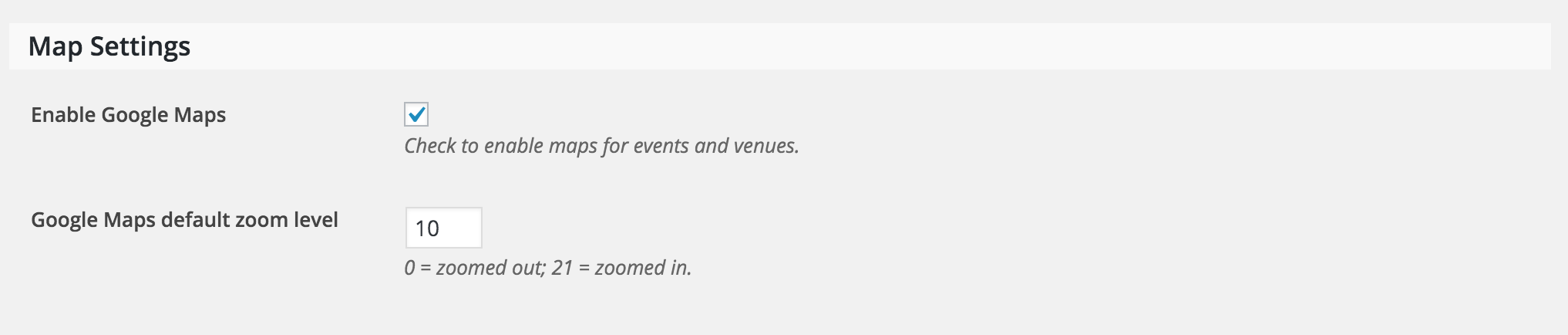
    If you have Enable Google Maps checked under Events > Settings > General, your events should display Google Maps by default (see screenshot below).

    If you need to get a little more fancy, you could use an SQL query to show/hide all maps as you please. The wp_postmeta field is _EventShowMapmeta_value1” means the map will be shown and “0” means the map will be hidden.

    Let me know if this helps answer your question. Have a great weekend and happy Earth Day!

    #1111862
    Support Droid
    Keymaster

    This topic has not been active for quite some time and will now be closed.

    If you still need assistance please simply open a new topic (linking to this one if necessary)
    and one of the team will be only too happy to help.

Viewing 3 posts - 1 through 3 (of 3 total)
  • The topic ‘Google Maps and Link – ticked by default’ is closed to new replies.