
Home › Forums › Calendar Products › Events Calendar PRO › Events Calendar not mobile
- This topic has 7 replies, 4 voices, and was last updated 10 years, 1 month ago by
Joshua.
-
AuthorPosts
-
August 2, 2016 at 10:43 am #1146698
Joshua
ParticipantThe Events Calendar is not responsive. Am I missing a setting?
-JW
August 2, 2016 at 10:58 am #1146705George
ParticipantHey @Joshua,
The Events Calendar is indeed responsive. I checked out your site and found the responsiveness working fine. There is some tight spacing because of your theme’s design, and so to further refine the responsive styles you would need to tweak your theme styles, but the responsiveness is indeed working there.
You can see responsiveness on our official demo site, too → http://wpshindig.com
Is there anything more you’re hoping to see in terms of responsiveness? Let me know what you think, and even consider sharing screenshots of areas that seem to lack responsiveness if possible. (You can do so by uploading the screenshots to this thread. If you have issues with that, you can upload to Imgur.com, Flickr.com, CloudUp.com, or any similar image-hosting site; then just share the links to those images here and I’ll take a look.)
Cheers!
GeaorgeAugust 3, 2016 at 6:10 am #1146984ParticipantThe events calendar loads clean in mobile/responsive on the homepage (see attached), but on this page http://www.votemikepompeo.com/events/ it doesn’t (see attached).
I took the screen shots on my iPhone 5s in vertical orientation.
-JW
August 3, 2016 at 7:16 am #1147009ParticipantHey Joshua,
Thank you for the screenshots. On the homepage, you are using the “Mini Calendar Widget”, so this is NOT the main calendar — I’m sure you’re aware of this, but just wanted to highlight the differences because the styles of these two separate calendar instances won’t be exactly the same.
With that being said, though, I understand what you mean now and can confirm that it seems like, on the events page, the responsiveness is attempting to fully take effect but is being hindered by your theme’s own styling.
To help see if this is the case, I would recommend doing the following steps:
1. Head to Events → Settings → Display in your site’s /wp-admin and locate the Events Template option, which is shown in the following screenshot:

2. Try out every single template option here—after EACH selection, check the responsiveness on the /events/ page. Does the responsive styling styling seem to improve with any specific template?
3. If there isn’t any specific template that seems to work better than others, I would recommend temporarily activating a default theme on your site like Twenty Sixteen or Twenty Twelve. Once this theme is activated, take a look at the /events page responsiveness and see if anything is improved.
4. With a default theme activated, pay close attention to what happens when you click a “day” in the responsive /events calendar. What I mean by this is that, when the responsive calendar is activated, a day with events is symbolized with a dot in the corresponding grid item. This screenshot shows how this works—Saturdays the 6th, 13th, and 20th all have events, for example:
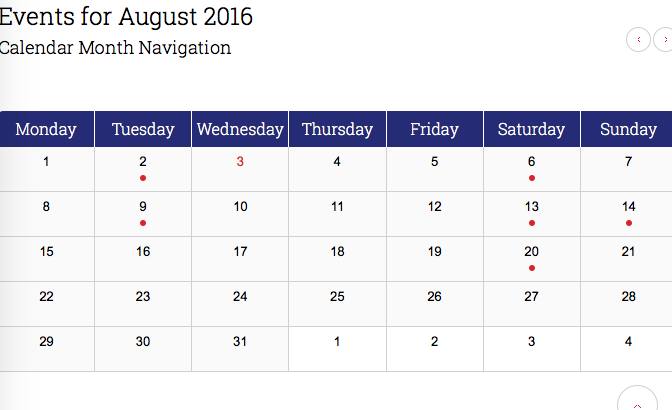
When you click on one of these dots, a list under the calendar of the actual events is supposed to appear (similar to the widget on your home page). This is not happening in your current theme—does it happen in a default theme like Twenty Twelve or Twenty Sixteen?
I’m sorry for the lengthy reply here, but wanted to provide you with a number of steps to try on your own to make for a more efficient conversation with a speedier resolution. Go through each of the four things above if possible, and let me know what you find for each point!
Thank you,
GeorgeAugust 3, 2016 at 11:25 am #1147239ParticipantI’ve tried all of the above suggestions and still have the same result. Perhaps it’s possible to wrap it in a DIV?
August 4, 2016 at 10:08 am #1147697ParticipantI’m sorry to hear that you find the same results even in a default theme—this could indicate a JavaScript error.
1. Can you first update the plugins on your site so that The Events Calendar is at version 4.2.4 on your site and that Events Calendar Pro is at version 4.2.3 on your site?
2. Once you do those updates, if issues persist then to help me try and identify the specific problem to recommend a specific fix, can you leave your site with the default theme activated temporarily? If you let me know once you’ve done this, I will work quickly and examine your site with my debugging tools to minimize the amount of time your site is in this state…I know that this is a pretty inconvenient thing to do, but since I cannot reproduce your issues I unfortunately need to take a closer look like this.
Thank you for your patience and persistence here!
Sincerely,
GeorgeAugust 26, 2016 at 9:35 am #1156395Support Droid
KeymasterHey there! This thread has been pretty quiet for the last three weeks, so we’re going to go ahead and close it to avoid confusion with other topics. If you’re still looking for help with this, please do open a new thread, reference this one and we’d be more than happy to continue the conversation over there.
Thanks so much!
The Events Calendar Support Team -
AuthorPosts
- The topic ‘Events Calendar not mobile’ is closed to new replies.