Events Calendar color styling

Home Forums Calendar Products Events Calendar PRO Events Calendar color styling

Viewing 5 posts - 1 through 5 (of 5 total)
  • Author
    Posts
  • #959936
    Donna
    Participant

    Hi guys,

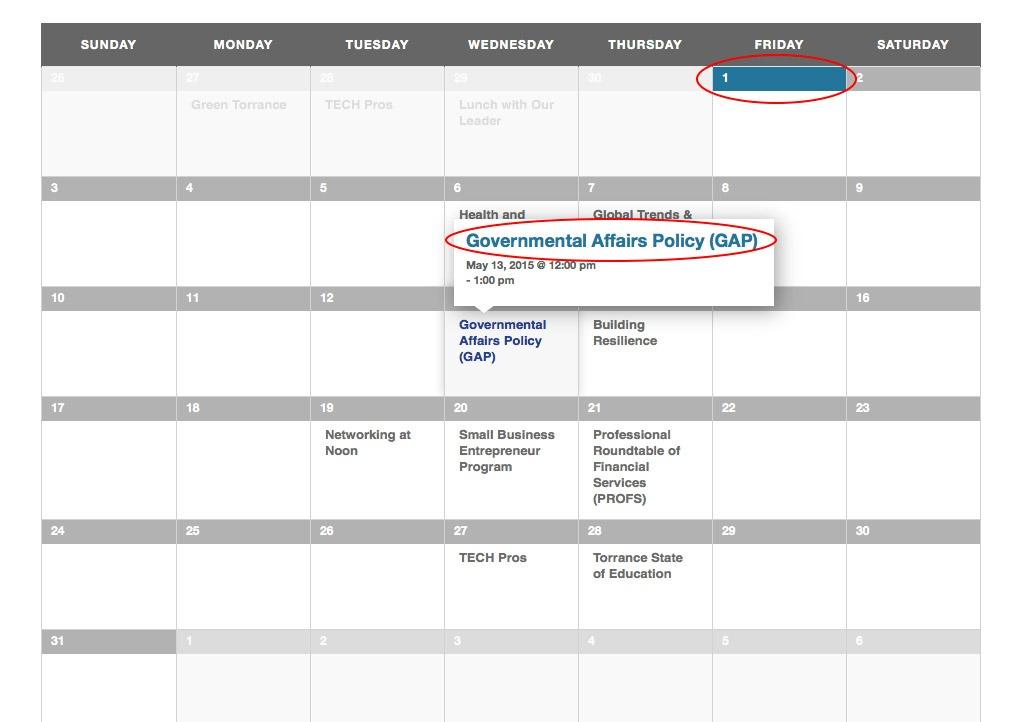
    I need some help adding custom CSS to change the standard blue color on the events calendar and the mini calendar. I’ve tried again and again to figure out the code, but haven’t been successful. I’m trying to change it to our website’s blue color, which is #25408f. Thanks for the help.

    #959999
    Geoff
    Member

    Hi there, Brandon! Welcome back to the forums. šŸ™‚

    You should be able to hit all those instances using CSS in your theme’sĀ style.css file. For example, to get the background color of the present dat header in Month View:

    .tribe-events-calendar td.tribe-events-present div[id*=tribe-events-daynum-] {
    background-color:Ā #25408f;
    }

    The trick is to locate the classname for the thing you want to modify. We have a tutorial here on how to use DevTools to help find those classnames, which makes it a lot easier that trying to browse through the code on your own.

    Will this help you get started? Please let me know. šŸ™‚

    Cheers!
    Geoff

    #960594
    Donna
    Participant

    Thanks, Geoff. So I need to add this code to my custom CSS for every day on the calendar (1-31)? There’s no one code to override all of them?

    Sorry, this just seems like a fairly time consuming solution, so I just want to make sure I’m understanding correctly.

    Thanks for the help.

    #960666
    Geoff
    Member

    Hey Brandon!

    The CSS I provided there was a specific example of how to modify the color for the Current day, which you had circled in the screenshot.

    You can target the background color for date headers globally–again, using a resource like DevTools will be your best bet here to target and test the classes you want to modify. šŸ™‚

    Cheers!
    Geoff

    #963899
    Geoff
    Member

    Hey there, Brandon! This thread has been pretty quiet for a couple of weeks, so I’m going to go ahead and close it. Please feel free to start a new thread if you still have questions here and we’d be happy to help. šŸ™‚

    Cheers!
    Geoff

Viewing 5 posts - 1 through 5 (of 5 total)
  • The topic ‘Events Calendar color styling’ is closed to new replies.