
Home › Forums › Ticket Products › Eventbrite Tickets › Eventbrite Tickets no longer showing on website
- This topic has 9 replies, 3 voices, and was last updated 11 years, 3 months ago by
Support Droid.
-
AuthorPosts
-
June 5, 2015 at 11:57 am #967486
learningalliance
ParticipantThe Eventbrite plugin is not working. It does not allow users of the website to purchase tickets. It doesn’t even appear as an event add on anymore in the menu even though it says that it’s an installed plugin. I tried to update the application key, but it said, “The application you’re trying to use has made an invalid request to Eventbrite. Please contact the application developer.”
You’re the application developer so please help! I am so confused.
Many thanks 🙂
June 5, 2015 at 12:02 pm #967488ParticipantI should also mentioned that it says our license key is still valid until 2015-11-11. I don’t know if this extra piece of information helps in helping to pin point the problem, but I thought I would share.
June 5, 2015 at 2:05 pm #967541Brian
MemberHi,
Sorry for the issues you are having.
I can help troubleshoot them.
I am not clear on what is happening here. Can you see the Import: Eventbrite in the admin menu under events?
Also, an you please confirm you are using Eventbrite Tickets 3.9.6 and that you have followed the configuration steps outlined here:
https://theeventscalendar.com/knowledgebase/configuring-eb-tickets/
Then can you go to an event that is suppose to show the tickets box and confirm this setting in the admin for that event is set to yes:
Display tickets on event page?
Even if it is set to yes can you please set it to no, then update, and then set back to yes and update again and see if it shows.
Let me know what you find out and we can go from there.
June 11, 2015 at 9:22 am #968832ParticipantHi Brian,
Thanks for your response. To answer some of your questions:
1. I can’t see Eventbrite in the admin menu under events, but “Eventbrite Tickets” does show up as an installed plugin. The version we have is 3.9.3. If we are suppose to have 3.9.6 wouldn’t it show up under the “update available” tab? Right now it is not showing there are updates available for Eventbrite Tickets.
2. I watched the video. I had tried this video before and all goes well until I try to authorize the plugin. I hit “authorization” and it takes me over to Eventbrite. I hit the green “allow” button, but than this message appears: “The application you’re trying to use has made an invalid request to Eventbrite. Please contact the application developer.” We think this is where we are stuck.
Thanks for your help so far. It’s much appreciated. If you need any further information, please let us know.
June 11, 2015 at 12:09 pm #968864MemberHi,
The current version of the plugin is 3.9.6.
If the automatic update is not registering it on your site you can download it from your account here @ theeventscalendar.com
Then deactivate and delete Eventbrite on your site and upload and active the latest.
Although no issues should come up it is always a good idea to backup your site first.
Let me know after the update if you still have issues authorizing the APP.
Also, if you have trouble with the existing APP in Eventbrite please try with a new APP.
Let me know and we can go from here.
Thanks
June 12, 2015 at 12:43 pm #969175ParticipantHi Brian,
So I deleted Eventbrite Tickets and installed Eventbrite Tickets 3.9.6. I then proceeded to input the key and client secret, but I was stopped at the exact same point and received the same messaged as before: “The application you’re trying to use has made an invalid request to Eventbrite. Please contact the application developer.”
Question: The Events Calendar plugin that I currently have installed is 3.9.3. Does that make a difference to this entire process? Also, should I just try deleting everything and then reinstalling?
Thanks for your continued help.
June 12, 2015 at 12:45 pm #969178Participantps. I should also mention that I also tried to create a new key in Eventbrite and authorize that one as shown in the video you provided before, but that also failed.
June 12, 2015 at 1:43 pm #969190MemberHi,
Thanks for the information.
No you do not need to change anything with the Events Calendar at 3.9.3. That is fine.
I am not seeing any reports of this exact issue so can you please follow our testing for conflicts guide:
And try to authorize the app with only the events plugins active and a WordPress codex theme.
Let me know if that helps the issue.
Thanks
June 16, 2015 at 10:13 am #969809MemberHi,
I wanted to follow up with this again.
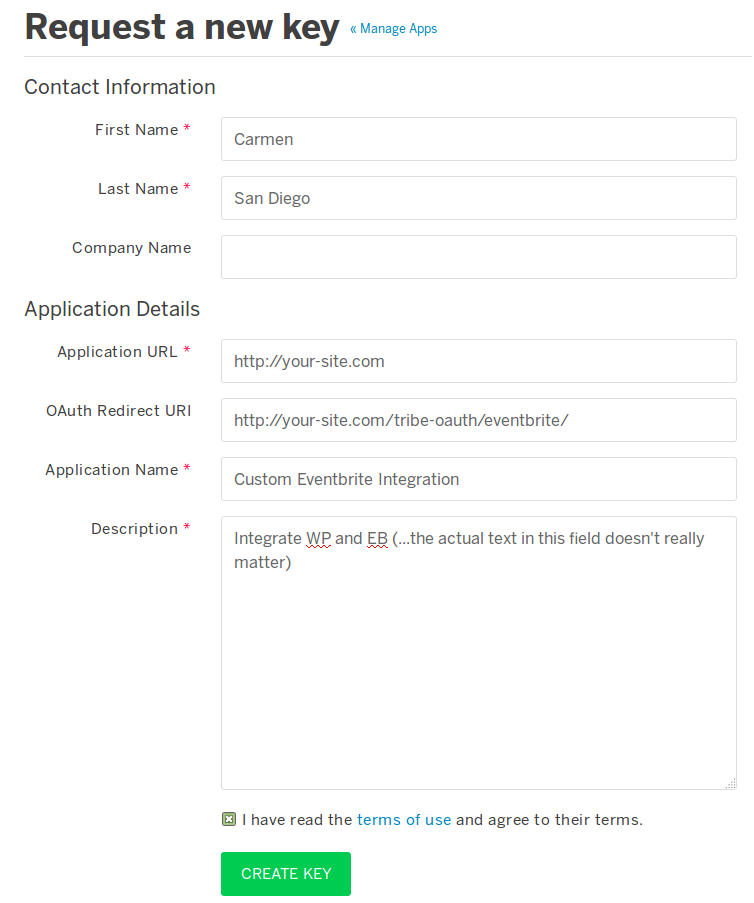
One thing to confirm is all the urls you have start with http:// as well making sure the url matches exactly with your site. So include the www if that is indeed part of your url.
Here is a sample of what everything should look like:
 July 7, 2015 at 6:32 am #984340Keymaster
This topic has not been active for quite some time and will now be closed.
If you still need assistance please simply open a new topic (linking to this one if necessary)
and one of the team will be only too happy to help. -
AuthorPosts
- The topic ‘Eventbrite Tickets no longer showing on website’ is closed to new replies.