
Home › Forums › Calendar Products › Events Calendar PRO › Event Date and Time integration with MailChimp Auto RSS Campaign
- This topic has 4 replies, 3 voices, and was last updated 10 years, 8 months ago by
Support Droid.
-
AuthorPosts
-
October 21, 2015 at 12:30 pm #1016683
Chris
ParticipantHello
Thank you for the plugin. I am attempting to send out an automated RSS Campaign through MailChimp. When you look at an Events Calendar feed URL (example: http://eventscaledarprosite.com/events/feed/) you can see where the date and time of the event(s) feed automatically into the RSS Event description. When I add the RSS URL to MailChimp it only feeds in the Event Title and the description (no date or time).
Is there anything I can do to get the date and time for the event to feed into the RSS driven campaign in MailChimp?
October 21, 2015 at 2:10 pm #1016722George
ParticipantHey @Chris!
Thanks for reaching out – this is an interesting question, but unfortunately there’s little we can help with from our side of things 🙁 This is because, as you mentioned, the Events feed on its own will include the start and end dates and times, e.g. in this screenshot:
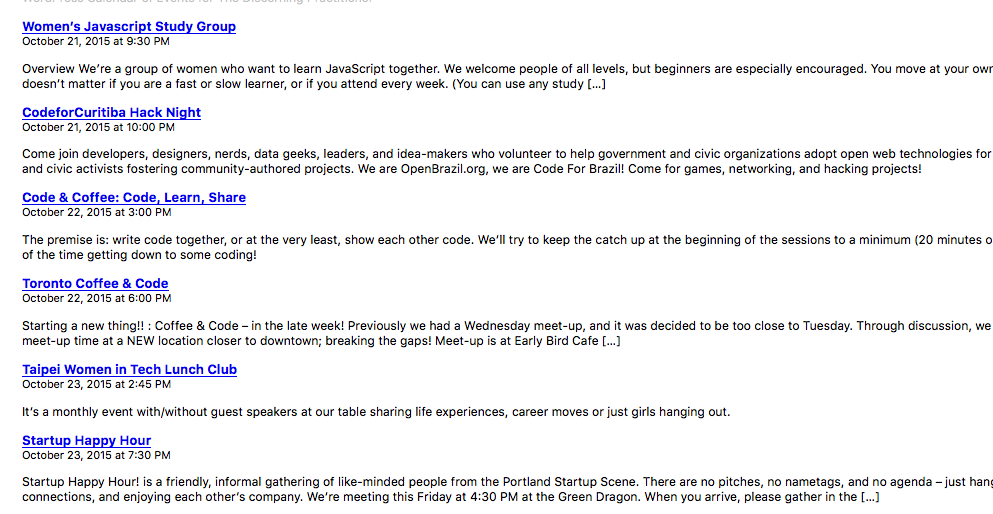
So if Mailchimp is not taking that data and including it in its feeds, then Mailchimp is the location where changes would need to be made to grab that data. I’d recommend contacting Mailchimp about this – there might be something customizable with feeds output that can be done on the plugin side of things.
However, even in that case, you would probably have to get “under the hood” and customize some feed-related code; this, too, is beyond the scope of support we can provide, but there is a Codex page here that is very helpful on that topic → https://codex.wordpress.org/Customizing_Feeds
I hope this all helps!
Cheers,
GeorgeOctober 27, 2015 at 1:24 pm #1019046ParticipantThank you for that explanation. What are the RSS tags that identify Date and time currently to make it feed in like your example into MailChimp? So then I can add those tags to customize my feed-related code.
Thank you.
October 28, 2015 at 2:12 pm #1019554ParticipantHey @Chris,
I’m sorry to admit that I don’t quite understand your question. If you’re curious about how to get the RSS feed on your site like I took a screenshot of, you’d just go to [your-site.com]/events/feed
Customizing the feed itself with other tags and such is unfortunately beyond the scope of these forums, but is touched on in that Codex article I linked to earlier.
I’m sorry if this isn’t helping; with the fact that we cannot offer any help with custom coding in mind, let me know more details about what you’re trying to do and I might be able to be more helpful than in this reply! 🙂
— George
February 18, 2016 at 8:29 am #1075220KeymasterThis topic has not been active for quite some time and will now be closed.
If you still need assistance please simply open a new topic (linking to this one if necessary)
and one of the team will be only too happy to help. -
AuthorPosts
- The topic ‘Event Date and Time integration with MailChimp Auto RSS Campaign’ is closed to new replies.