
Home › Forums › Calendar Products › Events Calendar PRO › Enable Event Views not displaying properly
- This topic has 6 replies, 3 voices, and was last updated 10 years, 6 months ago by
Support Droid.
-
AuthorPosts
-
March 7, 2016 at 1:40 pm #1085990
Paula
ParticipantI have the PRO version of the events calendar plugin and I’m not sure if it’s working properly. It appears there is something wrong. In the settings I’m checking the boxes to display “list, month, week, map” etc but when you view the calendar those options aren’t showing up.
I also can’t figure out how to make the calendar view properly by using the shortcode within a page. This is how it’s displaying when I use the shortcode: http://artloftrockland.org/learn/schedule/
And this is the entire calendar not giving me the various display options: http://artloftrockland.org/events/
How do I know if my Pro features are turned on? It’s very hard for me to tell if I’m using the Pro features. So far it’s been very difficult and confusing and not as user-friendly as I hoped.
March 9, 2016 at 7:34 pm #1086970Hunter
ModeratorHi and thanks for posting,
I visited the link provided and the views seem to be appearing properly (see screenshot below).
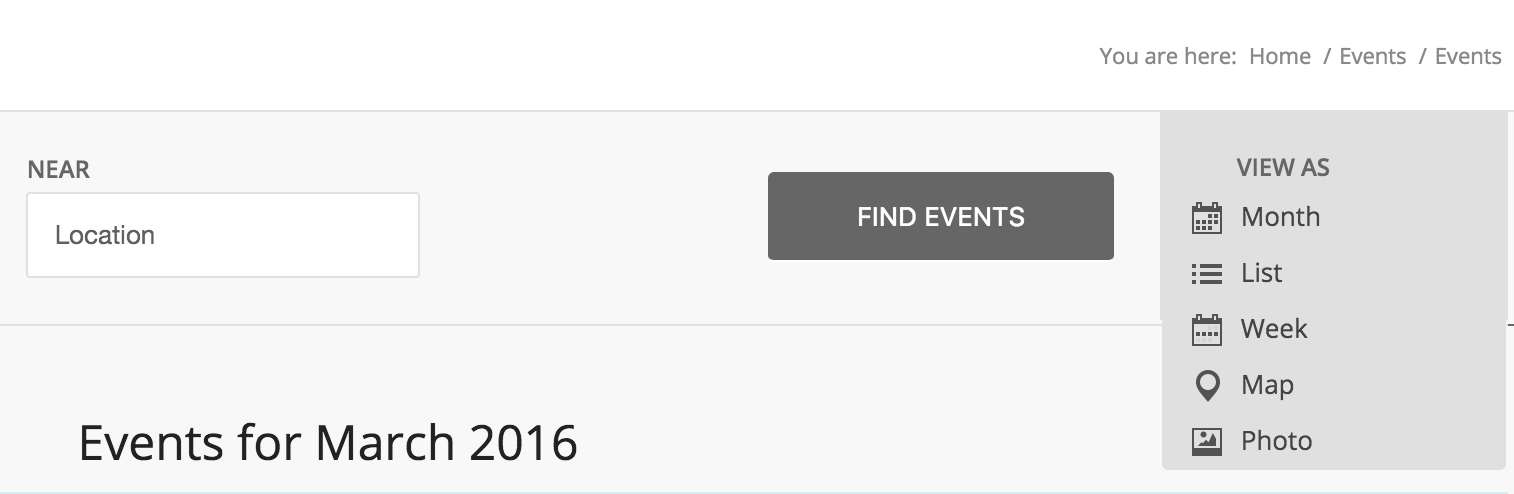
The learn/schedule page is using the [tribe_mini_calendar] shortcode. The mini calendar does not look the same as the main events calendar (/events). So it is working as designed.
Based on the additional views displaying, PRO is installed and appears to be working properly 🙂
March 10, 2016 at 6:44 am #1087127ParticipantOK I just tried something. When I load the page, only the “month” option is visible. And when I hover over the entire box nothing happens. The cursor doesn’t change and the other views don’t appear. I had no idea that I could click to see the other options. When I do click the other options do appear. Since I’m building the page, and know those options should be there . . . and still didn’t realize that I had to click, nobody is ever going to know to click to see more options. Is this the way it’s designed to work???? Why don’t the other view options just show up without clicking? This is a very bad design if it’s working properly. I’m hoping that something is not working properly and you can fix it to automatically show all the various options.
March 10, 2016 at 8:48 am #1087256ModeratorHi and welcome back,
I understand your point when you say the design/intuition of the change view selection could be improved. It might be an idea worth submitting to our UserVoice Feature Ideas page.
Additionally, I recently provided an alternative to the default View to another customer; feel free to check it out and see if it works for you 🙂
Again, we appreciate and understand your constructive criticism and best of luck. Have a good remainder of your week 🙂
March 10, 2016 at 10:06 am #1087313ParticipantI guess that arrow is better than nothing and I would like to add it. I’m just not sure exactly where to paste those lines of code that were in the thread you showed me. Would you mind explaining where I go to insert it? I think it would help usability.
March 11, 2016 at 5:19 pm #1088058ModeratorHey Paula,
Try adding the following code to your theme’s style.css file. A lot of themes include a theme options panel, so you may be able to enter it there. Look for “custom CSS” or something along those lines:
.tribe-bar-views-list li:first-child a span::after {

content: '\2193';

}
Let me know how it works out for you. Thanks for the response and enjoy your weekend 🙂
March 26, 2016 at 9:35 am #1094429KeymasterThis topic has not been active for quite some time and will now be closed.
If you still need assistance please simply open a new topic (linking to this one if necessary)
and one of the team will be only too happy to help. -
AuthorPosts
- The topic ‘Enable Event Views not displaying properly’ is closed to new replies.