
Home › Forums › Calendar Products › Events Calendar PRO › Custom URL Link Broke
- This topic has 3 replies, 3 voices, and was last updated 10 years, 1 month ago by
Support Droid.
-
AuthorPosts
-
November 29, 2015 at 4:39 am #1031882
Blake Miller
ParticipantI’m using a Custom Field / URL in my calendar and the display is broken. I’ve seen the couple of similar reports here on the forum, with your recommended fix to hack a custom PHP file to make it work. Is this bug to be fixed?
I am installing a testing/demo setup for a client to show/preview him and see if it’s something we want to move forward with. I don’t want to hack through our themes/content for something that might be fixed soon. (I’m never a fan of ‘hacks’ to make what would be otherwise basic functionality work) In the meantime, I’m telling him “It will be fixed if we move forward with this solution”
November 30, 2015 at 6:05 am #1032543George
ParticipantHey Blake,
Thanks for reaching out here! There are a few dimensions to this that are worth addressing – first, not to mince words, but just to be clear the cause of this problem is not quite a “bug”. What happened is that we doubled down on securing any variable output, using the functions provided by WordPress like esc_html() in many more places in the front-end and admin of The Events Calendar, which improves the security of the plugin pretty substantially.
The issue is that esc_html(), as the function name implies, escapes HTML, and so sometimes with links it will output the full link tag instead of just showing the URL. And so we have the issue on your site as shown in this screenshot:
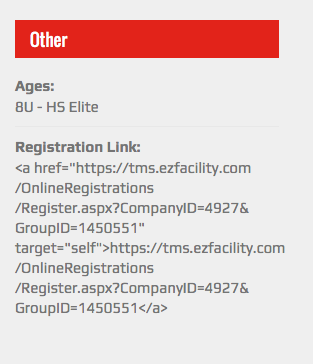
Next, fixing this isn’t quite a “Hack” either – to be clear, the recommended fix is to make a modified version of the plugin’s default template file. This is a totally healthy, stable, and stolid approach for fixing the over-aggressive escaping of esc_html(), and uses The Events Calendar’s powerful templating system.
Just as you might create Child Theme so that you can modify theme styles in a way that is NOT a “hack”, but a stable and good approach for customizing things, you can make a new folder inside your theme called /tribe-events where you can create custom calendar templates in a safe way [so that your customizations are not overwritten by plugin updates and the like].
For more information on this templating system, check out our Themer’s Guide here → https://theeventscalendar.com/knowledgebase/themers-guide/
Now, with everything above out of the way, here’s the actual way to get around this. The file you’ll want to create inside your theme should have the following file path:
[your-theme]/tribe-events/modules/meta/details.php
Once this empty file is made, find the original file in The Events Calendar’s plugin files:
the-events-calendar/src/views/modules/meta/details.php
Copy and paste ALL of the code from the original plugin file into the /tribe-events theme version of the file; then, scroll down in this theme version of the file until you see code like this near the bottom of the file:
<?php echo esc_html( $website ); ?>
Remove the esc_html() function call so that you just have this:
<?php echo $website; ?>
I hope that helps!
— George
—
P.S.
In fairness, I know how despite all that I wrote above, this can be seen as and experienced as an outright “bug” – we are aware of that and are hoping to fix this in the next release, though we’re still debating the exact right solution because we would like to preserve the extra layer of security provided by the escaping function. So The Events Calendar 4.0 will likely NOT require a custom theme file to get around this issue 🙂
November 30, 2015 at 6:09 am #1032546ParticipantHey @Blakemiller,
Sorry for the additional post here! But upon closer inspection I realized I made a mistake above – while what I shared above may indeed still be of help here, your main file change should ACTUALLY be this:
1. Create this file in your theme:
[your-theme]/tribe-events/pro/modules/meta/additional-fields.php
2. Use the contents of this Gist as the contents of that file → http://git.io/vBQGN
Sorry about the mixup on my end here 🙂
— George
February 18, 2016 at 8:32 am #1075832KeymasterThis topic has not been active for quite some time and will now be closed.
If you still need assistance please simply open a new topic (linking to this one if necessary)
and one of the team will be only too happy to help. -
AuthorPosts
- The topic ‘Custom URL Link Broke’ is closed to new replies.