
Home › Forums › Ticket Products › Event Tickets Plus › Correct settings for Woocommerce
- This topic has 11 replies, 4 voices, and was last updated 9 years, 9 months ago by
Juan Gerardo Mexia.
-
AuthorPosts
-
June 14, 2016 at 7:54 am #1126687
Juan Gerardo Mexia
ParticipantHi there. I created a new ticket and added a group of custom additional information, but when viewing the event and clicking on the purchase button, the website sends me to the Woocommerce registration form, and skips the ticket itself.
Can you please tell me which pages should I set for cart and payment on the Woocommerce settings?
Also, the website uses right now several plugins for the Woocommerce ticket-product: Advanced Custom Forms, Woo Checkout Field Editor Pro and WooCommerce Checkout Manager Pro. Can you please tell me if we need to disable some of those plugins in order to get the tickets created in Events Tickets Plus to show before finishing the purchase?June 14, 2016 at 3:29 pm #1127060Hunter
ModeratorHey Juan!
Thank you for choosing Event Tickets Plus and sorry to hear about the troubles! In these instances, we typically ask that you review our Testing for conflicts guide to see if we can identify the source(s) of conflict. Let me know what you find and we’ll continue investigating.
Again, thanks for choosing us for your event ticket needs and have a good rest of your day!
June 14, 2016 at 3:34 pm #1127065ModeratorForgive me for not answering this question in my first response:
Can you please tell me which pages should I set for cart and payment on the Woocommerce settings?
If you visit WooCommerce > System Status and scroll down to ‘WC Pages‘ – do you currently have any pages created/set? See screenshot below for how it should appear if you used the default WooCommerce page structure.

Let me know if this helps and if possible, send over a screenshot of your System Status ‘WC Pages’ settings and I’d be happy to take a closer look!
June 14, 2016 at 4:30 pm #1127082ParticipantHi. Thank you!
Attached is a screenshot of the current settings on Woocommerce – System Status. Let me know if you need credentials to access the website.June 15, 2016 at 10:06 am #1127424ParticipantHi again. Any news on this matter?
I think what I need is advice on how to set Woocommerce so when people click in the ticket button within the event, they are prompted to the “ticket” page, and when finished, until then they should be prompted to the woocommerce buying page.Thank you in advance.
June 16, 2016 at 10:46 am #1128031ModeratorHey Juan,
Thank you for getting back to me. It looks like you don’t anything set for your ‘Shop‘ and ‘Cart‘ pages. What you’ll need to do is visit WooCommerce > Settings > Tools and navigate down to the ‘Install WooCommerce Pages‘ option and hit the ‘Install pages‘ button (see screenshot below).

Once you do that, check WooCommerce > System Status and check to see if the ‘WC Pages‘ notices are green like they are in the screenshot I provided in my previous response. You may need to navigate to WooCommerce Settings > Checkout and scroll down to ‘Checkout Pages‘ and set the dropdown to the correct pages (see screenshot below).
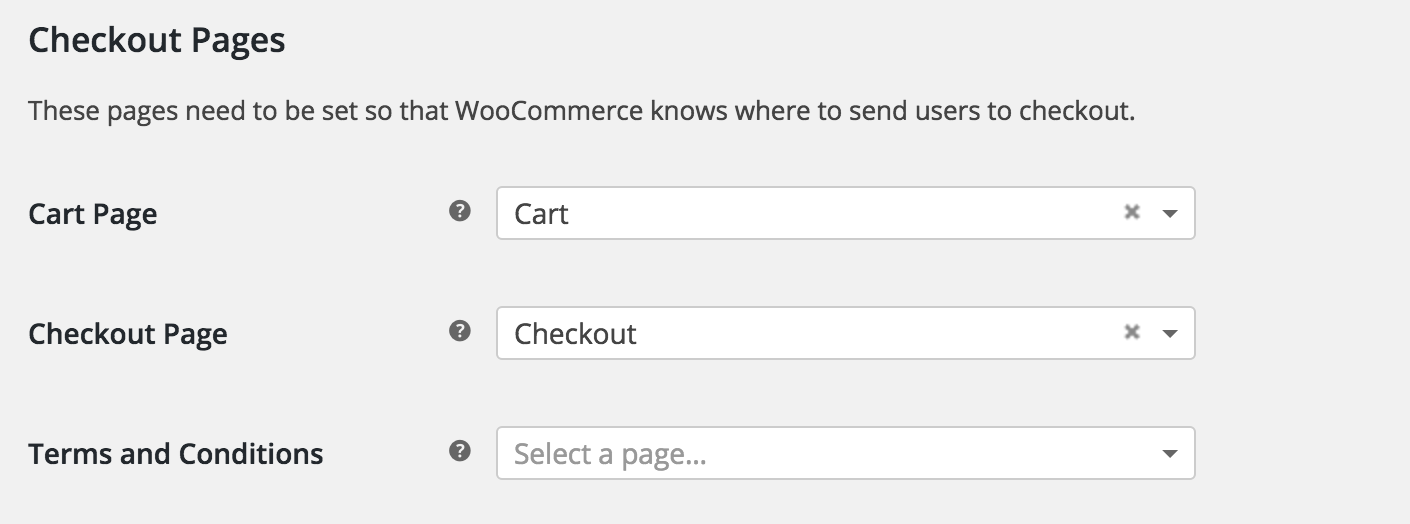
Let me know how that goes and we’ll take it from there. Thanks again.
Cheers!June 16, 2016 at 10:58 am #1128040ParticipantHi. Thank you.
I followed your instructions, and now the pages appear green in the WC status.
The remaining issue is now, when I click the “purchase” button in the event, it takes me to the cart, and then it takes me to the checkout page, but I never go to the ticket itself, to fill al the default fields and the custom fields that the “additional information” are for… Specifically, if I want to buy 2 or more tickets, I’m supossed to be able to fill in the ticket all the info of each attendee separatelly, and then proceed to the checkout…June 17, 2016 at 10:50 am #1128563ModeratorHey Juan,
Thanks for the update. Can you please review our Testing for conflicts guide to see if you’re experiencing a theme and/or plugin conflict?
Let me know if the Additional Information fields shows back up. Thank you again and have a great weekend!
June 19, 2016 at 10:52 am #1129031ParticipantThis reply is private.
June 20, 2016 at 11:34 am #1129406ModeratorThis reply is private.
July 5, 2016 at 9:35 am #1135522Support Droid
KeymasterThis topic has not been active for quite some time and will now be closed.
If you still need assistance please simply open a new topic (linking to this one if necessary)
and one of the team will be only too happy to help. -
AuthorPosts
- The topic ‘Correct settings for Woocommerce’ is closed to new replies.