Hey @Sean!
I took a look at your site and am honestly not sure where this comma is coming from – it does not seem like it’s generated by our plugin because I can’t recreate this issue on my local site…
So, I apologize about my lack of understanding the true source of this problem. It could be a remnant from your theme or from obscure part of our plugin’s code that I’m not familiar with.
The good news, regardless of all that, is that we get rid of the comma with some CSS. You can do that by pasting the following CSS code into the bottom of your theme’s style.css file:
.tribe-events-venue-details {

    visibility: hidden;

}
.tribe-events-venue-details span.author.fn.org,
.tribe-events-venue-details address.tribe-events-address,
.tribe-events-venue-details a.tribe-events-gmap {
visibility: visible !important;
}
.tribe-events-venue-details address.tribe-events-address span.street-address {
margin-left: -6px
}
Here’s how that CSS made things look for me when I tested it on your site:
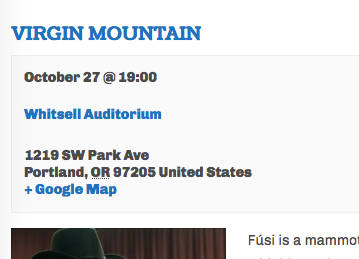
Not bad! In my opinion, anyways 🙂 Let me know if this helps.
Cheers,
George

.
