Change Default Google Maps Zoom Level

Home Forums Calendar Products Events Calendar PRO Change Default Google Maps Zoom Level

Viewing 4 posts - 1 through 4 (of 4 total)
  • Author
    Posts
  • #1073477
    Mark
    Participant

    Is there a way to change the settings for google maps on events so we can zoom closer in to locations when the events first load? This would be a helpful feature since most of our locations do not need to be zoomed out so much.

    #1074599
    Hunter
    Moderator

    Hey Mark,

    Welcome back to the forums 🙂

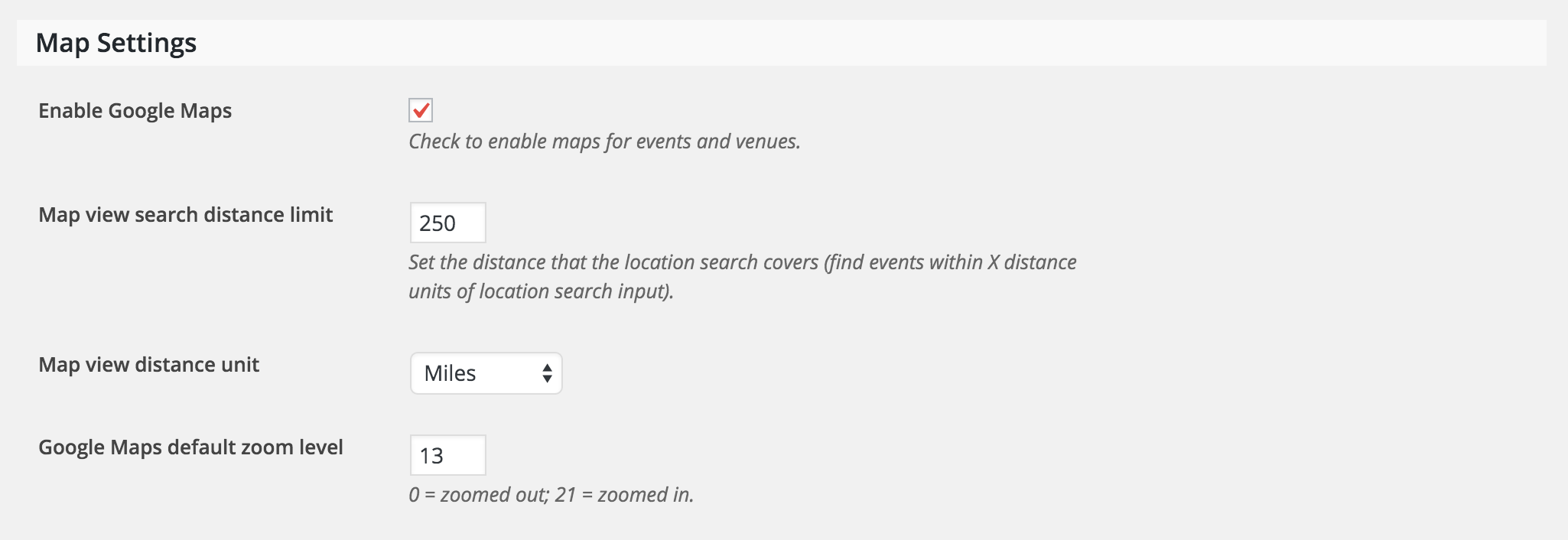
    We do have a setting for Google Map default zoom level. It can be found under Settings > General > Map Settings (see screenshot below)

    Let me know if this does the trick. Thanks for choosing PRO and have a great week!

    #1074603
    Mark
    Participant

    I don’t know why I didn’t see that. I think I was making it more complicating than it needed to be. Thanks!

    #1074696
    Hunter
    Moderator

    I think I was making it more complicating than it needed to be.

    Such is life 🙂

    I’ll close this thread out but please open a new one if you have any more questions. Take care and thanks again for choosing PRO!

Viewing 4 posts - 1 through 4 (of 4 total)
  • The topic ‘Change Default Google Maps Zoom Level’ is closed to new replies.