
Home › Forums › Calendar Products › Events Calendar PRO › Calendar shows # when click on month of date in monthview
- This topic has 4 replies, 3 voices, and was last updated 10 years, 5 months ago by
Support Droid.
-
AuthorPosts
-
April 4, 2016 at 1:17 am #1097704
Nico
ParticipantCalendar shows # when click on month of date in monthview
Hello, I have an problem on my website https://hoogkerkonine.nl were i installed the event calendar, the events calendar pro , the filter bar and communities.
When i am logged in i can click on the calendar view https://hoogkerkonline.nl/activiteiten/ i can click on the months en go to next of previous and i can click om an seperate date en that shows me what is planned for that date.
When i log out en go to the samepage al links are not clickable en show an # in the link instead of an activity of next month.
hope you can help me quicky because the site is live and this problem was not there before
kind regards Nico
April 4, 2016 at 11:12 pm #1098205Brook
ParticipantHowdy Nico,
I would love to help you with this.
I tried recreating your problem. These are the steps I went through:
- Select Month from the calendar Views
- Tried click on the blue See All link as picture here:
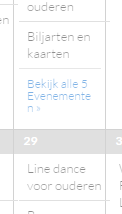
- And it showed all events for that day.
- I then tried paging back and forth in Month view, as you mentioned that. Then I click on a blue link again, and it showed all events for that day not a #.
Were you able to fix this problem? If not, am I doing the above steps correct? What browser and OS are you using?
Cheers!
– Brook
April 5, 2016 at 9:08 am #1098357ParticipantHi Brook,
on this page https://hoogkerkonline.nl/activiteiten/ click on << april 2016 >> to seen next month (result its goes to the top of the page en as result te link shows: https://hoogkerkonline.nl/activiteiten/#
on any date where is an dot bij de number try click it and you will see the same result as above.
When i am logged in at the backend en look at te frontpage with an calendar on it (example: https://hoogkerkonline.nl/activiteiten/) the result wil show the good link and i can click on the << and >> to see the next month.
hope you can help!
kind regards Nico
April 6, 2016 at 4:28 am #1098843ParticipantAhh thank you for clarifying. I can see that issue as well with your Mini Cal widget.
I am noticing the following JavaScript Error in your theme:
functions.js line 149 Uncaught TypeError: Cannot read property 'top' of undefinedI am wondering if this might be related. Could you try switching to the Twenty Fifteen theme and seeing if the problem temporarily goes away? I know you are currently using a modified Twenty Sixteen theme, but I am keen to see if the other one which is presumably unmodified works. If so we have narrowed down where the conflict is happening.
Cheers!
– Brook
April 21, 2016 at 9:35 am #1105441KeymasterThis topic has not been active for quite some time and will now be closed.
If you still need assistance please simply open a new topic (linking to this one if necessary)
and one of the team will be only too happy to help. -
AuthorPosts
- The topic ‘Calendar shows # when click on month of date in monthview’ is closed to new replies.