
Home › Forums › Ticket Products › Event Tickets Plus › Attendee Ticket Meta
- This topic has 4 replies, 3 voices, and was last updated 10 years ago by
Support Droid.
-
AuthorPosts
-
March 16, 2016 at 10:14 am #1089797
Jessica
ParticipantReally excited about the updates! I am trying to work through each one, but I’ve hit a road block with the new Attendee Ticket Meta. I have followed the instructions and added the additional information I am requesting, but where does it actually appear? I published the event and ran a test, but the request for additional information never appeared. I’m not sure what step I am missing or if here is a conflict between any of the other plugins. Any guidance would be greatly appreciated – we would love to take advantage of this feature!
Also, on an unrelated note, prior to the update when I would click on “Attendees” in the Events view I could then export my class list with email addresses. Now that email addresses have been moved under “Event Type” they are no longer exporting. Is there a way to correct this?
Thanks!
March 17, 2016 at 10:50 am #1090394Barry
MemberHi Jessica,
Sorry to hear you’re hitting some snags.
I published the event and ran a test, but the request for additional information never appeared.
Once you increment the quantity selector (ie, you select 1 or more tickets) then the meta fields should appear just below that form. Example:
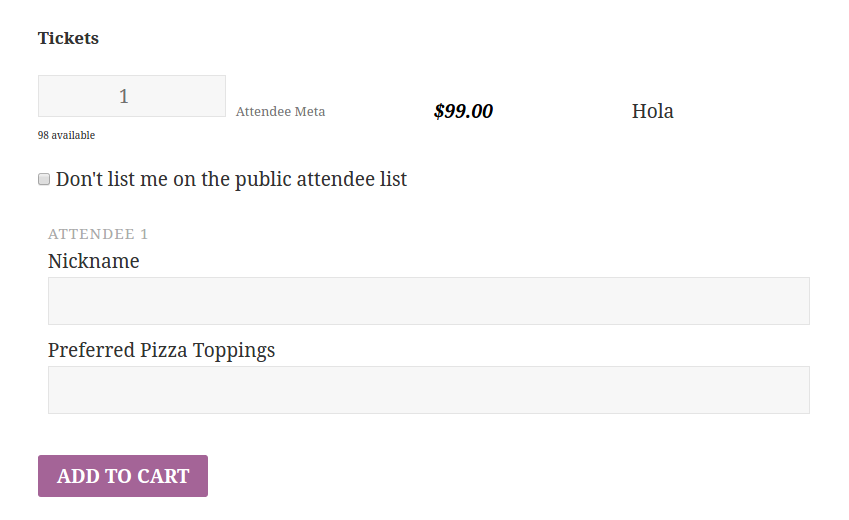
They don’t appear until the quantity is above zero, however. Does that help at all? If not, can you link me to an example of an event that his tickets (for which attendee meta fields have been configured) and perhaps also share your system information by private reply?
Now that email addresses have been moved under “Event Type” they are no longer exporting. Is there a way to correct this?
Great observation! I’m not actually sure of the background to this change but I’ll chat with the team and see if it was deliberate/something others generally didn’t require.
https://gist.github.com/barryhughes/3be509552be340039f8f
In the meantime, something like the above (which you could add to a custom plugin or even to your theme’s functions.php file if you prefer that approach) might serve as a temporary workaround … be sure to dock off the opening <?php tag if you add it to an existing PHP file.
Does that help at all?
March 21, 2016 at 7:56 am #1091772ParticipantThis reply is private.
March 21, 2016 at 8:21 am #1091792MemberThanks!
So you seem to have some customizations in place – one of which is a custom wootickets/tickets.php template (located within your child theme’s tribe-events directory) and my guess is you have also done something to change the position in which the ticket form displays.
What I suspect is that one or more customizations are getting in the way here. Can you temporarily disable them, starting with the most obvious ones (like the custom tickets template) and see if that resolves the problem at hand?
April 5, 2016 at 9:35 am #1098371KeymasterThis topic has not been active for quite some time and will now be closed.
If you still need assistance please simply open a new topic (linking to this one if necessary)
and one of the team will be only too happy to help. -
AuthorPosts
- The topic ‘Attendee Ticket Meta’ is closed to new replies.