
Home › Forums › Welcome! › Pre-Sales Questions › Attendee information, E-mail input?
- This topic has 4 replies, 2 voices, and was last updated 9 years, 7 months ago by
Support Droid.
-
AuthorPosts
-
February 16, 2017 at 10:27 am #1238921
Laura
GuestHi!
I have the plugin The Event Ticket Plus. I would like that those people would buy my tickets (example: customer buys 3 tickets at the time) should fill e-mail field for every ticket. Now I use just text input, but I would like the system to check, if the e-mail is correct. Is it possible?
The second question: Can I collect quickly all the e-mails from all my attendees (not manually)?
Thank you!
February 16, 2017 at 1:22 pm #1239098Caroline
MemberHi Laura,
Thanks for reaching out! Unfortunately, we don’t currently offer a way to validate text fields added using the “Attendee Information” option as valid email addresses. I’d suggest posting this feature idea over on our UserVoice forum, where we gather suggestions from our users for future feature releases–we’d love to continue the conversation over there!
Regarding your second question, can you provide any clarification on how you’d like to gather attendee email addresses? Is there a type of functionality that our current RSVP/ticketing process (which does require at least one email address) lacks? Let us know, and we’ll see if we can provide any suggestions. 🙂
Thank you!
February 16, 2017 at 1:58 pm #1239126GuestHi, Caroline!
Thank you for your response!
About the second question: I am sorry if I have been unclear. I meant, that can I collect all the e-mails somehow easily and use them later with MailChimp? As a client list? I do not know much about that stuff, so I am sorry if its hard to get, what I have on my mind.
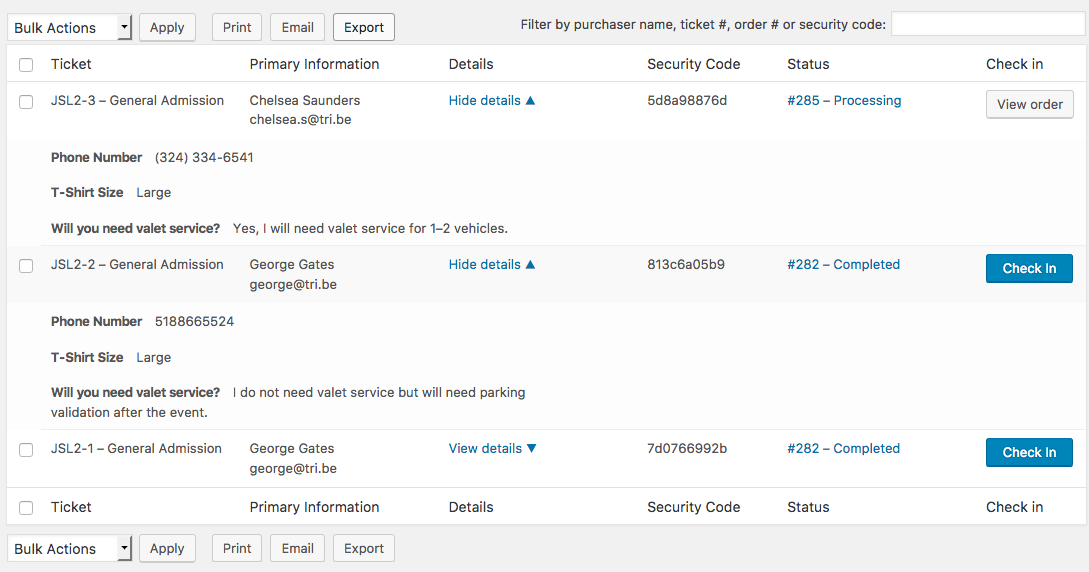
Also, I have a small problem. I made tickets, where all attendees have to fill a form with 3 questions. Then I made a purchase and I can`t find that info from anywhere. I know it should be in attendee list and show details, but there is none (somewhere here:https://theeventscalendar.com/content/uploads/2014/11/Screen-Shot-2016-12-22-at-3.21.07-PM.png). But my attendee list looks like that: http://meelind.com/blingipildid/n%C3%A4ide.JPG
Primary info is empty, because we didn`t collect any billing information, but there should be that additional infos an so on.
I would like to share our event page with you, but I do not want to put that link here for everyone to see.February 16, 2017 at 7:13 pm #1239417MemberHi Laura,
Thanks so much for clarifying here–no trouble at all! You can easily export a CSV file of your attendee data from your WordPress backend to import into MailChimp. Our Knowledgebase article here provides some information on managing and exporting attendee data, and you can read more about how to import CSV files into MailChimp here!
I’m so sorry to hear that you’re having some issues with your event registrations! Unfortunately, we’re not able to assist with technical issues here in the pre-sales forum, but one of our support team members over in the premium forums would be glad to take a closer look. Would you mind logging in to your account and submitting a post to our Event Tickets Plus forum? We’ll make sure that someone follows up just as soon as possible!
Thanks again, and please don’t hesitate to let us know if there’s anything else we can do for you! 🙂
March 10, 2017 at 8:35 am #1252430KeymasterHey there! This thread has been pretty quiet for the last three weeks, so we’re going to go ahead and close it to avoid confusion with other topics. If you’re still looking for help with this, please do open a new thread, reference this one and we’d be more than happy to continue the conversation over there.
Thanks so much!
The Events Calendar Support Team -
AuthorPosts

- The topic ‘Attendee information, E-mail input?’ is closed to new replies.