
Home › Forums › Calendar Products › Community Events › All Events from February 2016 Have Disappeared
- This topic has 11 replies, 4 voices, and was last updated 9 years, 7 months ago by
robincarlton.
-
AuthorPosts
-
July 27, 2016 at 10:21 am #1144745
robincarlton
ParticipantI went to my calendar last night and realized that all of the events posted since February 2016 have disappeared except for two. And if I remember correctly, those are the two I posted myself. They disappeared from my backend as well as the actual calendar. I have a huge community posting events on their own and now they are gone. I followed instructions by deactivating my theme (Genesis NewsPro), activated twenty sixteen, deactivated all of my plugins except for The Events Calendar and Community Events and cleared my cache. Nothing changed. I reactivated the theme and plugins, then deactivated The Events Calendar and Community Events and cleared cache. I activated them again and still no change. I did realize that my Community events license expired, so I just renewed. I deactivated it, cleared cache and activated it. Still missing all of my events. Can you help?
July 28, 2016 at 10:01 am #1145165Hunter
ModeratorHey Robin,
Welcome back and thanks for reaching out! Sorry to hear about the missing events. Do you have the ability to check the database to see if the events are still stored there? Also, what type of events aren’t displaying (single events or recurring events)? The expired license doesn’t delete any data from your site, it simply requires renewal to receive updates.
Keep me posted and have a good Thursday.
Cheers!July 28, 2016 at 10:04 am #1145169ParticipantAll of the events are missing. I’m not sure how to check the database, can you explain how to do that? I didn’t think the expired license created the issue. I just want to know if there is going to be a way for me to recover these events. I’ve been working diligently to get people to submit their events and now they are gone. I’m afraid my credibility may go down the tube if I can’t recover.
July 28, 2016 at 10:04 am #1145170ModeratorRobin,
I forgot to ask, can you reply back with what you have entered in the following options found under Events > Settings > General? (see screenshot below)
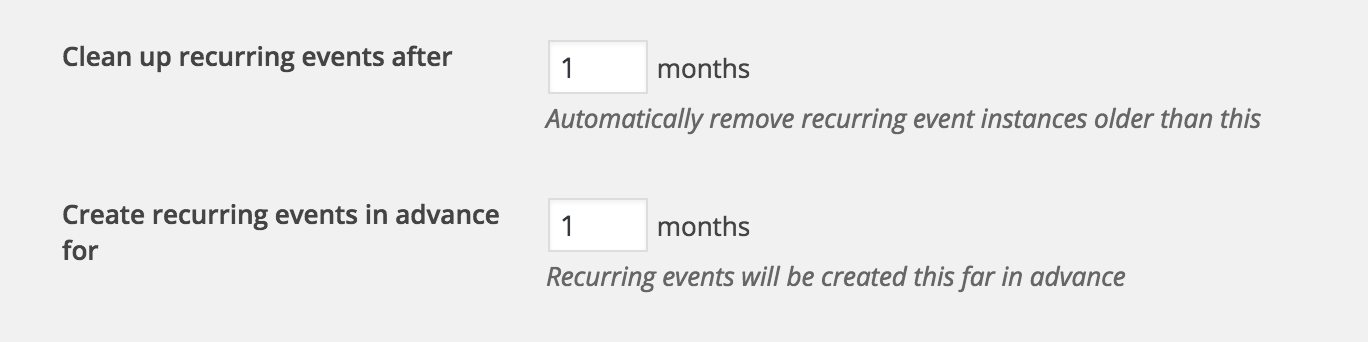
Thanks again!
July 28, 2016 at 10:10 am #1145175ParticipantI don’t have those options on my screen.I’ve added the screen shot of what I do have in my general settings area.
If its helpful to know I still have all of 2015 and January of 2016 events listed and on the calendar. That is what is super strange to me. I stopped adding events for others right around the end of January and the only two events that I have showing since then are the two that I posted, one in April and one in May. All of the missing events have been posted by others via the community events.
The events that are currently showing for August and forward where just posted right before I noticed the others are missing.
-
This reply was modified 9 years, 8 months ago by
-
This reply was modified 9 years, 8 months ago by
July 29, 2016 at 11:25 am #1145636ModeratorHey Robin,
Thank you for the update. So I think I’ve got a good idea of what’s going on. You can disregard my previous comment regarding ‘options found under Events > Settings > General.’ These options are only available with the PRO calendar plugin.
I took a look at your System Information (thank you for sharing that in the initial thread creation) and noticed you’re running an outdated version of Community Events. If you’re able, can you update to the latest version (4.2.3)? This may have something to do with the events not being saved properly. And not to flip-flop on my previous statement, but the expired license could have also been a contributing factor to the “missing” events.
To see if the “missing” events are stored in your database, you’ll need to access your MySQL database. If you’re on shared hosting such as GoDaddy or HostGator, you can access your database via your cPanel. Look for ‘phpMyAdmin’ which should take you to your databases. (see screenshot below)
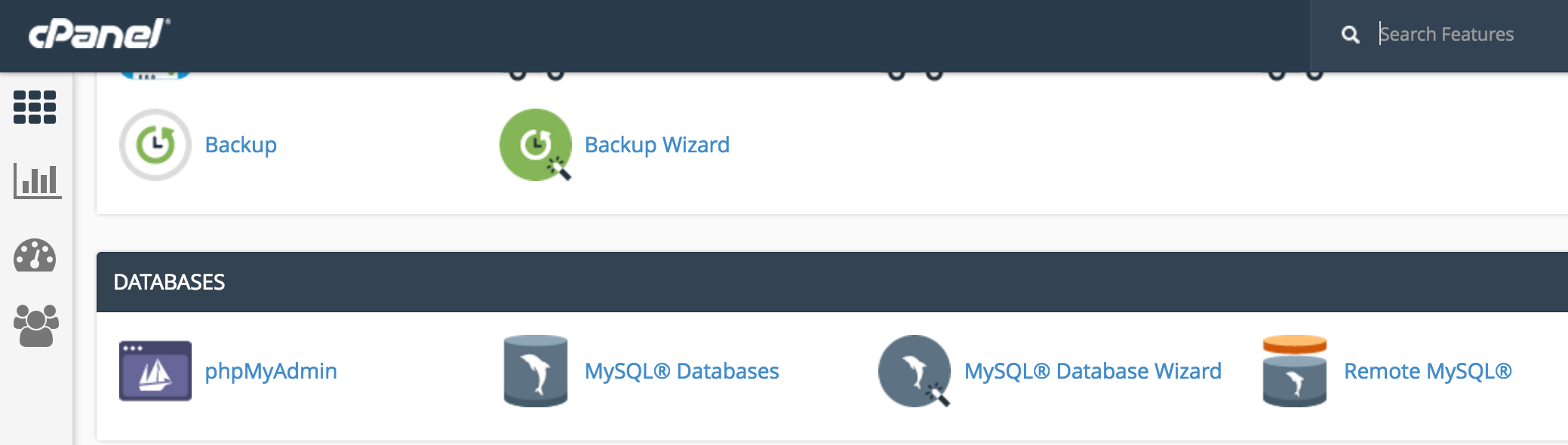
From there, enter your ‘wp_posts’ table. The events ‘post_type’ are stored as ‘tribe_events’. You can then check to see if the missing events are hopefully saved in your database.
Let me know what you discover and we’ll take things from there. Have a good weekend.
Cheers!July 30, 2016 at 8:06 am #1145827ParticipantOkay, I found them. My host is Synthesis. They are in the database. What do I do now?
July 31, 2016 at 12:31 pm #1145941ModeratorHi and welcome back,
I’m not really sure where to go from here seeing I’m unable to reproduce the issue and we don’t have any logged bugs confirming anything resembling your issue. What is the ‘post_status’ set to for all the events not displaying? You may need to look into our list of customizers if I’m unable to confirm it’s on our end.
Thanks for keeping me updated and have a good rest of your Sunday.
Cheers!July 31, 2016 at 1:09 pm #1145944ParticipantI realized that I was looking at the tribe venues and not the tribe events. They events are not on my database – the same dates are shown as mentioned before. I’m super bummed right now. What can I do to ensure this doesn’t happen again? I just don’t understand how a period of time can just disappear, it would make much more sense if they would have all disappeared.
I hope your Sunday is going better than mine.
Please advise as to what my next steps are.
Thanks.
August 1, 2016 at 10:37 am #1146164ModeratorHey Robin,
My Sunday wasn’t too bad, but let’s see if we can make Monday a bit better for you. Have you tried contacting your hosting company to see if they have a backup or backups that contain the missing events? This has saved me many times in the past!
Unfortunately there isn’t much we can do help here other than recommend automatic, scheduled backups and always checking in on your site to make sure everything is up-to-date and working as designed.
I know this isn’t the most ideal answer, but as previously mentioned, we don’t have a widespread problem of this occurring. Let me know what you find out from the hosting company and I hope it turns out positive.
Thank you for understanding and my sincerest apologies I can’t do anything more to help. Best of luck and have a good rest of your day.
August 23, 2016 at 9:35 am #1154858Support Droid
KeymasterHey there! This thread has been pretty quiet for the last three weeks, so we’re going to go ahead and close it to avoid confusion with other topics. If you’re still looking for help with this, please do open a new thread, reference this one and we’d be more than happy to continue the conversation over there.
Thanks so much!
The Events Calendar Support Team -
This reply was modified 9 years, 8 months ago by
-
AuthorPosts
- The topic ‘All Events from February 2016 Have Disappeared’ is closed to new replies.