
Home › Forums › Ticket Products › Event Tickets Plus › After Upgrading to Plus, only free Ticket options are available
- This topic has 10 replies, 3 voices, and was last updated 10 years ago by
Armin.
-
AuthorPosts
-
September 30, 2016 at 1:45 am #1170900
Armin
ParticipantHI all,
after installing the Tickets Plus plugin, we are only able to add free rsvp tickets… no ticketprize can be entered.the licencekey has been entered and is valid.
any suggestions?
regards
MalteSeptember 30, 2016 at 2:40 am #1170913Andras
KeymasterGrüss dich Armin
Thanks for going Pro and welcome to the forums! Let me help you with your question.
Event Tickets Plus gives you the opportunity to sell tickets, however it cannot do it on its own. You will also need an ecommerce plugin to be able to use this feature. Event Tickets Plus currenctly supports WooCommerce, Easy Digital Downloads, Shopp and WP eCommerce.
Once you have the ecommerce plugin also activated, then you should see a section like this when adding a ticket to an event:
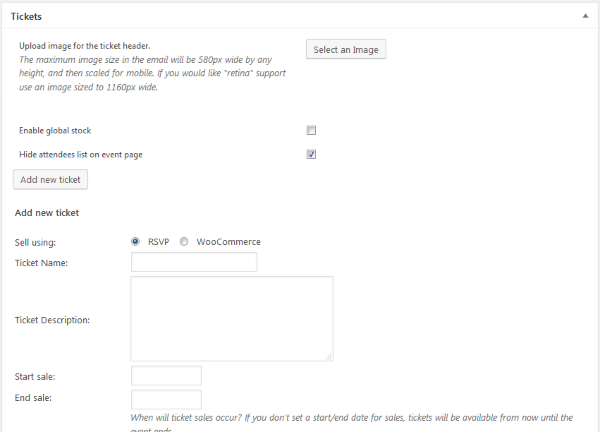
I hope this clarifies. Please do let me know if you need any further help.
Cheers,
AndrasOctober 1, 2016 at 3:37 am #1171413ParticipantThis reply is private.
October 3, 2016 at 2:33 am #1171727KeymasterGuten Morgen Armin
Yes, it is possible to hide it.
Paste this little snippet to your theme’s style.css file to hide the event cost on the single event page.
.single-tribe_events .tribe-events-schedule .tribe-events-divider, .single-tribe_events .tribe-events-schedule .tribe-events-cost {
display: none;
}Please note, that this will hide the cost even if it is not free.
If you want to limit this to only the Events which are in the tribe_events_cat-auswaertsspiel category, then use this instead:
.single-tribe_events .tribe_events_cat-auswaertsspiel .tribe-events-schedule .tribe-events-divider, .single-tribe_events .tribe_events_cat-auswaertsspiel .tribe-events-schedule .tribe-events-cost {
display: none;
}Let me know if this helps.
Grüsse,
Andras
October 4, 2016 at 11:27 pm #1172572ParticipantThis reply is private.
October 5, 2016 at 9:27 am #1172736KeymasterThis reply is private.
October 8, 2016 at 1:22 am #1174032ParticipantHi Andras,
unfortunately it did not work…
any further idea?regards
MalteOctober 10, 2016 at 9:35 am #1174540KeymasterHey Armin,
I’m sorry about this. I checked the code and it does work, it just got pasted with wrong (curly) apostrophes.
Copy the code from here, that should solve it. I tested it on the theme twentysixteen and worked as expected.
https://gist.github.com/anonymous/917a02c662b06da87f37f9c5154e9f98
Let me know if this solves it.
Cheers,
AndrasOctober 13, 2016 at 12:52 am #1175788ParticipantHi Andras,
THANK YOU VERY MUCH! THIS WORKED NOW!
You are my hero for topday 🙂regards
MalteOctober 13, 2016 at 2:02 am #1175808KeymasterHi Malte,
I’m suuuuuuuuuuuuper happy to hear that helped. 🙂
Since this is marked resolved I am going to close this ticket, but if you need anything else related to this topic or another please post a new topic in the forum and we will help you out.
Good luck with your project!
Cheers,
AndrasPS: If you like our plugin, and you didn’t yet do so 🙂 we would be happy to receive a review in the wordpress.org repository. Thanks!
https://wordpress.org/support/view/plugin-reviews/the-events-calendarPS2: We’d be also grateful if you would give us feedback on your satisfaction with support. Just click on one of the classy looking emojis below. 🙂 If you can spare a few words, that’s even better. Doublethanks!
-
AuthorPosts
- The topic ‘After Upgrading to Plus, only free Ticket options are available’ is closed to new replies.