
Permalinks. That little setting buried at the bottom of your WordPress Settings options. It seems like such an insignificant thing, but it can have a lot of impact on the functionality of your site and The Events Calendar plugin.
For full functionality, you must use pretty permalinks with The Events Calendar and Event Tickets. Without getting too technical, some of the functionality of the plugins depends on these more-readable URLs in order to work.
What’s the difference between pretty and ugly (aka plain) permalinks? There is a nice breakdown of the differences in the WordPress Codex, but you can see the difference right away in the following examples:
- Ugly: http://example.com/?p=N
- Pretty: http://example.com/post-name
Isn’t the URL much nicer in the second example? That’s because it’s a lot easier to read. Any permalink setting besides the Default one is considered pretty.
To keep things running smoothly and looking sharp, we recommend using “pretty” permalinks. While most styles work, selecting Post Name is usually the best bet for ensuring the plugin functions properly.
Just head over to Settings → Permalinks, select Post Name, and save your changes.
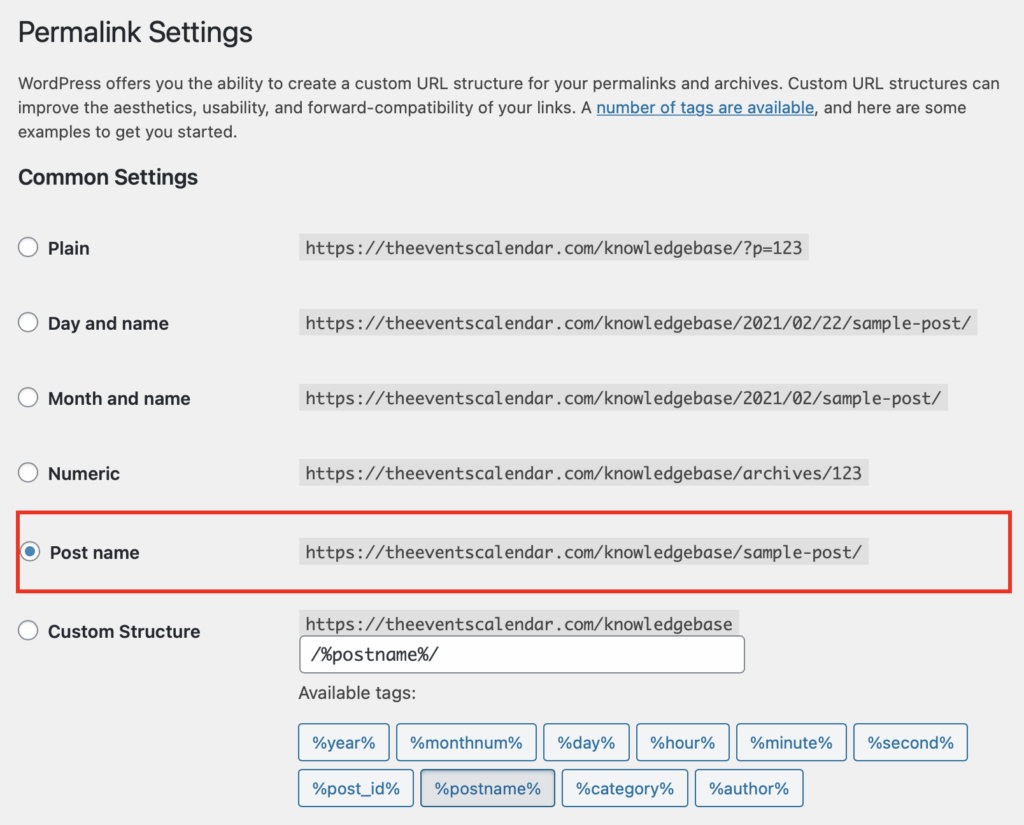
It’s also worth noting that permalinks are helpful for troubleshooting issues with the plugin as well. For example, let say you head over to your calendar page and–what?–nothing is there! A common fix is to flush your permalinks by going to Settings > Permalinks and simply clicking the Save Changes button. If you run into trouble, resaving your permalinks is one of the first troubleshooting steps to take.
💡 Pro tip: If you get a “Page Not Found” (or 404) error when visiting the calendar, try clicking the “Save Changes” button on the Permalink Settings page without making any changes. This flushes the site’s cache and often resolves those issues.