The ability to hide and show content to certain users is helpful on many kinds of sites, from forums and community sites to news sites and even event calendars. WordPress actually has a lot of options for controlling access to certain pages and posts on a site.
So let’s look at several of them and how they can be used for online calendars. We’ll go into great detail for each plugin in additional sections.
Plugin Comparison
Before jumping in, let’s consider what it is we’re looking for. If the goal is to control access to the calendar and certain events, then these are things we want to be able to do:
- Limit access to the calendar as a whole to members
- Limit access to certain events and event categories to members
- Display content on a page that is only visible to members
- Limit who can submit events to the calendar based to members
- Create tickets that only members can purchase (availble with some integrations with this handy extension)
There are probably other requirements we could dream up, but what we have here should account for the bulk of many community and membership sites that use calendars.
There are more plugins that meet at least some of our requirements that we have time to cover, but some below are some of the top contenders.
Each of these plugins are powerful and awesome in their own right. While some cater to specific use cases (e.g. BuddyPress for creating community groups), they all deal with members in some way, shape or form.
| BuddyPress | Woo Memberships | Restrict Content | MemberPress | |
|---|---|---|---|---|
| Limit access to the calendar | ❌ | ✅ | ✅ | ✅ |
| Limit access to certain events | ❌ | ✅ | ✅ | ✅ |
| Shortcode to display event details to members only | ❌ | ✅ | ✅ | ✅ |
| Limit who can submit events to the calendar | ✅ | ✅ | ✅ | ✅ |
| Create tickets only members can purchase | ❌ | ✅ | ✅ (Pro) | ✅ |
| Special ticket pricing and discounts for members | ❌ | ✅ | ✅ (Pro) | ✅ |
| Custom messaging for no access | ❌ | ✅ | ✅ | ✅ |
Using Restrict Content Pro
Restrict Content Pro is a premium plugin that allows you to limit access to any WordPress page, post, or custom post type. It offers the same capabilities as the free version of the plugin, Restrict Content, but with additional features, such as the ability to create an unlimited number of membership plans — including paid ones — and restrict access to content based on a user’s membership.
Events created with The Events Calendar and tickets created with Event Tickets Plus are custom post types, meaning both of these plugins work well with Restrict Content and Restrict Content Pro, as well as our premium calendar add-ons, like Events Calendar Pro.
Let’s look at some ways that Restrict Content Pro can be used with the calendar and tickets. We’re focusing on Restrict Content Pro instead of Restrict Content since the features offered in Restrict Content are also available in Restrict Content Pro.
Restrict Access to the Calendar and Events
It’s possible to limit access to the calendar based on a user’s membership status. Restrict Content Pro can prevent non-members from accessing post archives, which is what the calendar is.
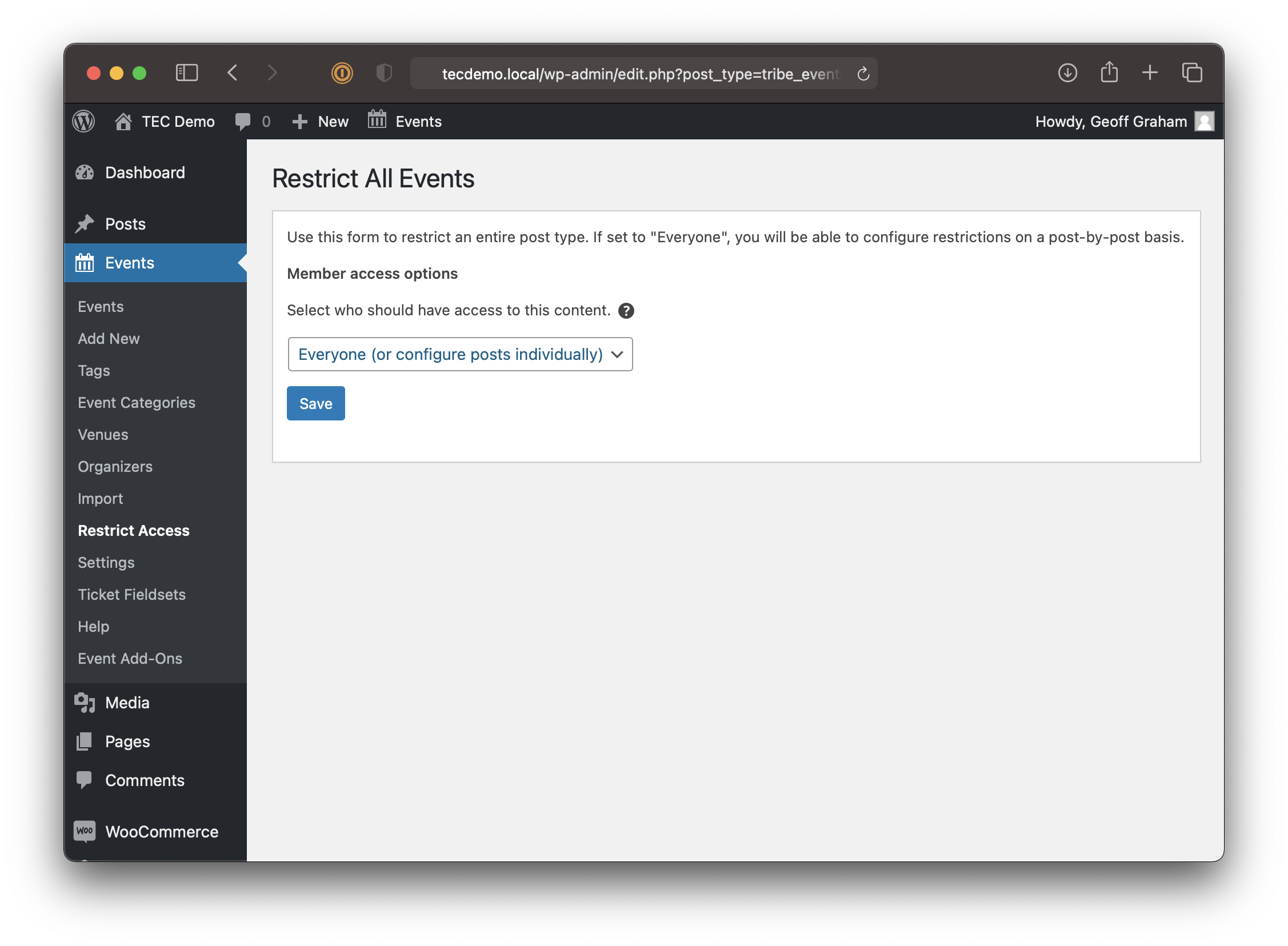
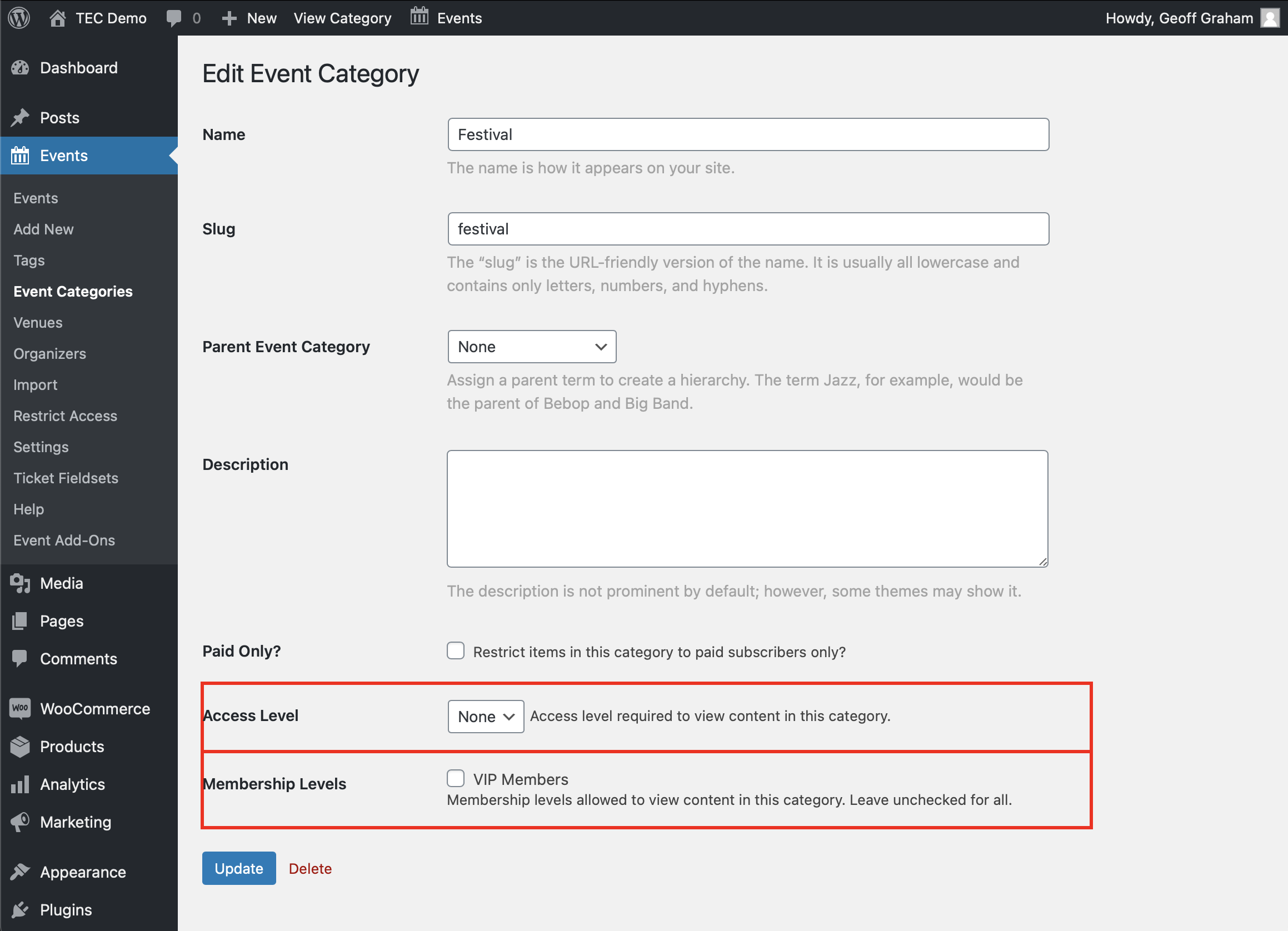
But maybe all we want is to restrict access to a specific event, or even a category of events. We can do both! For example, jump into the editing screen for an event category and select the restriction settings that Restrict Content adds to the category options.
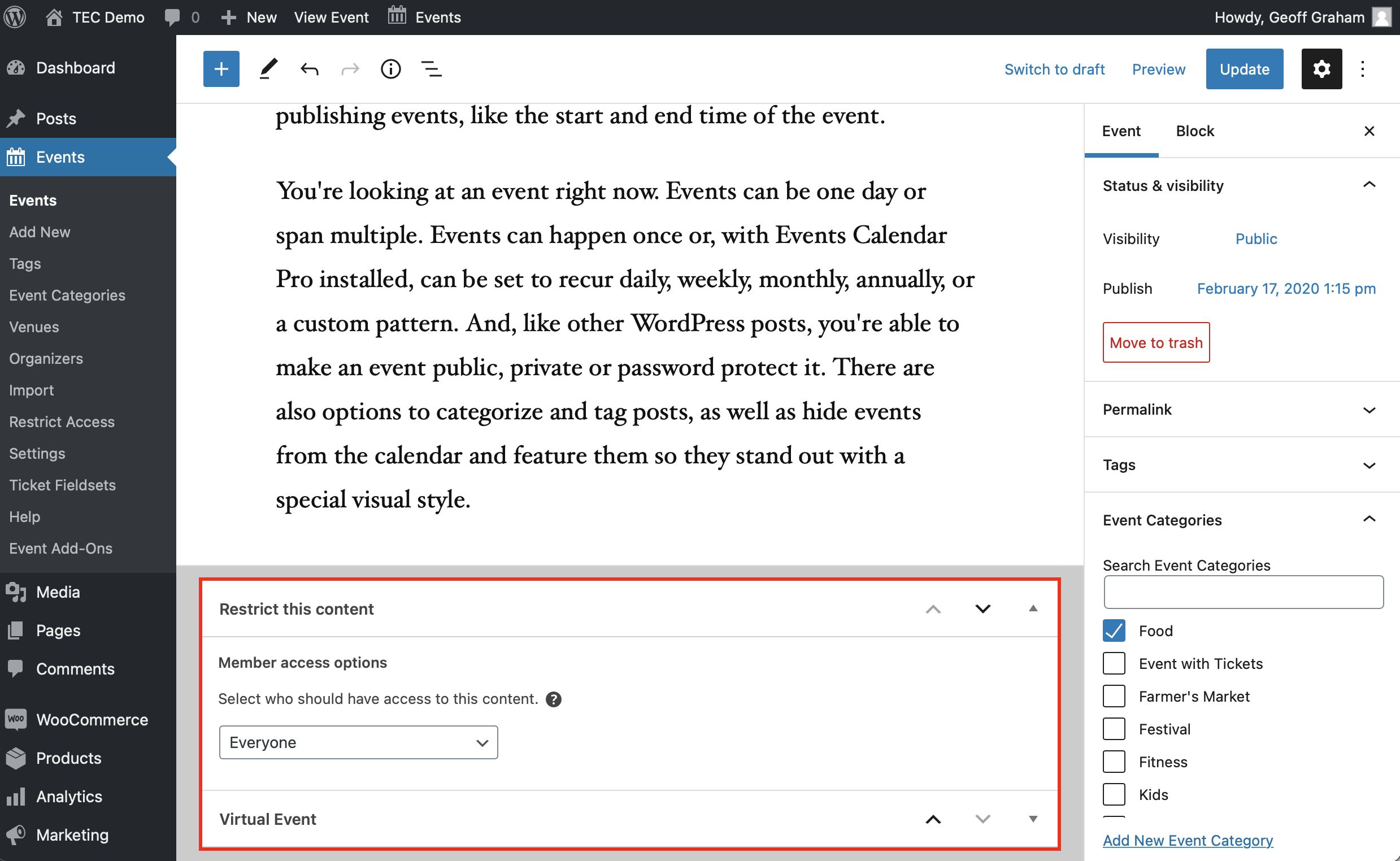
The same thing goes for events. Open an event in the WordPress editor, and select who is able to access that event in the “Restrict this content” settings.
Restrict Content gives us even more fine-grain control by allowing us to restrict certain content on a page to members, including events.
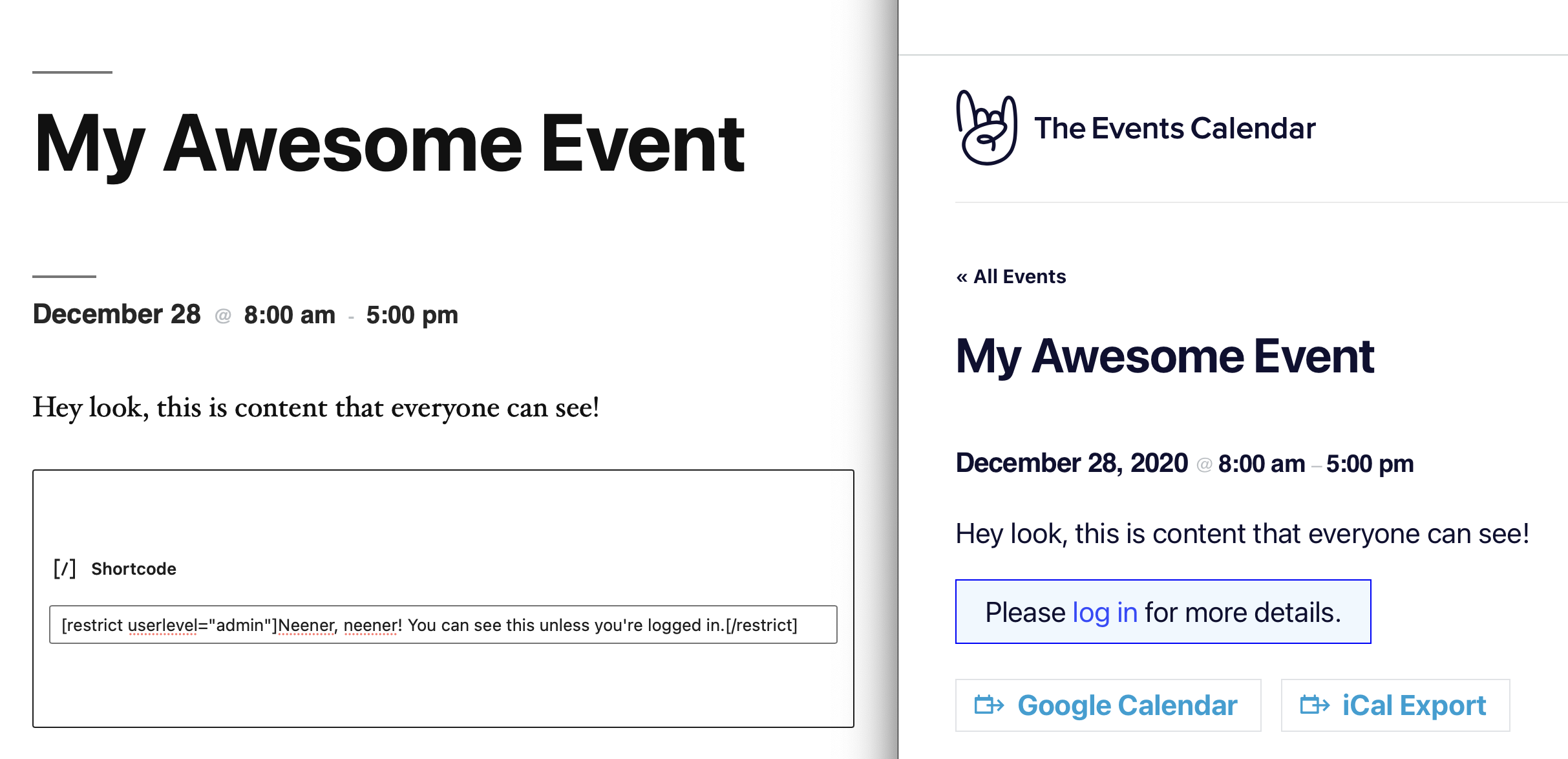
Restrict Ticket Purchases
Another thing we can do is allow specific memberships access to certain tickets, whether we’re using Event Tickets by itself or with The Events Calendar. For example, we can use the [restrict] shortcode that comes with Restrict Content to display the tickets for an event just to members.
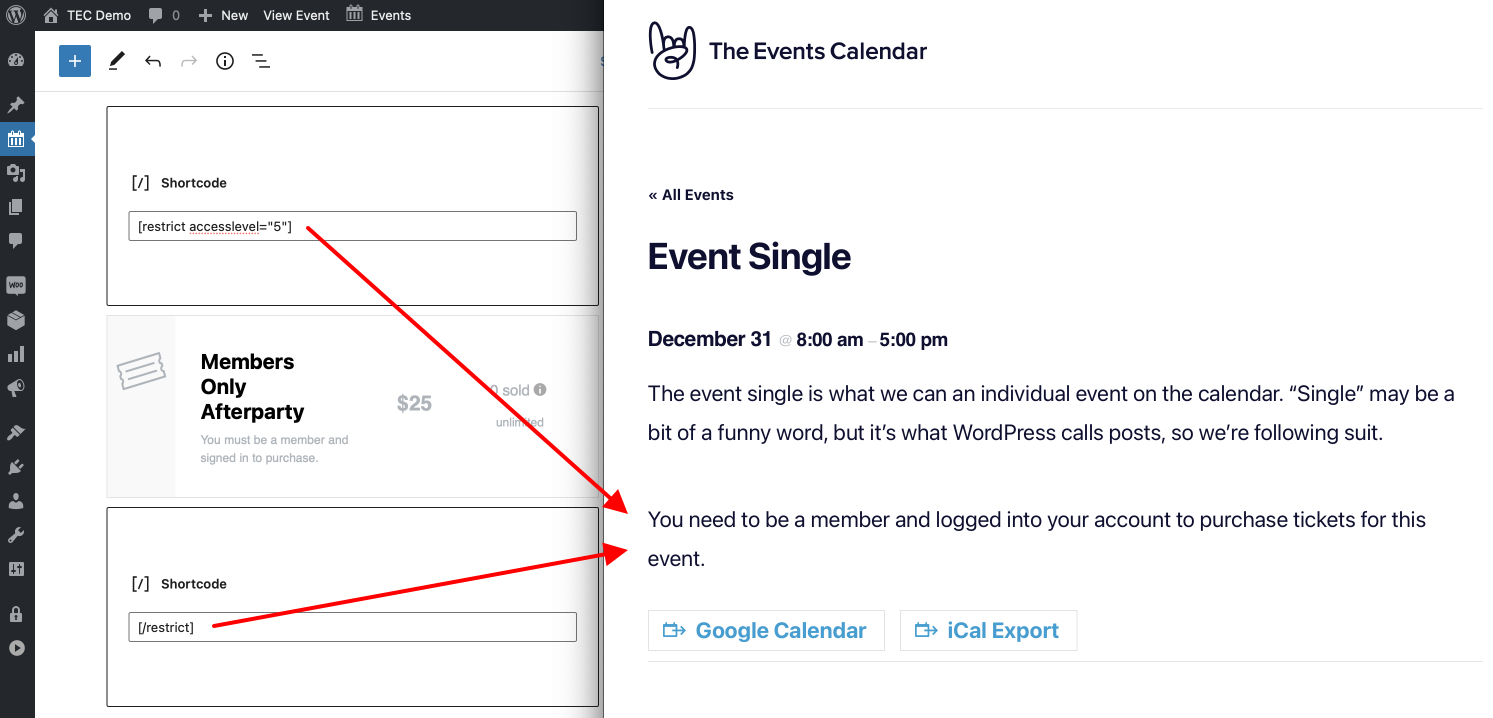
[restrict] shortcode limits access to the ticket to a specific user role, access level or membership level.This is great if you’re using Event Tickets to create and sell tickets, but what if we’re using Event Tickets Plus to make tickets with an e-commerce plugin, like WooCommerce? A ticket is a product and products are a custom post type, which means Restrict Content Pro is able to restrict access to those tickets as well. We can even set those restrictions on the product editing screen.
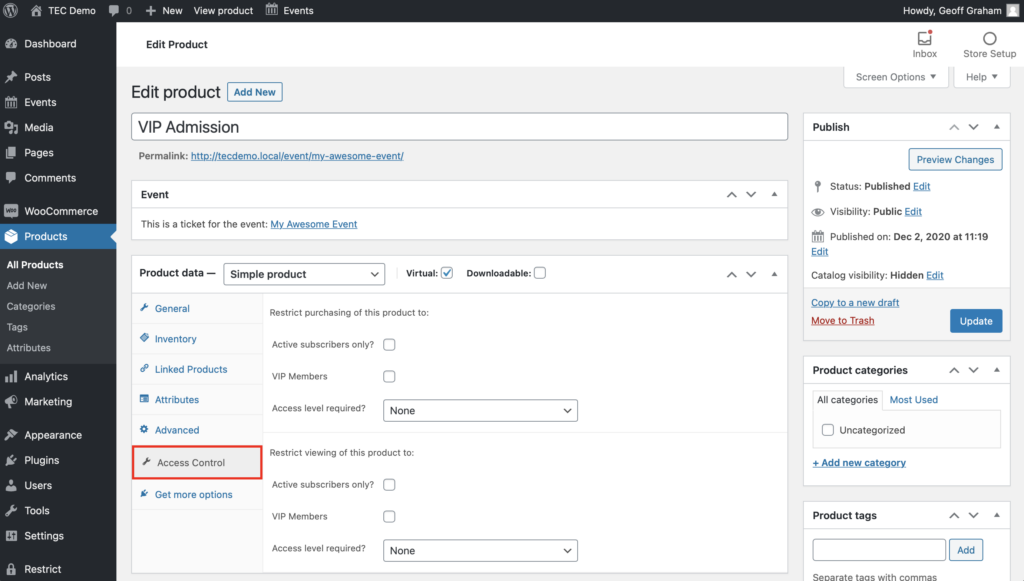
And to make members-only ticket creation even easier with Restrict Content Pro, check out our handy extension!
Restrict Access to Event Submissions
Community Events is a paid add-on for The Events Calendar. It creates a page with a form on it that allows users to submit events to be published to the calendar without giving them access to the WordPress admin. While Community Events provides a way to limit access to users who are registered to your site and logged into their account, we can use Restrict Content Pro to add further restrictions.
Just like any other page or post, Restrict Content Pro provides additional settings to the page editor — including the event submissions page. And that’s because you add the submission form to any page on your site using the [tribe_community_events] shortcode.
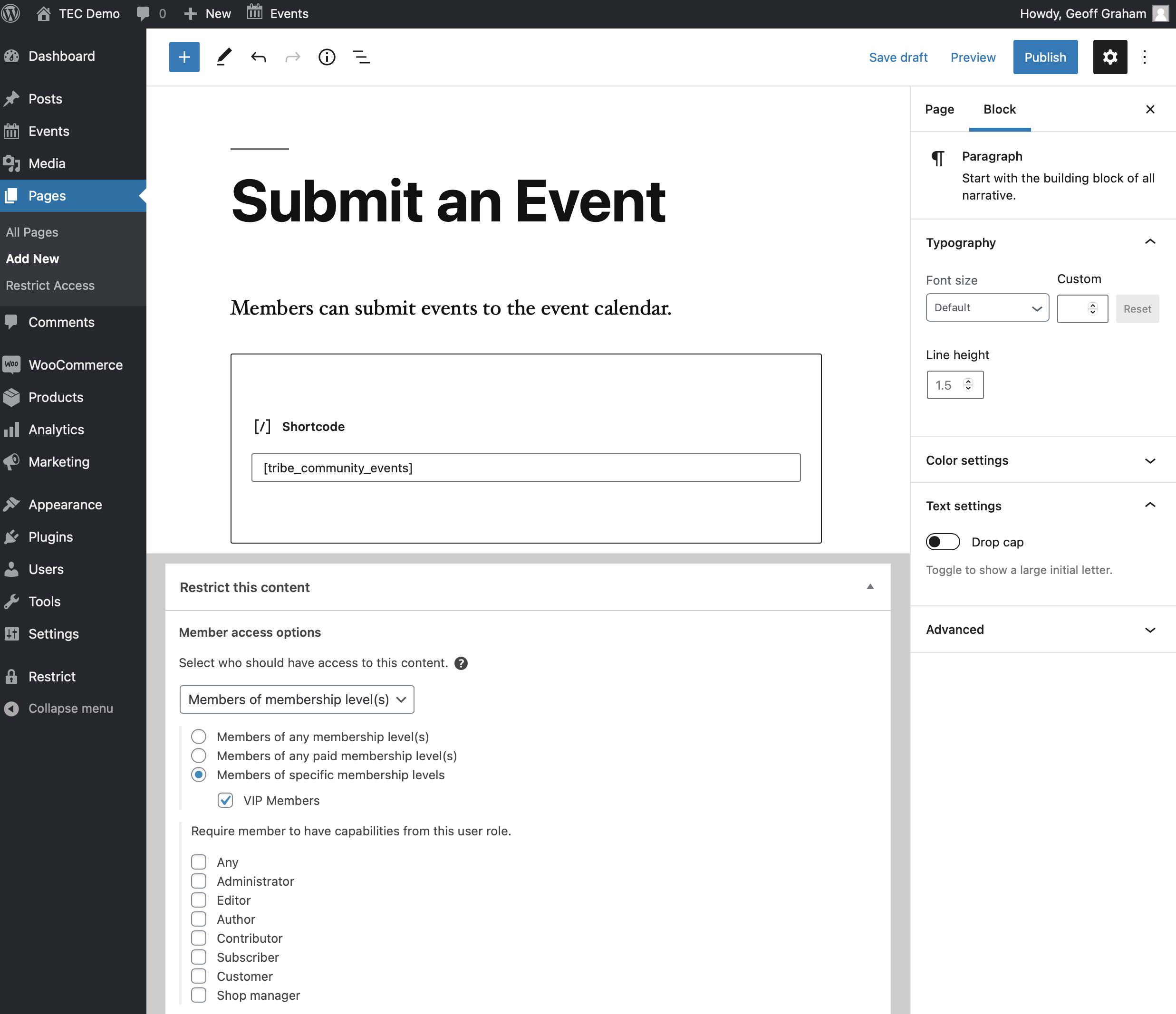
[restrict] shortcode here as well, but setting it at the page level ensures non-members never even see the page.We can do the same thing with any other Community Events shortcode, including the one that displays a list of events a user has submitted to the calendar ([tribe_community_events_event_list]). We might even consider bumping up the restriction level on this page to higher membership level, allowing us to charge more for a membership that allows members both to submit events, and manage the events they have submitted.
Pros and Cons
There’s a lot to like about Restrict Content and Restrict Content Pro! But like all things, there are upsides and downsides to it, in this case, when it comes to events and tickets.
Pros
- Easily restrict access to any page, post, event, etc. based on user role.
- Use a shortcode to restrict access to content within a page or post, including events.
- Create membership levels with tiered levels of access to content.
- Integrates with WooCommerce to set access to tickets.
- Display custom messaging for non-members.
- Create tickets that only members can purchase, by upgrading to the premium plugin.
Cons
- Requires a paid upgrade to Restrict Content Pro to set ticket restrictions, though that can be offset by charging a membership fee.
- Product restrictions are limited to WooCommerce, which may not be ideal for some organizations.
Using BuddyPress
BuddyPress adds social networking features to WordPress. When users register to the site, they have the ability to join and create groups where they can send messages, post status updates, and get notifications for other user activities.
Pretty cool, right? But what does that have to do with calendars?
While BuddyPress allows users to register as members of a site, it’s really more about curating member groups and creating connections between users than it is managing access to content like a membership plugin. Regardless, BuddyPress is a community-driven plugin that provides a way to give users access to certain groups and to make those groups public or private — all great stuff when it comes to an online calendar.
For example, a group can be private but still displayed in the Group Directory.
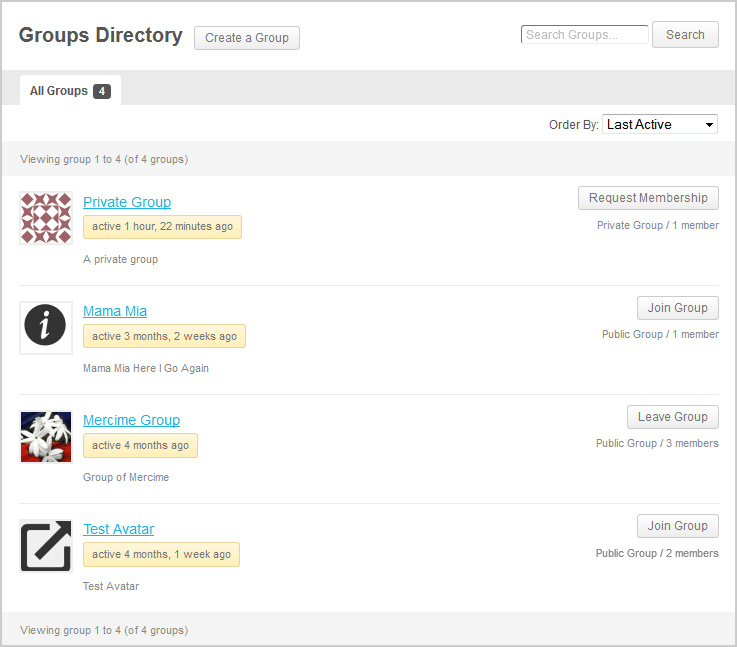
So let’s look at various ways that BuddyPress and our products can work together.
Add the Calendar to a Group Page
So, yes, BuddyPress does indeed restrict access to certain pages, or groups in this case. While that doesn’t do much in the way of restricting access to the full calendar, group pages support shortcodes. That means, with the help of shortcodes in Events Calendar Pro, we can drop [tribe_events] in the group description and only the members of that group can see the calendar. That is, assuming the calendar isn’t linked up somewhere else.
But we can do better. The [tribe_events] shortcode can be used to show certain categories of events which is a nice way to give group members access to specific events.
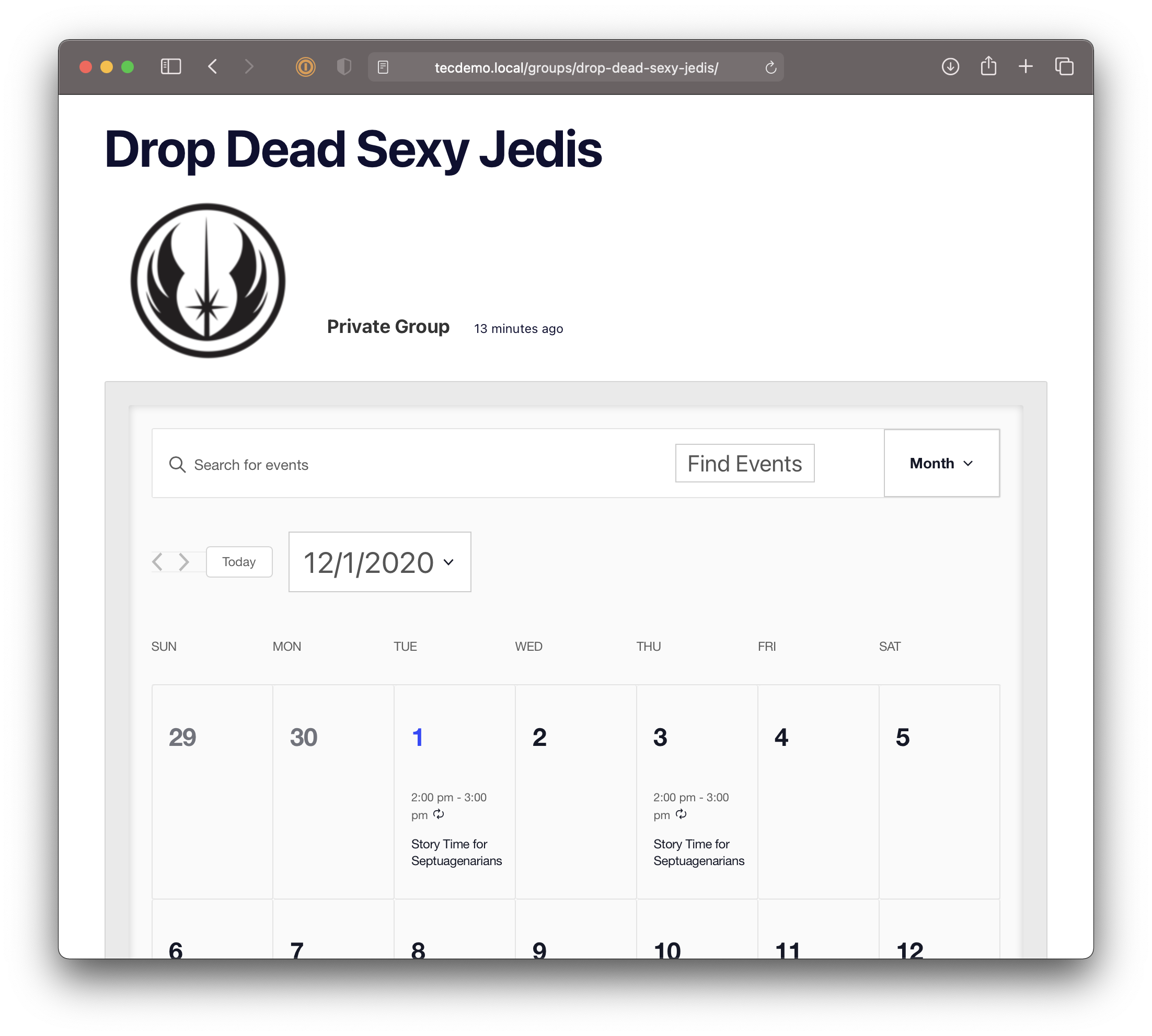
tribe_events shortcode is a nice workaround to give group members their own calendar view in the group description.Allow Members to Submit Events
Another thing you might want to consider is allowing members to submit and publish events to the calendar. That’s exactly what our Community Events add-on for The Events Calendar does: it adds a page on your site that contains a form that allows users to submit events to the calendar.
But that form is on a single page, and that page can’t really be added to a group or restricted so that certain members can access it. That’s where the shortcodes included in Community Events help. For example, we can drop [tribe_community_events view="submission_form"] on the page and that gives members a way to add events to the calendar. That way, certain groups can have access to post events, and you still have the ability to moderate those submissions.
Limit Access to Calendar Content
We can sort of restrict access to the calendar, but it’s a little hacky and limited only to group descriptions. There’s also no way to restrict access to other content based on a user’s role or which groups they are in. There are BuddyPress extensions — like Restrictions for BuddyPress — available that can make that happen, but BuddyPress is unable to do it on its own.
Another option is The BuddyPress Members Only plugin. It will actually restrict certain WordPress pages and posts so that only registered members can access and manage them. This includes events, tickets, venues and organizers, all of which are custom post types.
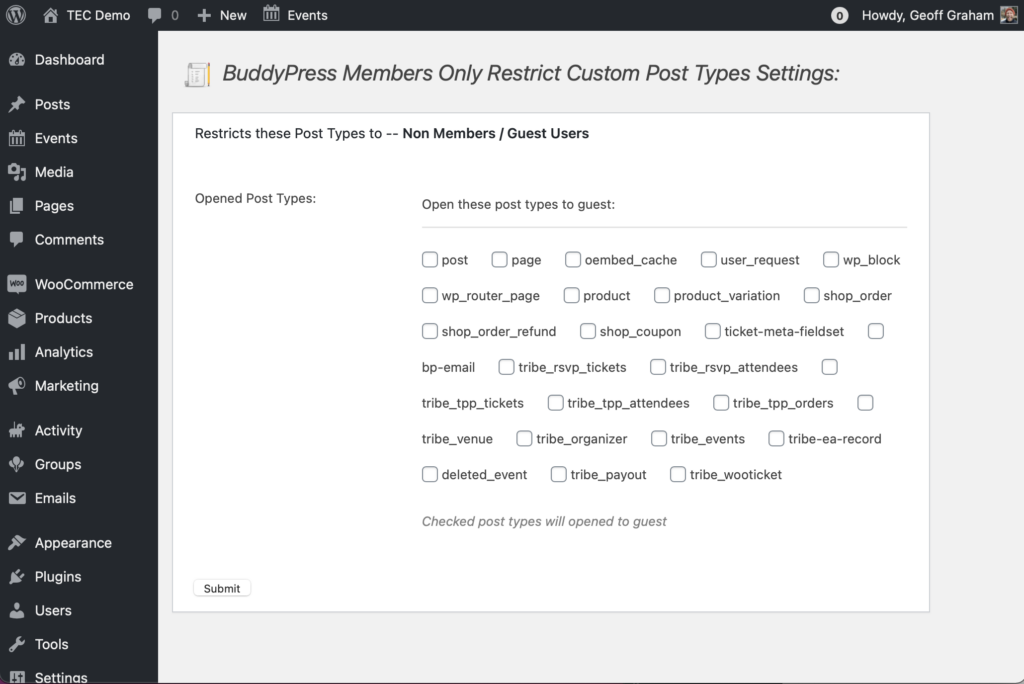
Create Member-only Tickets
Let’s say you want to create tickets that only BuddyPress members can purchase — or even see. There are a couple ways to go do that.
First, as we saw in the last section, we can use a BuddyPress extension to restrict access to tickets. That way, only members will be able to view and purchase them.
Second, we can embed tickets on a group page or a member profile using a shortcode. Event Tickets Plus includes [tribe_tickets] and [tribe_rsvp] that displays tickets on any WordPress page or post — including BuddyPress pages — and can even embed specific tickets from specific events.
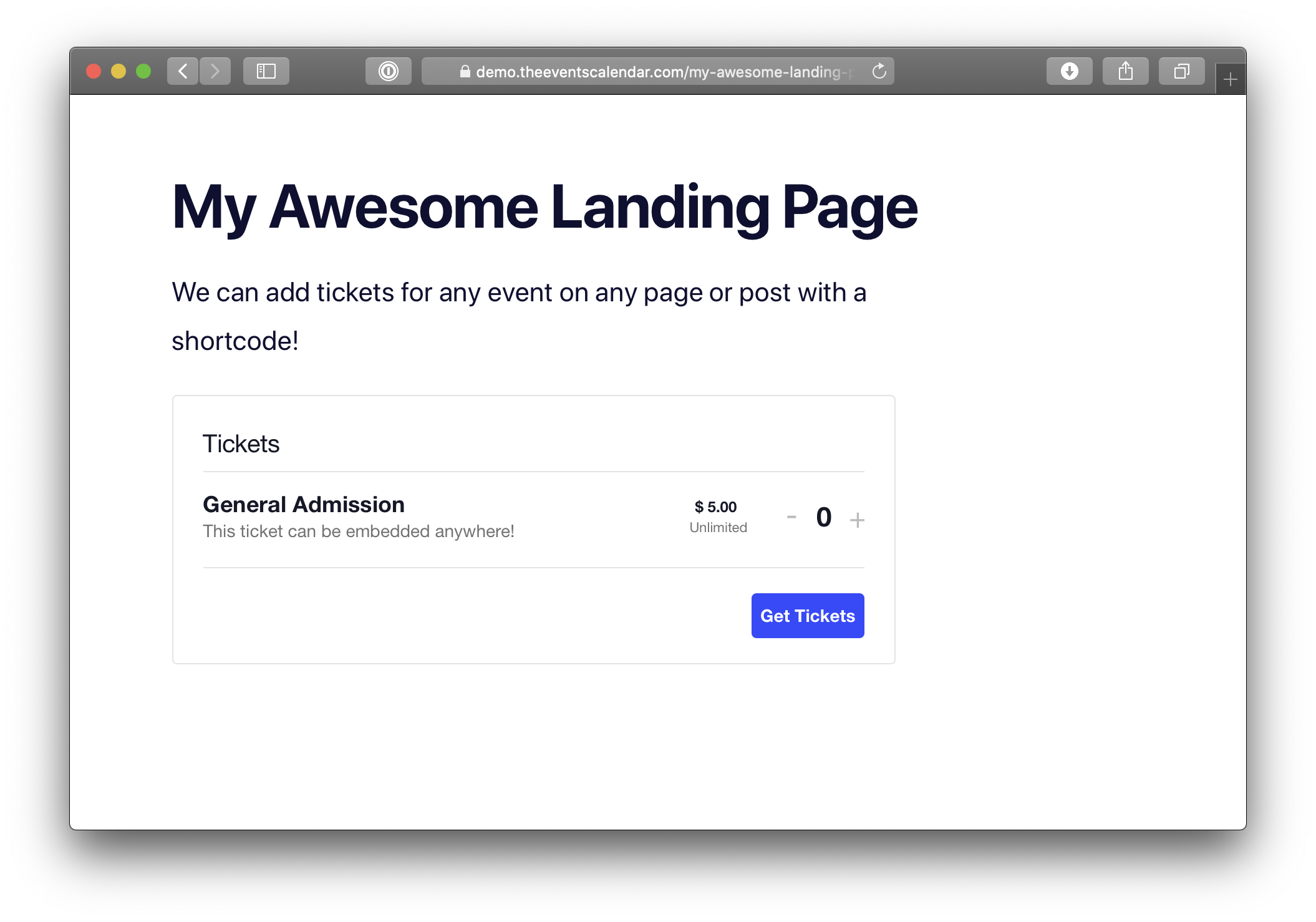
[tribe_tickets] shortcode can embed tickets on any WordPress page or post.Pros and Cons
Pros
- Calendar and event shortcodes work on personal profile and group pages.
- Groups can be private or hidden, allowing for certain events to be displayed to group members with a filtered
[tribe_events]shortcode. - Supports integrations with other plugins that are capable of restricting content to users based on their BuddyPress user role or group membership.
Cons
- Calendar shortcodes are not the same as restricting access.
- Restricting access to content is limited to group pages.
- Restricting access to the calendar, events, and event submissions requires an additional plugin.
- There is no clear way to limit ticket purchases to certain members out of the box.
Using MemberPress
MemberPress is a comprehensive and robust membership plugin for WordPress. It accounts for everything, from the membership plans and commerce, to content restrictions and member management.
MemberPress also happens to work extremely well with The Events Calendar. Let’s briefly look at how MemberPress works, then move into some examples of how it can be used with The Events Calendar and our other plugins.
👋 Heads up! MemberPress is a premium WordPress plugin that is purchased and downloaded through the MemberPress website. It is not freely available in the WordPress Plugin Directory.
Creating Memberships
MemberPress is designed, first and foremost, to create and manage memberships plans that users can sign up for. The plugin makes it incredibly simple to do. Once it’s activated on the site, navigate to MemberPress → Memberships in the WordPress admin and click the “Add New” option.
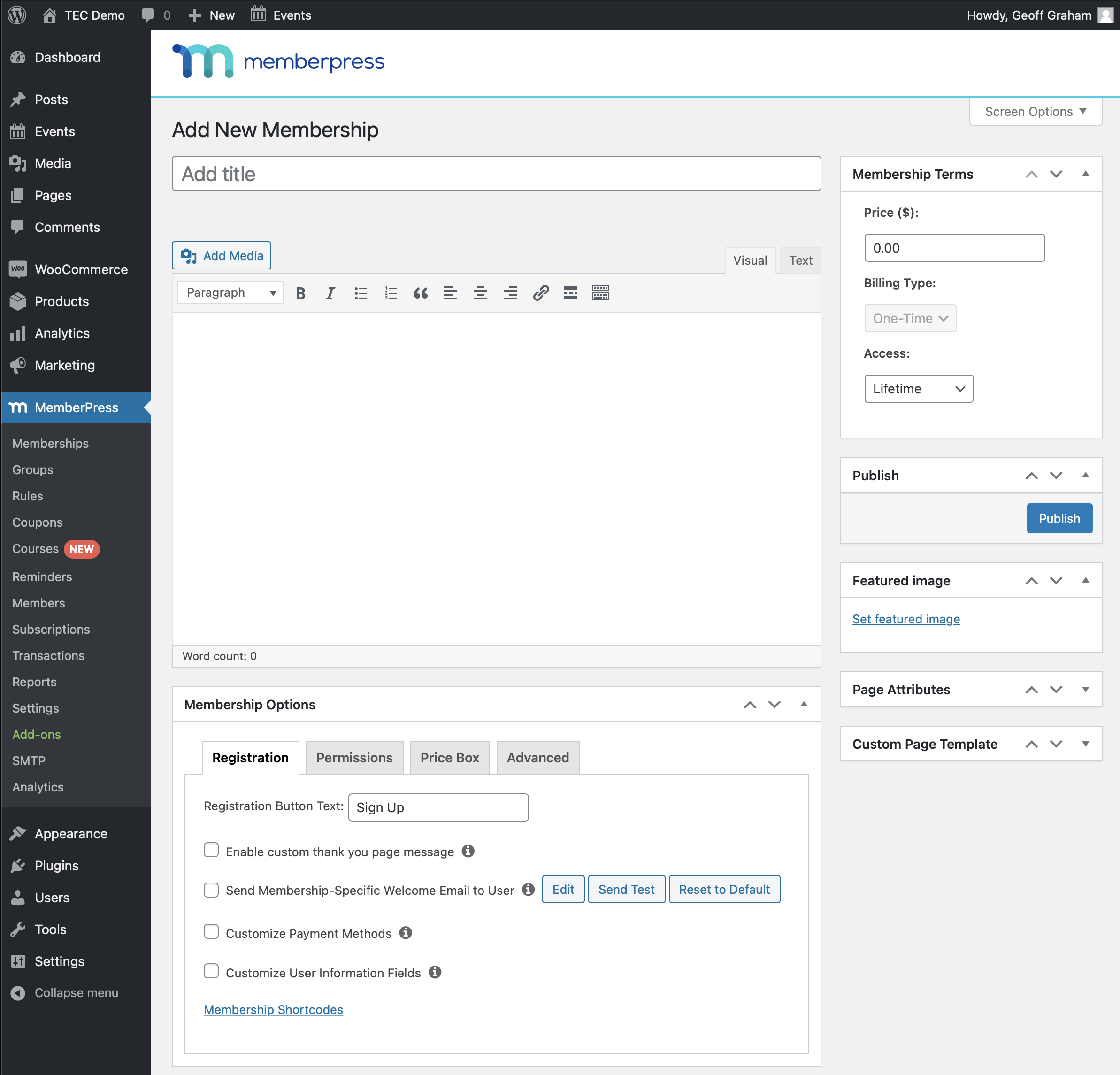
The exact settings for a membership depend on what it needs to do. How long does a membership last? What’s the price? Can someone renew their membership? Who’s allowed to sign up for it? These are the sorts of things you get to decide here.
Members-only Calendar and Events
MemberPress makes an assumption when a new membership is created. It assumes that anyone who registers for it gets a benefit for being a member, and one of those benefits is access to certain content on the site. It does that in the “Rules” section of the plugin.
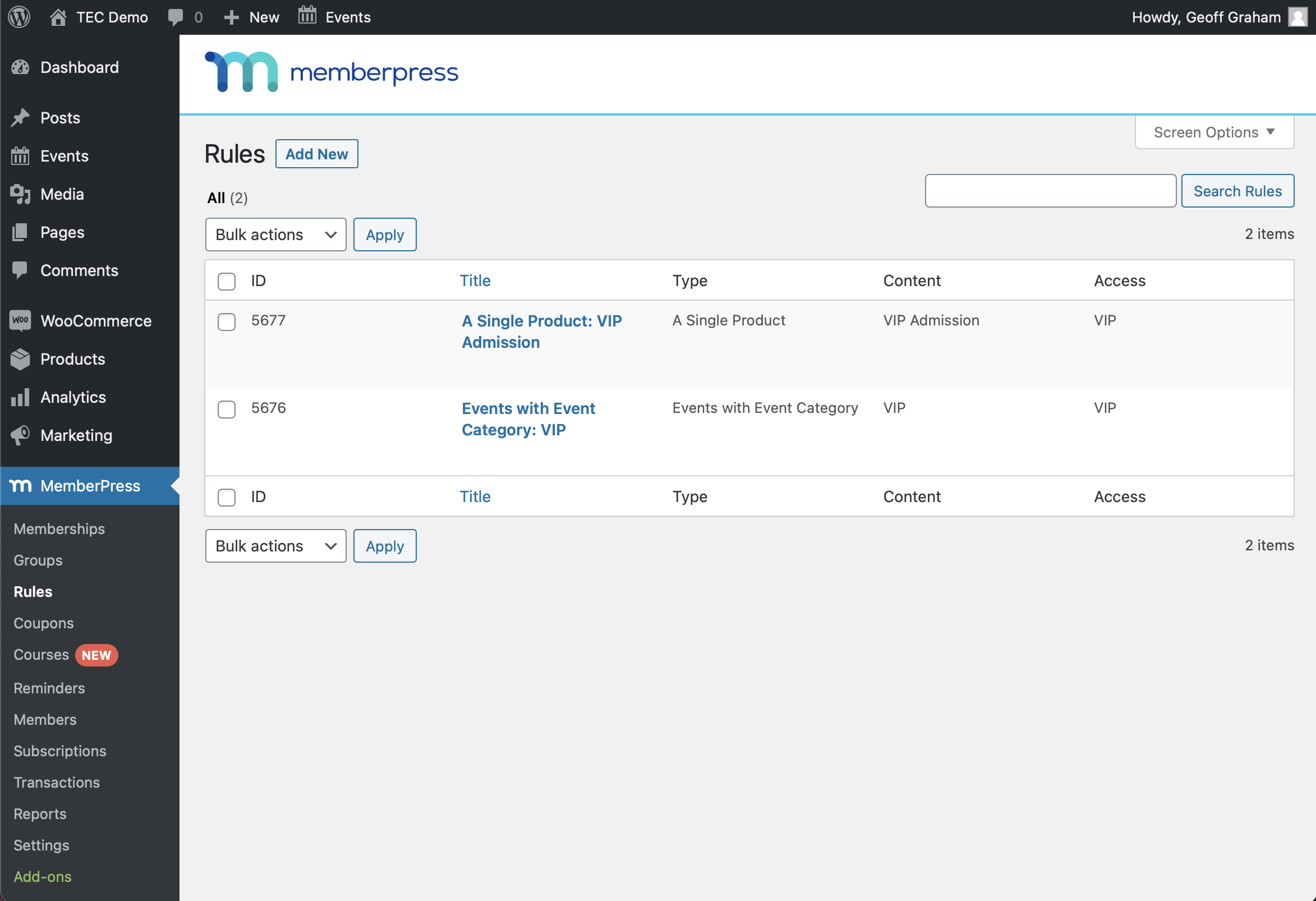
MemberPress provides no shortage of options for what type of content can be restricted to memberships. It can even be used to limit access for everything, from specific pages, posts, categories, tags, products, taxonomies, child pages, URLs, and lots more.
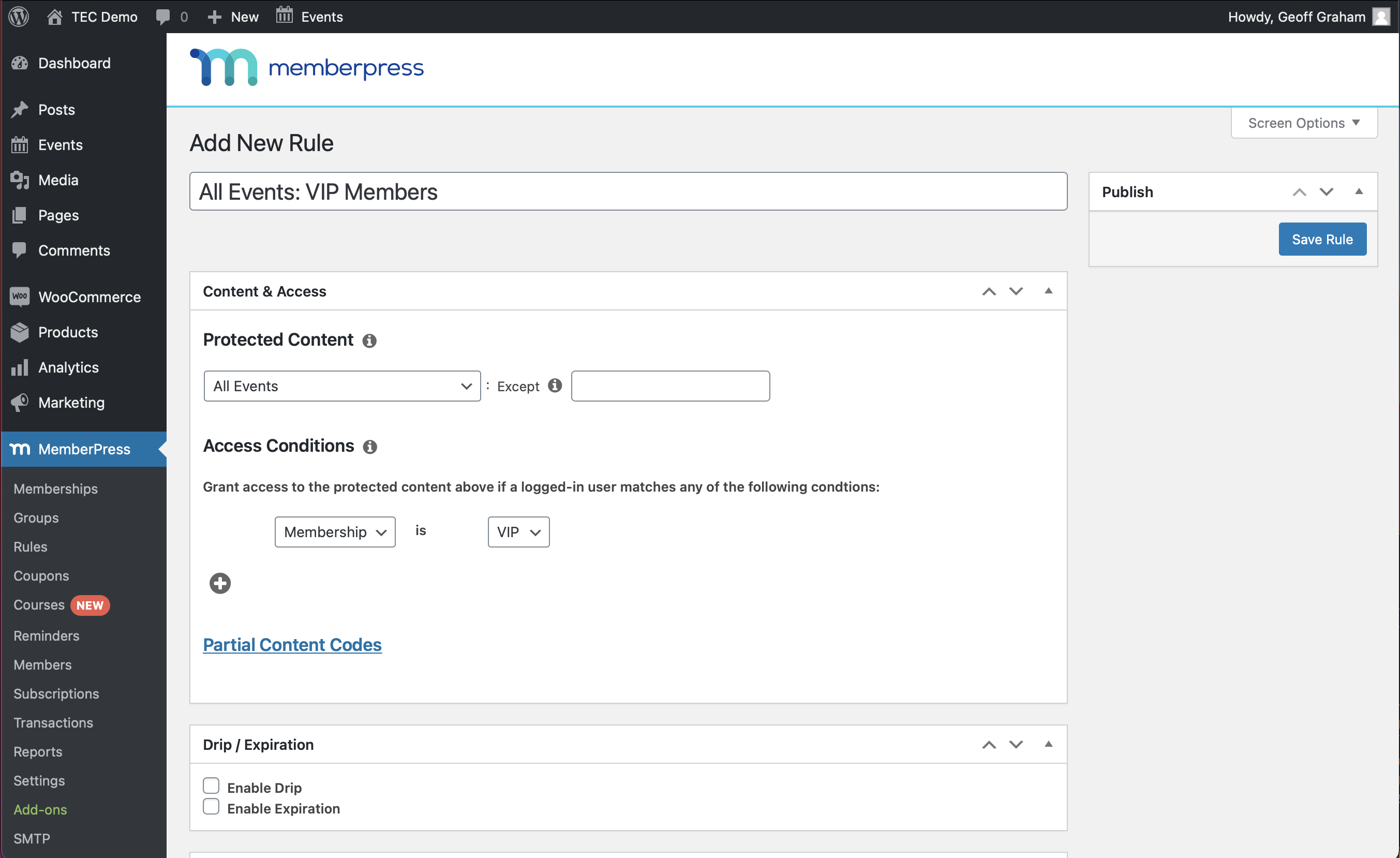
It’s this sort of flexibility that might make MemberPress a must for a community calendar with memberships. Need to restrict access to the entire calendar? Check. How about just to a certain category of events? Yep. Specific events? Of course. Sell tickets? That’s covered too. No WooCommerce? No problem.
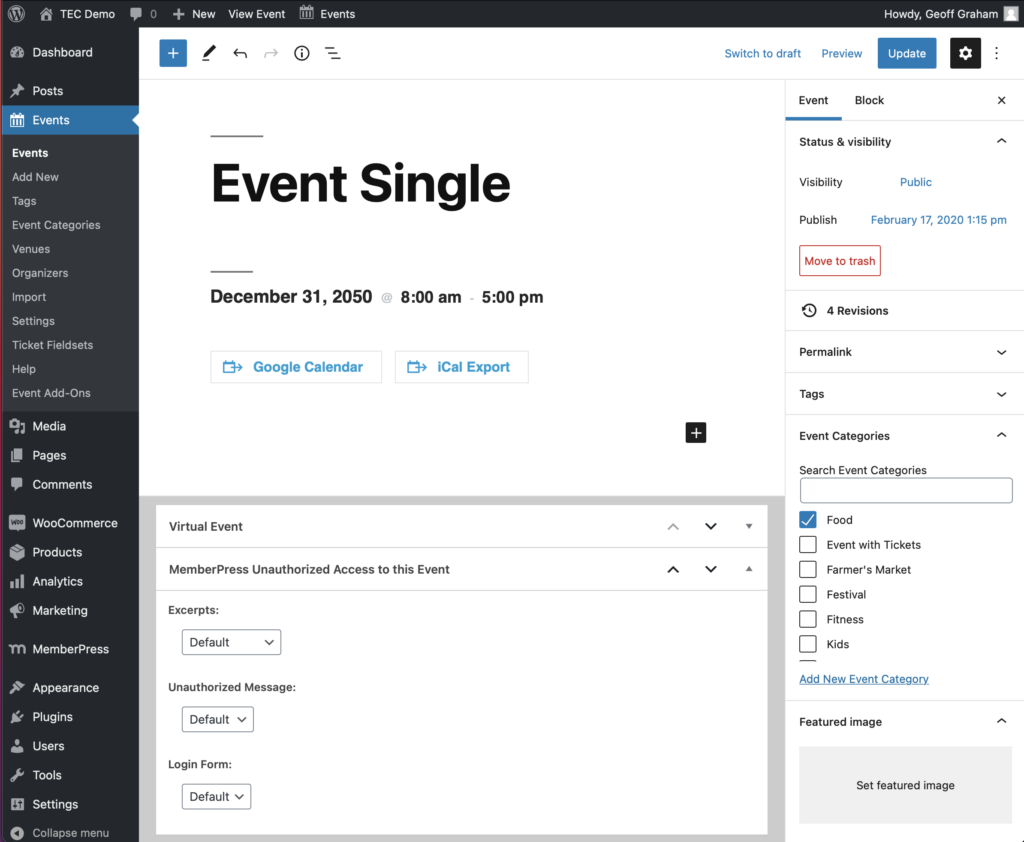
We can also define micro-level settings in the page and post editor, including whether non-members can view the post excerpt, what message non-members see when trying to access restricted content, and whether to display a login form for members to access their account.
Members-only Tickets
Our free Event Tickets plugin provides the ability to create tickets for events, pages, posts, and any custom post type. It supports PayPal right out of the box, but if you’re already using an e-commerce provider, including WooCommerce and Easy Digital Downloads, our Event Tickets Plus add-on can be added to integrate Event Tickets with it.
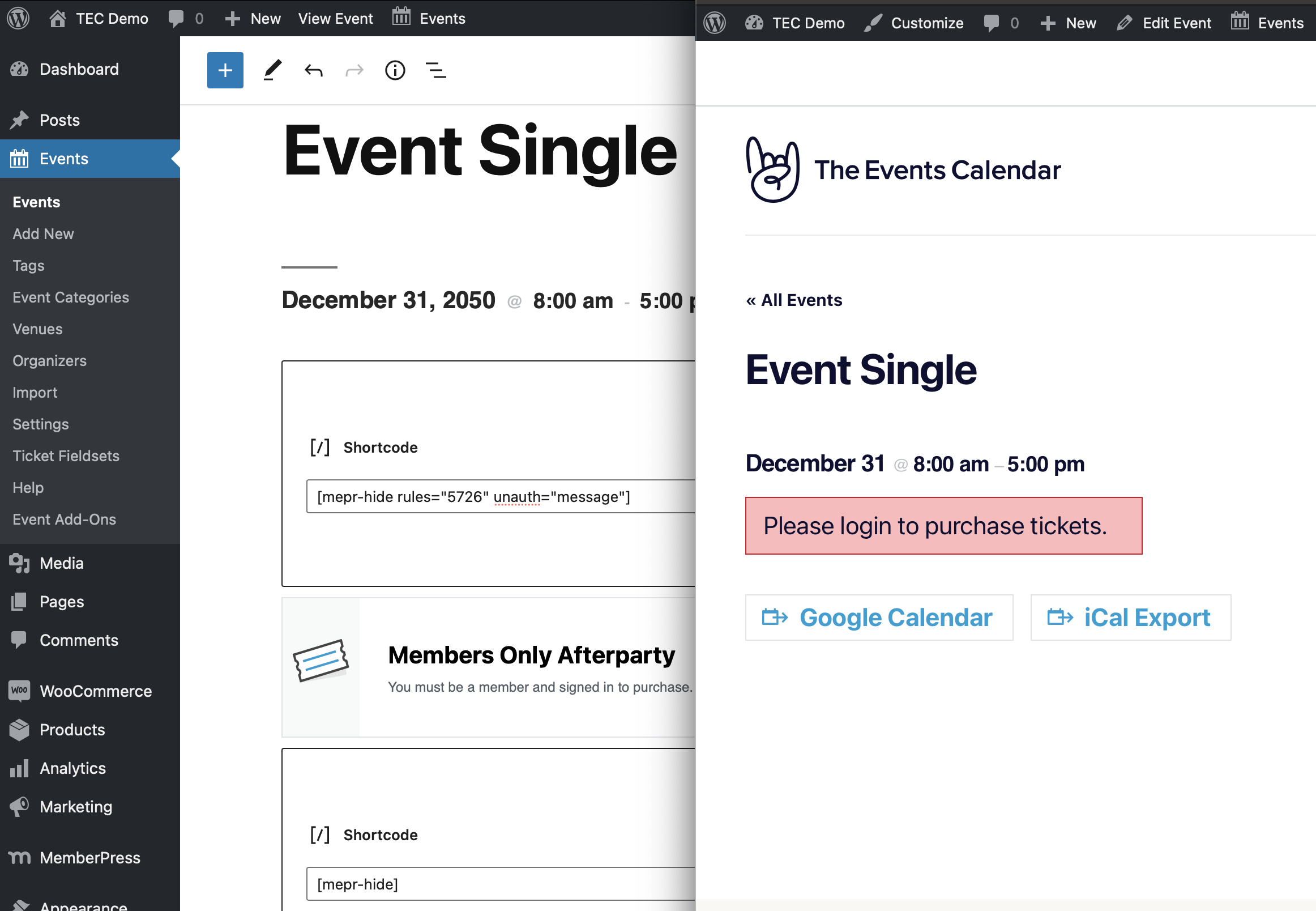
MemberPress is unable to limit access to tickets created with Event Tickets as far as its Rules settings go. However, MemberPress provides shortcodes that enforce rules when they are wrapped around content on a WordPress page or post.
[mepr-show rules="5723" unauth="message"]Only VIP members can see this.[/mepr-show]
That means we can hide tickets from non-members directly on the page using Shortcode blocks. We need three blocks altogether:
- Shortcode block that contains the opening part of the MemberPress shortcode
- Ticket block that we want to show only to members
- Shortcode block that closes the MemberPress shortcode
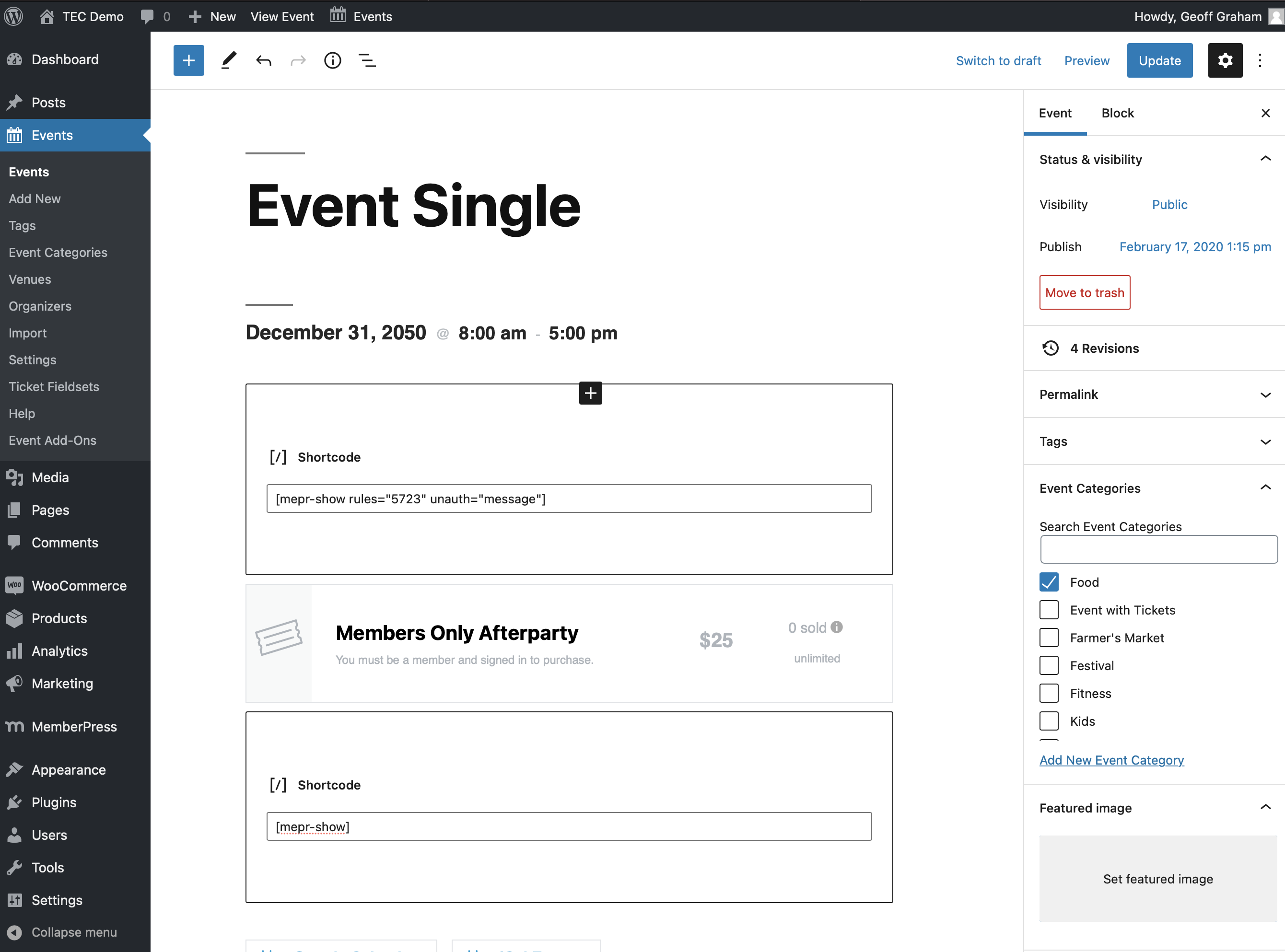
Now that the ticket is placed between the two shortcodes, only members will see it when visiting the event.
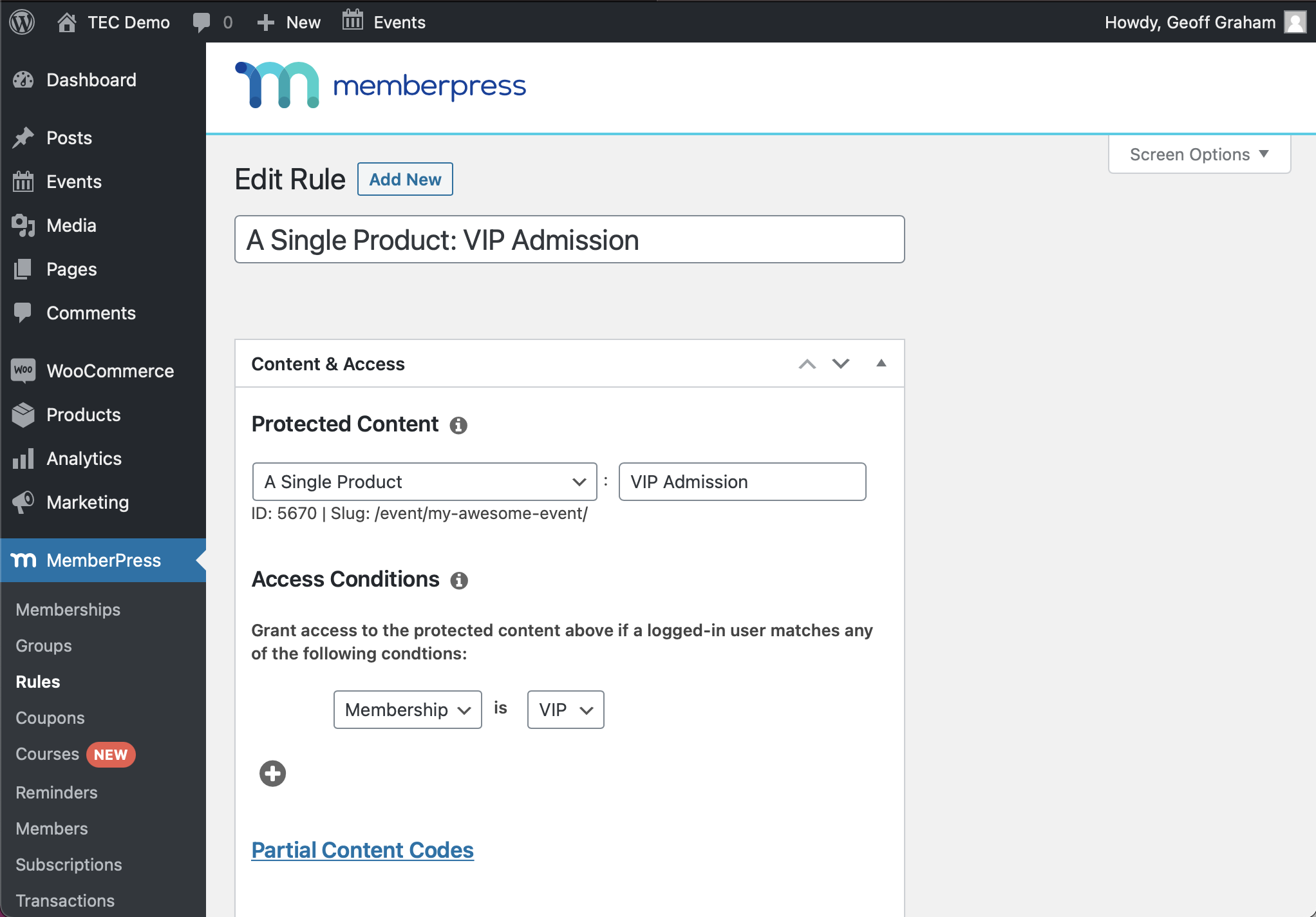
Hiding tickets from non-members becomes a little easier if you’re using Event Tickets Plus with WooCommerce or Easy Digital Downloads. Tickets created with Event Tickets Plus are registered as products and those products are custom post types, and MemberPress can create rules for custom post types.
To make creating membership-only tickets even easier, you can use our handy extension that integrates perfectly with MemberPress.
Members-only Event Submissions
Hey, here’s an idea: let members post events to the calendar! With our Community Events add-on to The Events Calendar, an event submission form can be added to the front end of the website. And, since MemberPress can give members exclusive access to any WordPress page or post, we can give exclusive access to the submission form as well.
Add [tribe_community_events] to a Shortcode block in the WordPress page editor, save the page, and we get the event submission form.
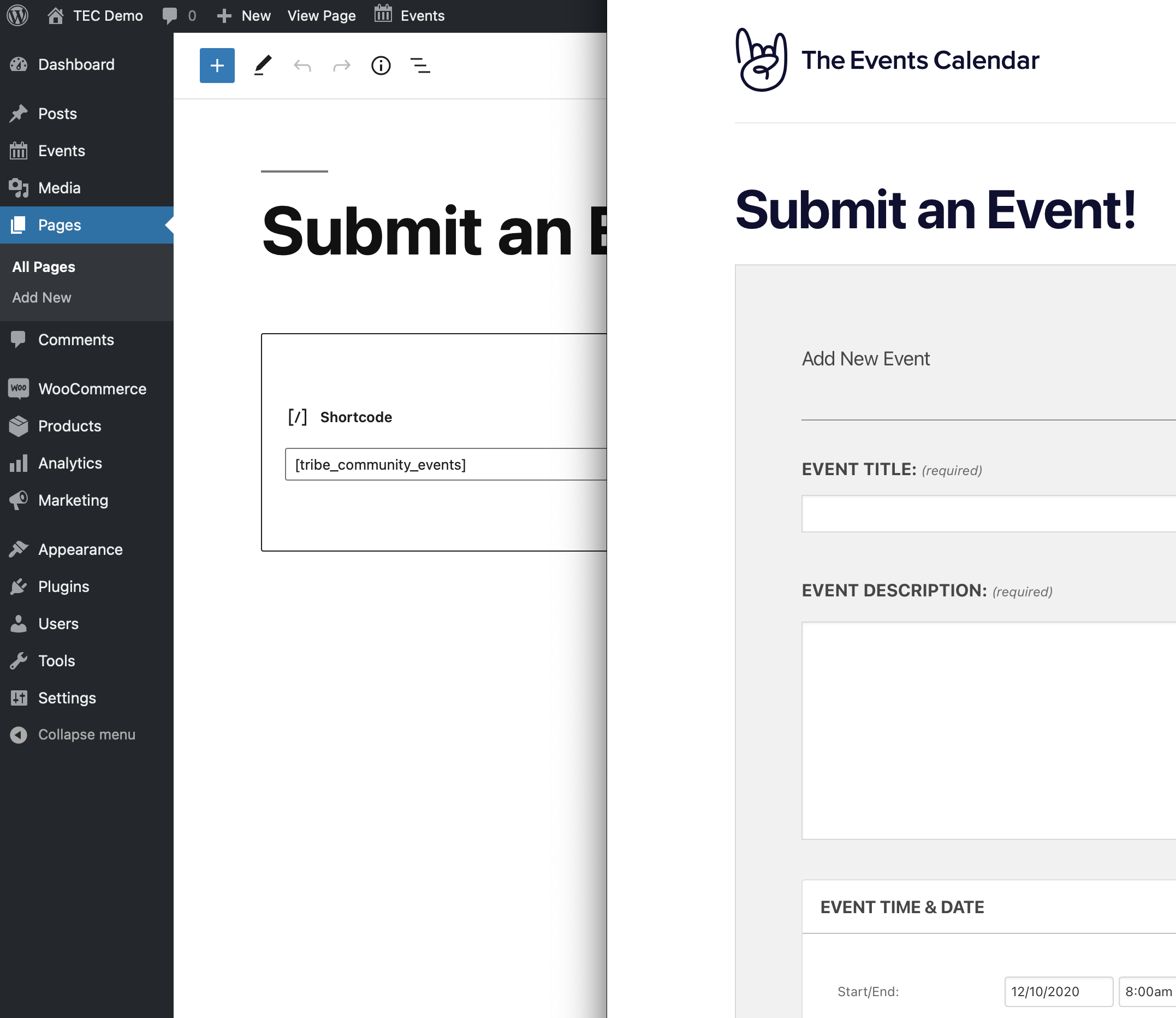
Now, this becomes a page like any other, which means MemberPress can limit access to it based on a user’s membership plan.
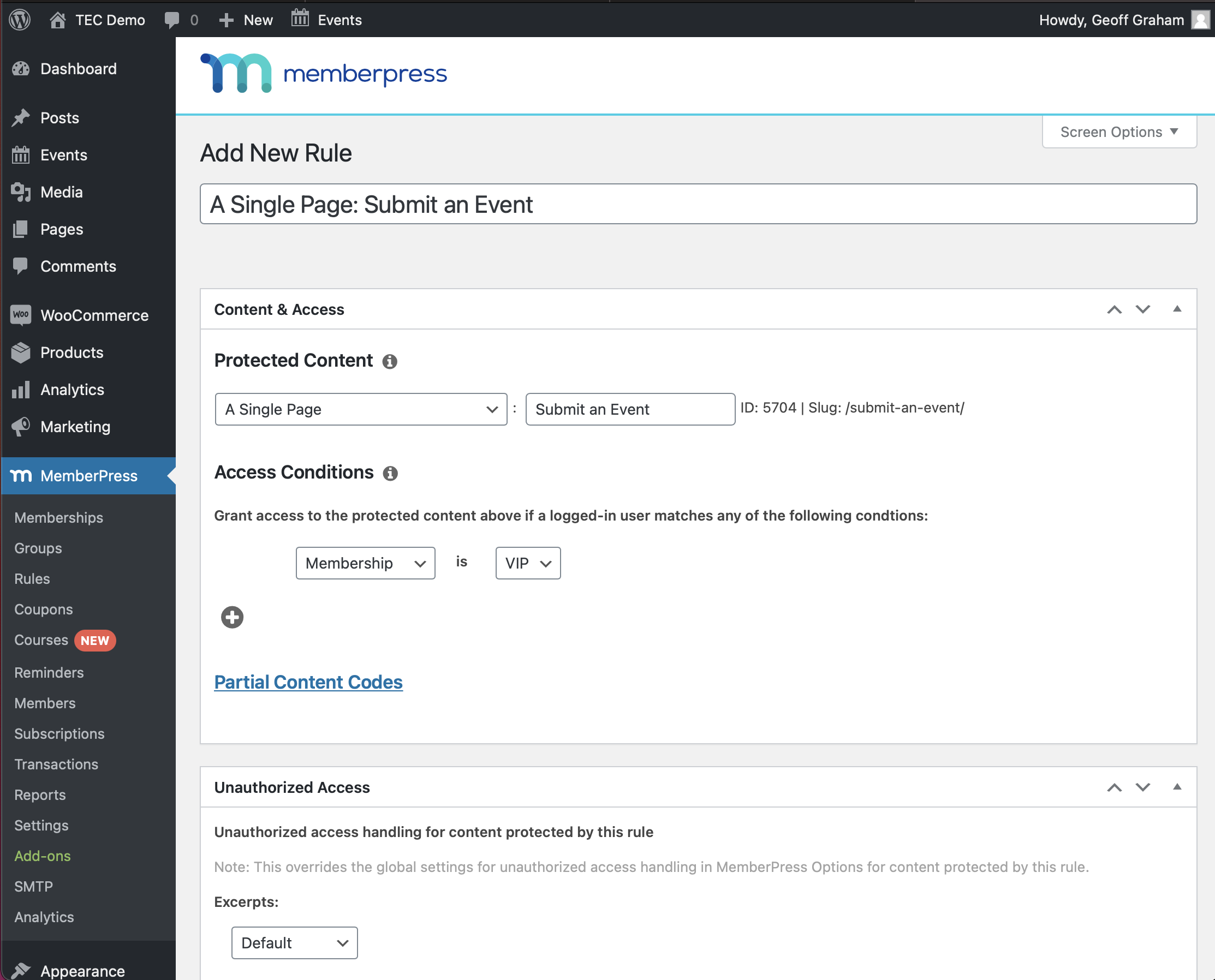
Here’s another idea: create one membership plan that allows members to submit events, and create an additional plan that allows members access to view and edit their events. We can do that the exact same way we just did for the event submission form, only adding a parameter to the shortcode we used before, like this: [tribe_community_events view=”my_events”]. That embeds a list of the events a user has submitted if they are logged in, and we can use a MemberPress rule to limit access to it.
Pros and Cons
MemberPress is a pretty darn neat plugin, but that doesn’t mean it’s perfect for everyone. Here are a few things to consider before using it with your calendar and events.
Pros
- Easily restrict access to any page, post, event, event category, venue, or organizer based on a user’s role.
- Integrates with WooCommerce, but can accept payments on its own.
- Create tickets that can only be purchased by members.
- Create multiple membership tiers to offer different levels of access to events and tickets.
- Set the amount of time members can access content (e.g. one-year membership plan) and allow renewals.
- Display a call to action just for non-members to purchase a membership plan.
- Display content on a page or post that only members can see using shortcodes.
Cons
- There is no free option.
- It might be be overkill for basic needs.
Conclusion
Again, we think MemberPress is pretty fantastic. It’s going to have everything you need to create and manage memberships, as well as slew of things, like courses and subscriptions. And, of course, it works extremely well with The Events Calendar for lots of use cases.
At the same time, MemberPress might be too much for your site, especially if you’re already using WooCommerce or Easy Digital Downloads as an e-commerce provider. There’s no need to manage two e-commerce systems. It’s probably more practical to look at either WooCommerce Memberships or Restrict Content Pro with Event Ticket Plus in that scenario.
Regardless of the situation, MemberPress is most certainly capable of everything you’d need from a membership-based calendar, from providing exclusive access to the calendar, and certain categories of events, specific events, to tickets and event submissions. There are so many
Using Ultimate Member
With the Ultimate Member plugin, it’s possible to restrict event content for specific user roles. You can use a shortcode provided by the Ultimate Member plugin to make this happen. Ultimate Member supplies shortcodes that you can use to restrict event content for specific user roles. This way, only certain roles will have access to your calendar and tickets.
Show Content to Specific Roles
Use the following shortcode to display your event content to specific roles:
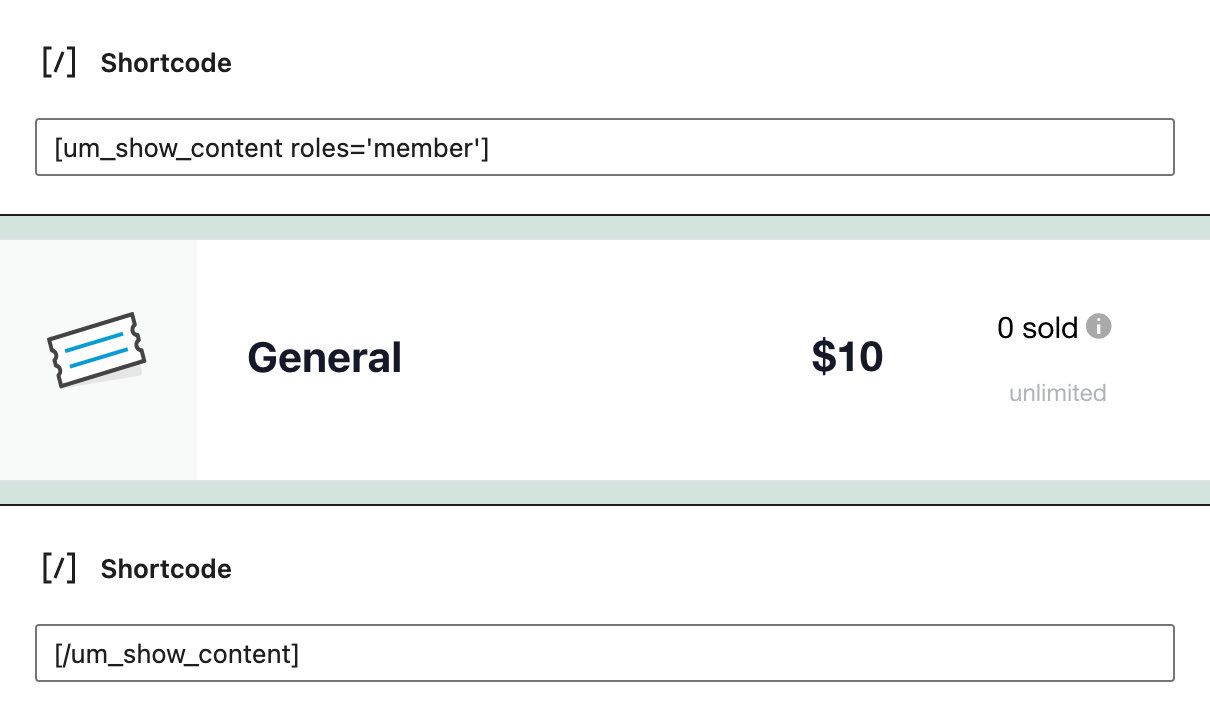
[um_show_content roles='member'] <!-- insert content here --> [/um_show_content]
Note: You can add multiple target roles, use ‘,’ e.g. [um_show_content roles='member,candidates,pets']
Hide Content from Specific Roles
Use the following shortcode to hide your event content from specific roles:
[um_show_content not='member'] <!-- insert content here --> [/um_show_content]
Note: You can add multiple target roles, use ‘,’ e.g. [um_show_content roles='member,candidates,pets']
Limit Access to Calendar Content
To limit access to calendar content, like events, you’ll first want to check that option in the settings under Ultimate Member > Settings.
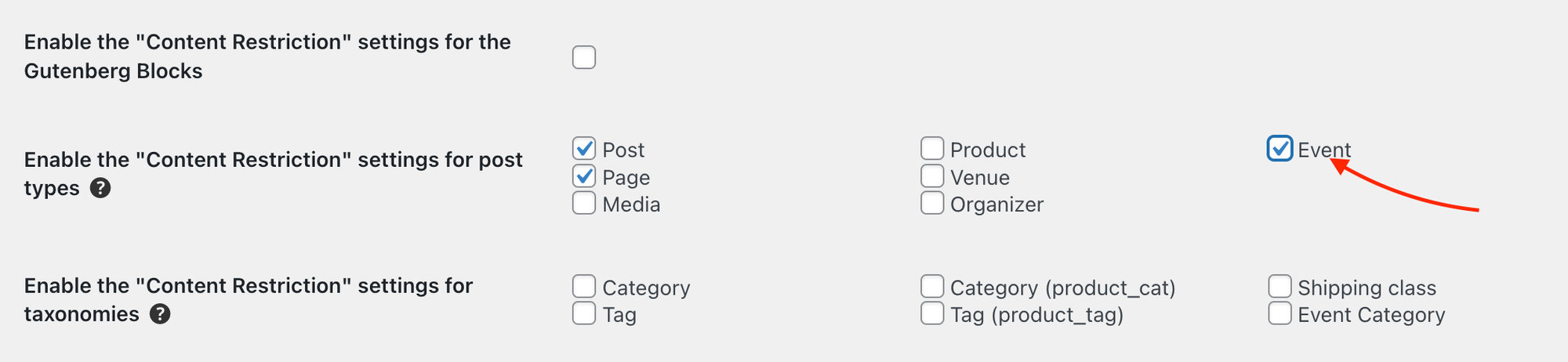
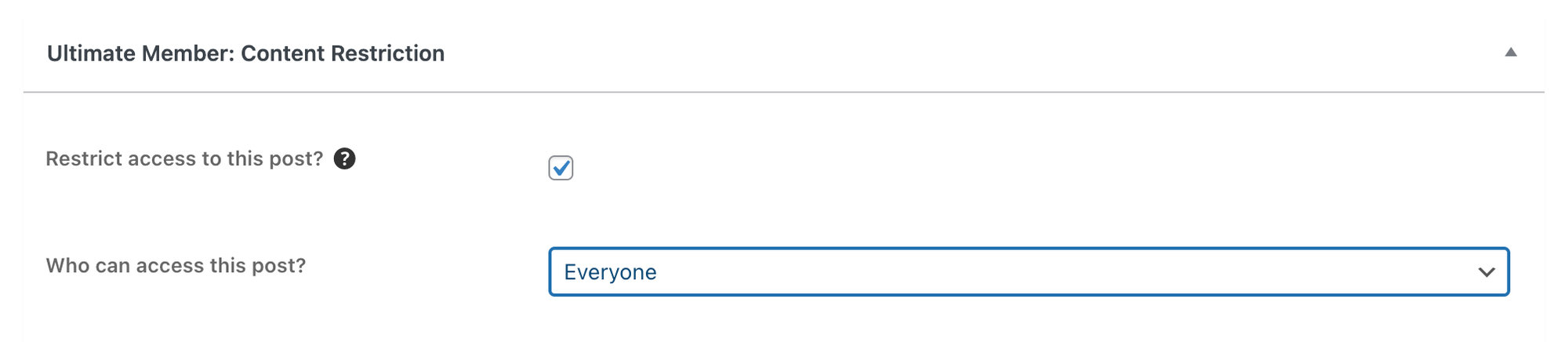
Now head over to one of your single event pages on the backend. You’ll see this nifty new option at the bottom of the page to restrict content to your event page. Check the box and select who you’d like to see the event content.
Members-only Tickets
You can restrict access to tickets as well with Ultimate Member. To do this, you’ll need to wrap a Ticket Block in the Ultimate Member shortcode provided above. So it’ll look something like this: