
In Elementor, when using Loop Grid or the Loop Carousel Widget to show an event that is set to recurring, the widget show all the instances of that event.
To only show the next upcoming event and to remove recurring events from the Loop Grid or the Loop Carousel Widget, the below PHP snippet is helpful:
<?php
function hide_subsequent_recurrences($query) {
    $query->set("hide_subsequent_recurrences", true);
}

add_action("elementor/query/hide_subsequent_recurrences", "hide_subsequent_recurrences");
You can add the above code snippet directly to your theme’s or child theme’s functions.php file. If you’re not comfortable editing your theme’s functions.php file, you can use the Code Snippets plugin to safely add custom code without directly modifying theme files.
Here’s how:
- Install and activate the Code Snippets plugin from the WordPress repository or directly download the plugin here:https://wordpress.org/plugins/code-snippets/
- Go to Snippets > Add New in your WordPress dashboard.
- Copy and paste the code snippet above into the code editor.
- Name your snippet (e.g., “Remove Recurring Events Loop Grid”) and click Save and Activate.
- Add the below to the Query ID of the widget (see screenshot).
hide_subsequent_recurrences
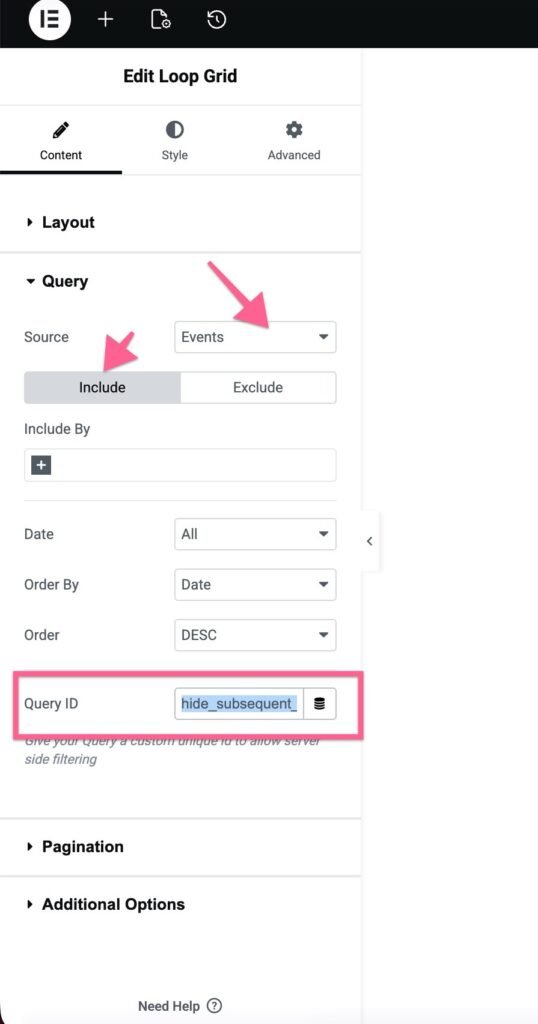
That’s it! Now, only the next upcoming recurring event will display in the Elementor’s Loop Grid or Loop Carousel Widget.