
By default, The Events Calendar and Event Tickets display Free when an event’s cost is zero, and show a price range (e.g. Free – $10) when an event has both free and paid tickets. This article covers the available snippets for customizing that behavior: renaming the “Free” label to something else, replacing it with a numeric zero, removing it from mixed cost ranges, and controlling which end of a price range is shown.
All PHP snippets can be added via your child theme’s functions.php file or using the Code Snippets plugin. See Best Practices for Implementing Custom Code Snippets for guidance.
Renaming the “Free” Label
When an event’s cost is set to zero, the front end displays it as Free. You can rename this to any text you prefer — for example “Complimentary”, “No Charge”, or a numeric 0.
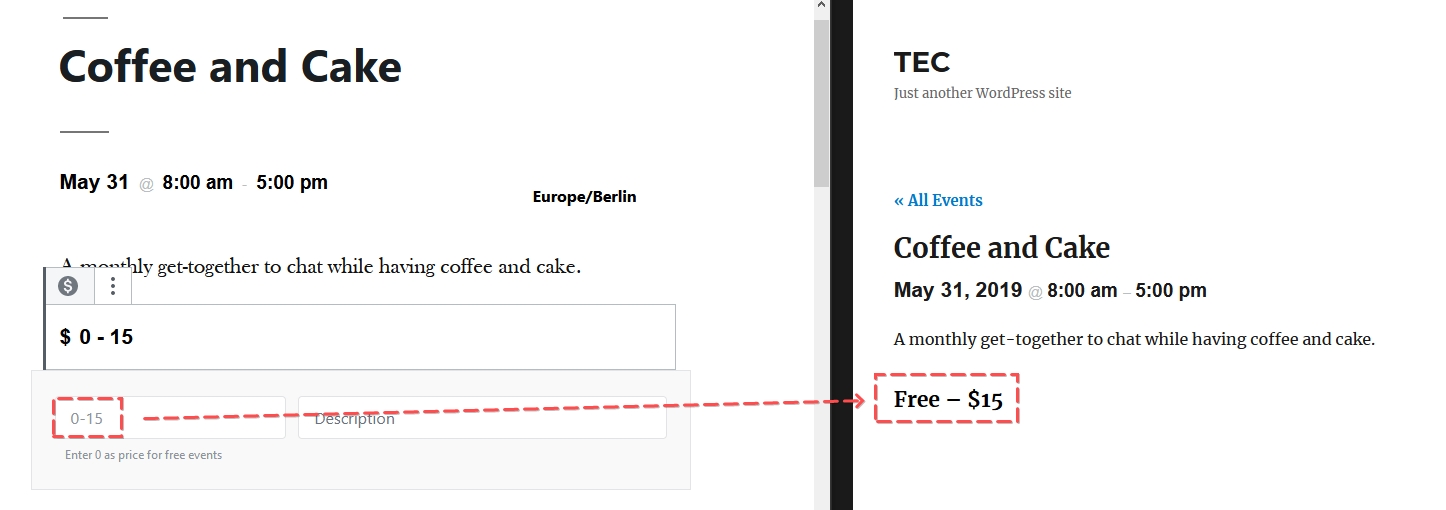
There are two ways to do this.
Option 1: PHP Snippet
Add the following to your functions.php file. Change '0' to whatever you want the label to say — it is case-sensitive.
function tribe_tec_rename_free_label( $translation, $text, $domain ) {
    $custom_text = [ 'Free' => '0' ]; // Replace '0' with your preferred label

    if ( 0 === strpos( $domain, 'the-events-calendar' ) && array_key_exists( $translation, $custom_text ) ) {
        $translation = $custom_text[ $translation ];
    }

    return $translation;
}
add_filter( 'gettext', 'tribe_tec_rename_free_label', 20, 3 );
👋 Note: This uses the gettext filter and applies to The Events Calendar plugin’s text domain. If you are using Event Tickets or Event Tickets Plus and the label is still showing after applying this snippet, the tribe_get_cost approach in the next section may be needed instead.
Option 2: The Say What? Plugin
The Say What? plugin provides a user interface for WordPress string replacements without writing code, and does the same thing as the snippet above.
After installing and activating the plugin, go to Tools → Text Changes and add a new entry:
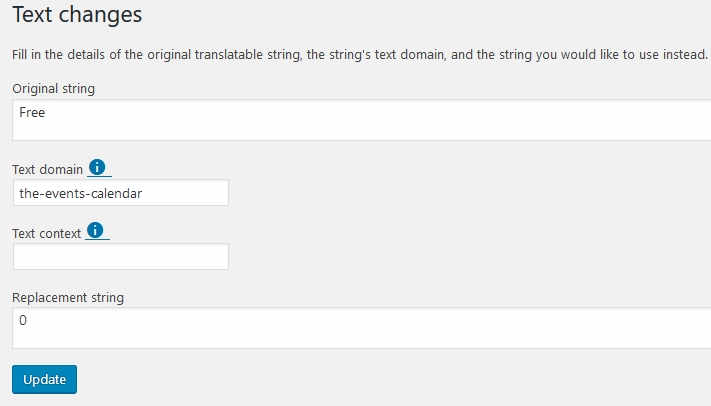
Click Save and the label will update on the front end.
Removing “Free” from a Mixed Cost Range
If your event has both free tickets (or RSVPs) and paid tickets, the cost display defaults to a range — for example, Free – $10. If you would rather not show “Free” in this range at all, the following snippet removes it along with the dash separator, leaving only the paid price.
This uses the tribe_get_cost filter, which works with Event Tickets and Event Tickets Plus.
function tribe_not_show_free( $cost, $post_id, $with_currency_symbol ) {
    $regex = '/Free/';
    $match = preg_match( $regex, $cost );

    if ( $cost == 0 || $cost == 'Free' || $match ) {
        $cost = str_replace( 'Free', ' ', $cost );
        $cost = str_replace( ' – ', ' ', $cost );
    }

    return $cost;
}
add_filter( 'tribe_get_cost', 'tribe_not_show_free', 10, 3 );
Showing Only One End of a Price Range
When multiple tickets exist for an event, the cost displays as a range (e.g. $5 – $50). This can be confusing in cases like early bird pricing, where the lower price is no longer available. The following snippet lets you replace the range with either the lowest price (with optional prefixed text) or the highest price only.
Add the snippet to your functions.php file or via Code Snippets. Before saving, delete the block you do not want — either the lowest-price block or the highest-price block.
function tec_remove_price_range( $cost, $post_id, $with_currency_symbol ) {
    $pieces = explode( ' – ', $cost );

    // If the ticket is free, just display it as-is.
    if ( $cost == 'Free' ) {
        return $cost;
    }

    // DELETE the block below if you want to show only the highest price instead.
    // To show the lowest price with prefix text:
    if ( ! empty( $pieces[0] ) ) {
        return 'Starting from ' . $pieces[0];
    }

    // DELETE the block above if you want to show only the lowest price.
    // To show the highest price with prefix text:
    if ( ! empty( $pieces[1] ) ) {
        return 'Up to ' . $pieces[1];
    }

    // If not a range, return the default value.
    return $cost;
}
add_filter( 'tribe_get_cost', 'tec_remove_price_range', 10, 3 );
Showing the lowest price with “Starting from” prefix:
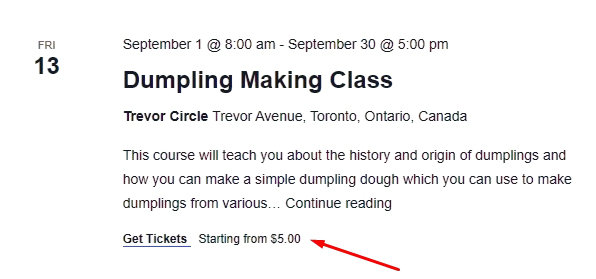
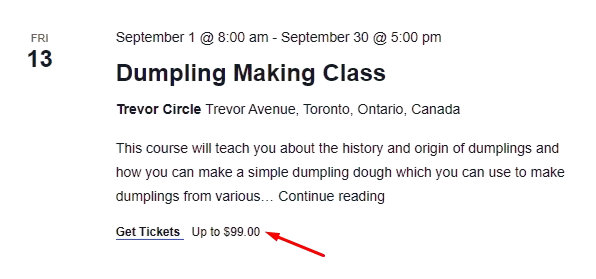
Showing only the highest price with “Up to” prefix (remove lines 9–12 from the snippet above):
Disclaimer
As with all of our snippets, please note that we share these in the hope they will be useful but without any guarantees or commitments. If you wish to use them, it is your responsibility to test them and adapt them to your needs (or find someone who can do so on your behalf). We are unable to provide further support in relation to these snippets.