Customers who use WooCommerce to sell a variety of products often want their tickets to be treated as products as well, so they can sell everything together. We have a separate article here that explains how to sell tickets directly from a product page. In this article, we’ll focus on how to embed products, including tickets, using WooCommerce shortcodes.
By using the shortcode below, you can display a product along with its price and an Add to Cart button in a single place.
[add_to_cart id=”00000″ show_price=”true”]
Finding Product ID
To locate a product ID, go to WP Admin → Products → All Products, then hover over the product you want to use. The product ID will appear beneath the product name in the row details.

Once you have the product ID, you can insert the shortcode into your page. Keep in mind that this shortcode does not display the product name, so you’ll need to add the name manually in a text block.
Once you publish the page, the shortcode might appear unstyled. WooCommerce shortcodes offer limited built-in styling options. Most visual customization is done via CSS, not shortcode attributes.

Styling the Shortcode with CSS
Now, with a bit of CSS, you can make the block look great and fit perfectly with your site’s design.
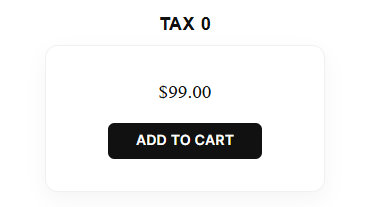
To achieve this look, place the code below in Dashboard → Appearance → Customize → Additional CSS.
/* Product Title Styling */
.entry-content p:has(+ .add_to_cart_inline),
.entry-content h3:has(+ .add_to_cart_inline),
.entry-content strong:has(+ .add_to_cart_inline) {
    display: block !important;
    text-align: center !important;
    font-family: "Oswald", sans-serif !important;
    font-size: 22px !important;
    font-weight: 600 !important;
    letter-spacing: 1px !important;
    margin-bottom: -10px !important;
    color: #111 !important;
}

/* Product Card Container */
.add_to_cart_inline {
    display: flex !important;
    flex-direction: column !important;
    gap: 20px !important;
    align-items: center !important;
    background: #fff !important;
    border: 1px solid #f0f0f0 !important;
    border-radius: 16px !important;
    padding: 40px 30px !important;
    margin: 20px auto !important;
    width: clamp(260px, 90%, 350px) !important;
    box-shadow: 0 10px 25px rgba(0,0,0,0.04) !important;
    transition: all 0.3s ease !important;
}

/* Price and Button Styling */
.add_to_cart_inline .woocommerce-Price-amount {
    font-size: 24px !important;
    color: #111 !important;
}

.add_to_cart_inline a.button {
    background: #111 !important;
    color: #fff !important;
    padding: 12px 35px !important;
    border-radius: 8px !important;
    font-weight: 600 !important;
    border: none !important;
    transition: 0.2s !important;
}
For some extra visual sparkle, check out the CSS snippets below.
Glass effect responsive on hover
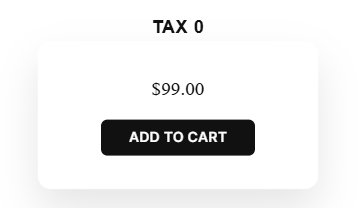
/* Glassmorphism Effect */
.add_to_cart_inline {
    background: rgba(255, 255, 255, 0.45) !important;
    backdrop-filter: blur(15px) saturate(180%) !important;
    -webkit-backdrop-filter: blur(15px) saturate(180%) !important;

    border: 1px solid rgba(255, 255, 255, 0.7) !important;
    outline: 1px solid rgba(255, 255, 255, 0.2) !important;

    box-shadow: 0 15px 35px rgba(0, 0, 0, 0.05),
                inset 0 0 0 1px rgba(255, 255, 255, 0.3) !important;
}

/* Glass Interactive Hover */
.add_to_cart_inline:hover {
    background: rgba(255, 255, 255, 0.6) !important;
    transform: translateY(-8px);
    box-shadow: 0 25px 50px rgba(0, 0, 0, 0.1) !important;
    border-color: rgba(255, 255, 255, 1) !important;
}
Horizontal Product

/* Horizontal Override */
.add_to_cart_inline {
    flex-direction: row !important;
    justify-content: space-between !important;
    padding: 15px 25px !important;
    width: 100% !important;
    max-width: 500px !important;
}


/* Compact Button */
.add_to_cart_inline a.button {
    padding: 10px 20px !important;
    margin: 0 !important;
}
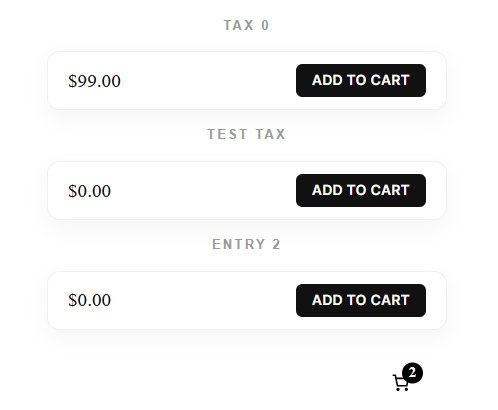
Capsule Product
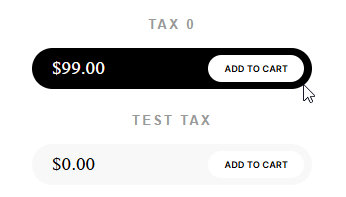
/* Title */
.entry-content p:has(+ .add_to_cart_inline) {
    font: 600 12px "Oswald", sans-serif;
    text-transform: uppercase;
    color: #bbb;
    margin: 30px auto 10px auto !important;
    max-width: 500px;
}

/* Fluid Pill - Shadow & Border Removed */
.add_to_cart_inline {
    display: flex !important;
    flex-direction: row !important;
    justify-content: space-between !important;
    align-items: center;
    background: #f8f8f8 !important;
    border-radius: 100px !important;
    padding: 8px 10px 8px 25px !important;
    margin-bottom: 12px !important;
    max-width: 500px !important;
    /* Kill the shadow and borders here */
    border: none !important;
    box-shadow: none !important;
    transition: 0.3s;
}

/* Hover + Price Visibility */
.add_to_cart_inline:hover {
    background: #000 !important;
    box-shadow: none !important; /* Ensure shadow doesn't appear on hover */
}

.add_to_cart_inline .woocommerce-Price-amount {
    font-size: 18px;
    font-weight: 500;
    color: #000 !important;
}

.add_to_cart_inline:hover .woocommerce-Price-amount,
.add_to_cart_inline:hover .woocommerce-Price-amount span {
    color: #fff !important;
}

/* Inset Button - Shadow Removed */
.add_to_cart_inline a.button {
    background: #fff !important;
    color: #000 !important;
    border-radius: 100px !important;
    padding: 10px 20px !important;
    font-size: 11px;
    box-shadow: none !important;
    border: none !important;
}
Simple Design
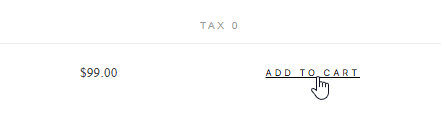
/* 1. Delicate Title */
.entry-content p:has(+ .add_to_cart_inline) {
    font: 300 13px "Oswald", sans-serif !important; /* Thin weight */
    letter-spacing: 3px !important;
    text-transform: uppercase;
    color: #999 !important; /* Muted grey */
    margin: 50px auto 0 auto !important;
    max-width: 600px;
    padding-bottom: 15px;
    border-bottom: 1px solid #eee !important; /* Hairline divider */
}

/* 2. The Product Row */
.add_to_cart_inline {
    display: flex !important;
    flex-direction: row !important;
    justify-content: space-between !important;
    align-items: center;
    background: transparent !important;
    border: none !important;
    box-shadow: none !important;
    padding: 25px 0 !important;
    margin: 0 auto !important;
    max-width: 600px !important;
}

/* 3. The Price: Sophisticated & Minimal */
.add_to_cart_inline .woocommerce-Price-amount {
    font-size: 16px !important;
    font-weight: 300 !important;
    color: #444 !important;
    letter-spacing: 0.5px;
}

/* 4. The Delicate "Link" Button */
.add_to_cart_inline a.button {
    background: transparent !important;
    color: #999 !important;
    border: none !important;
    border-radius: 0 !important;
    padding: 0 !important; /* No box at all */
    font-size: 11px !important;
    font-weight: 400 !important;
    text-transform: uppercase;
    letter-spacing: 2px;
    transition: all 0.4s ease;
    text-decoration: none;
}

/* Hover: Subtle reveal */
.add_to_cart_inline a.button:hover {
    color: #000 !important;
    letter-spacing: 4px !important; /* Text expands softly */
}
Feel free to tweak the CSS using these classes to create the perfect snippets for your project.
Extra Functionality
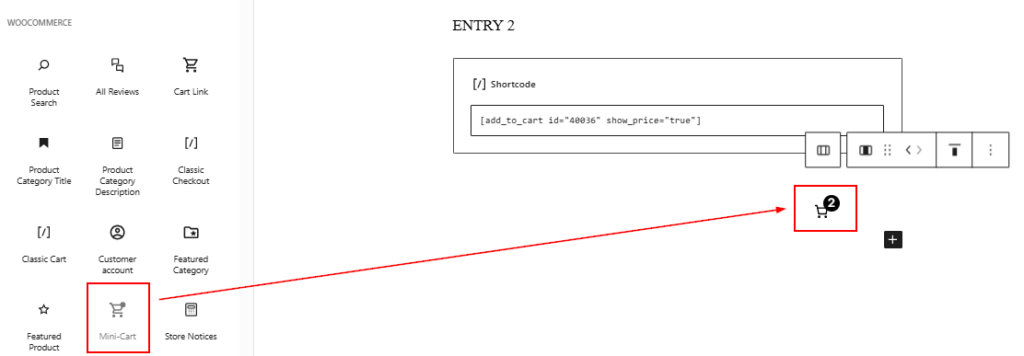
When listing multiple products or tickets on a single page, adding a cart can create a more fluid checkout experience. You can use any widget to achieve this; the example below demonstrates how to implement a Mini Cart widget.