
The minimum required PHP version is 7.4. If you’re using an earlier version, please update to 7.4 or above. We’ve got you covered and can take you through the steps on how to make this change, and will explain why this change will be beneficial for all of us.
What is PHP?
In its simplest terms, PHP is the language that WordPress is written in. PHP acts as the foundation on which your WordPress site is run on, and the more recent the version of PHP your site uses, the faster and more secure your site will be.
It’s important to note that PHP versions below 7.4 generally don’t receive security fixes, meaning they’re no longer maintained. PHP 5.6 reached End of Life on December 31st 2018, which marks the official end of support and updates for this version. This could—and often does—leave a site running older versions of PHP vulnerable to hackers.
According to WordPress.org, site owners should care about PHP because of the three things they care about the most:
“First, they want their website to work as expected when people visit it—we often call this site availability. Second, another major concern is how fast the site loads and functions, or site performance. Finally, you likely want your site to make use of all the latest and greatest tools, or features.”
Why do we have a minimum requirement?
Using a more recent version of PHP will not only help us build a better product—it’ll also help to cut down on support time for outdated PHP versions. This change will furthermore create a better testing environment for us so that we can get bug fixes out more efficiently. These things, along with improved security and performance, will benefit not only our team but our users as well.
With an updated version of PHP, your site can handle more visitors and can run faster than with an outdated version. All of these things will benefit not only our team but our users as well.
How do I know what version I’m using?
You can do this by going to Events → Troubleshooting from the WordPress dashboard and checking out your system information, like in the following screenshot:
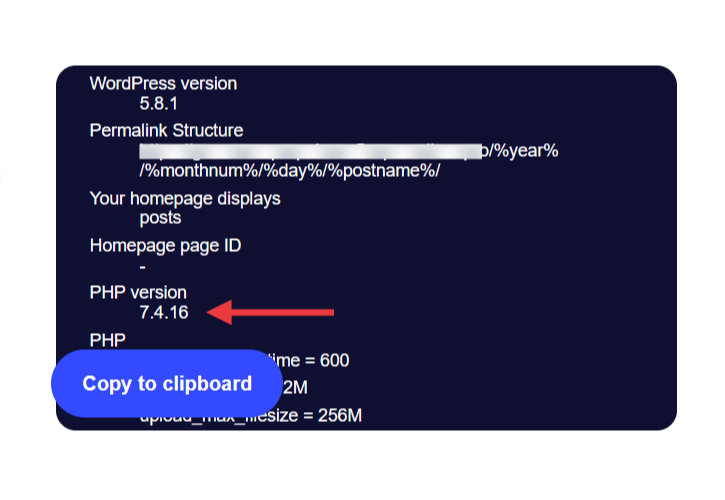
If you’re using PHP version 7.3 or below, you’ll want to update as soon as possible.
Using PHP 8.2
The Events Calendar is compatible with PHP 8.2, though you may encounter occasional issues, such as deprecation notices. While these are typically minor, we encourage you to report any PHP version-related issues by submitting a support ticket. This will help us further refine and improve our codebase.
It is worth to mention that deprecation notices and warning messages don’t interrupt the PHP script execution in your website.
While warning messages refer to inclusion of non-existing files, wrong function parameters or incorrect SLQ queries and database connection.
Deprecation Notices with PHP 8.2
Deprecation notices in PHP are specific types of warnings that are integral to the software development and maintenance process.
Deprecation notices are generated by PHP when it identifies code that uses functions, methods, or practices that will become outdated according to the latest programming standards. These pieces of code are still operational but are marked by the PHP development team to be phased out in future versions.
In short, the notices indicate that, while the code works now, it might become incompatible or cease functioning in upcoming PHP releases.
Specific Conditions for Notices to Appear
It’s important to note that these deprecation notices only appear when the wp_debug constant is enabled in your WordPress configuration.
https://codex.wordpress.org/WP_DEBUG
The wp_debug mode is a WordPress-specific feature used primarily for development and debugging. When enabled, it displays all PHP errors, warnings, and notices, including deprecations.
This mode is typically turned off on live sites to prevent these technical messages from being visible to users.
You can also learn more about that in the following article: How to Enable Debugging in WordPress.
Are These Notices a Cause for Concern?
Deprecation notices are not bugs or errors in the plugin; they do not indicate immediate problems.
Instead, they serve as alerts for developers about code that needs to be updated in future versions. If wp_debug is disabled (as recommended for live sites), these notices will not appear, and they will not affect the functionality or performance of your website.
Our Approach to Addressing Deprecation Notices
We are committed to ensuring our plugin is compatible with the latest PHP standards.
Our development team is aware of these deprecation notices and is proactively working to update the code. This is a routine part of our ongoing efforts to improve the plugin and keep it up-to-date with current technology standards, allowing for timely and efficient code maintenance and enhancement.
Ensuring Optimal Performance
For most users, especially on live sites with wp_debug disabled, these deprecation notices will have no impact as those are not bugs/errors.
However, if you are using wp_debug for development purposes and encounter any issues that stop the code from executing and providing the expected result, we encourage you to contact our support team.