
The Events Calendar and Genesis Theme Framework by Studiopress can work very nicely together, but may require a little bit of customization. Depending on your site settings, you may need to add some snippets to get your calendar displaying how you would like. Unless otherwise stated these snippets should be added to your child theme’s functions.php or through a custom plugin.
Genesis content archive settings
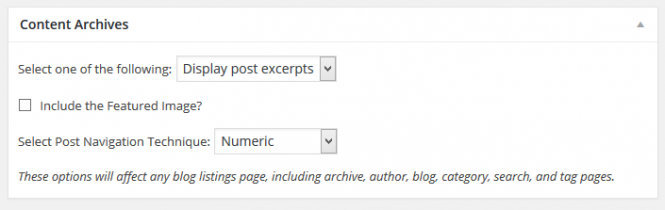
In Genesis there is an archive setting which can cause the main event views to display only partial text and not the full view.
If you have the Content Archives set to Display post excerpts as shown here:
Your main event views will end up looking like this:
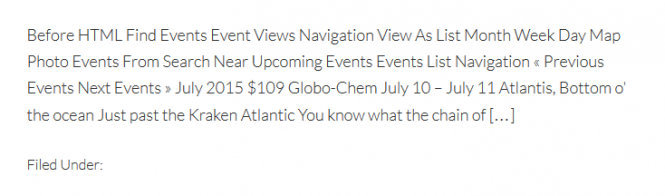
To fix this, please add the following to your child theme’s functions.php file. This snippet will force the main event views to display full content.
/**
 * The Events Calendar - Bypass Genesis genesis_do_post_content in Event Views
 *
 * This snippet overrides the Genesis Content Archive settings for Event Views
 *
 * Event Template set to: Admin > Events > Settings > Display Tab > Events template > Default Page Template
 *
 * The Events Calendar @4.0.4
 * Genesis @2.2.6
 */
add_action( 'get_header', 'tribe_genesis_bypass_genesis_do_post_content' );
function tribe_genesis_bypass_genesis_do_post_content() {
	if ( ! class_exists( 'Tribe__Events__Main' ) ) {
	  return;
	}

	if ( class_exists( 'Tribe__Events__Pro__Main' ) ) {
		if ( tribe_is_month()
		  || tribe_is_upcoming()
		  || tribe_is_past()
		  || tribe_is_day()
		  || tribe_is_map()
		  || tribe_is_photo()
		  || tribe_is_week()
		  || ( tribe_is_recurring_event()
		    && ! is_singular( 'tribe_events' ) )
		) {
			remove_action( 'genesis_entry_content', 'genesis_do_post_image', 8 );
			remove_action( 'genesis_entry_content', 'genesis_do_post_content' );
			add_action( 'genesis_entry_content', 'the_content', 15 );
		}
	} else {
		if ( tribe_is_month() || tribe_is_upcoming() || tribe_is_past() || tribe_is_day() ) {
			remove_action( 'genesis_entry_content', 'genesis_do_post_image', 8 );
			remove_action( 'genesis_entry_content', 'genesis_do_post_content' );
			add_action( 'genesis_entry_content', 'the_content', 15 );
		}
	}

}
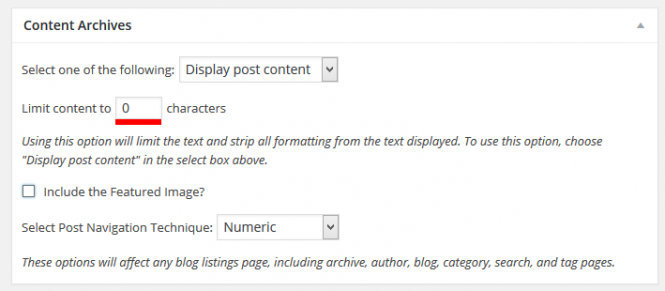
If you have Content Archives settings set to Display Post Content and the limit is zero (0 ) the events will display without issue. If you add any number to that field, it will prevent the main event views from showing, but if you add the above snippet it will bypass that setting for the event views as well.
Event layouts in Genesis
The main event views of Month, List, Photo, Map, etc. are archives in WordPress, meaning there is no way to directly change layouts from the Admin. While Genesis allows you to change the default layout different pages, the event templates will only use your default layout.
Your default layout may work for the single event template, but not your main event views. The following layout snippet helps you target Events templates and display the layout you want on your site.
For all the layout snippets, you can change full-width-content with any of these other options or a custom layout: full-width-content, content-sidebar, sidebar-content, content-sidebar-sidebar, sidebar-sidebar-content, sidebar-content-sidebar.
The following snippets will only work if you event template setting is set to default page template. That setting is found here in your site admin:
Events → Settings → Display Tab → Events Template → Default Page Template
Main Event Views
This first snippet will show the main event views at full width.
/**
 * Genesis Page Layout of The Event Calendar Main Events Templates (Month, List, Photo, Etc.)
 * The Events Calendar @3.10
 * Genesis @2.1.2
 * Options - full-width-content, content-sidebar, sidebar-content, content-sidebar-sidebar, sidebar-sidebar-content, sidebar-content-sidebar
 */

// Target all Event Views (Month, List, Map etc)
add_filter( 'genesis_pre_get_option_site_layout', 'tribe_genesis_view_layouts' );
function tribe_genesis_view_layouts( $layout ) {
	if ( ! class_exists( 'Tribe__Events__Main' ) ) {
		return $layout;
	}

	if ( class_exists( 'Tribe__Events__Pro__Main' ) ) {
		if( tribe_is_month() || tribe_is_upcoming() || tribe_is_past() || tribe_is_day() || tribe_is_map() || tribe_is_photo() || tribe_is_week() ) {
			return 'full-width-content';
		}
	} else {
		if( tribe_is_month() || tribe_is_upcoming() || tribe_is_past() || tribe_is_day() ) {
			return 'full-width-content';
		}
	}

	return $layout;
}
All event templates
This snippet will show all the event templates including the single templates at full width.
/**
 * Genesis Layout of The Event Calendar Views for all Templates
 * The Events Calendar @3.10
 * Genesis @2.1.2
 * Options - full-width-content, content-sidebar, sidebar-content, content-sidebar-sidebar, sidebar-sidebar-content, sidebar-content-sidebar
 */
// Target all Event Views (Month, List, Map etc), Single Events, Single Venues, and Single Organizers
add_filter( 'genesis_pre_get_option_site_layout', 'tribe_genesis_all_layouts' );
function tribe_genesis_all_layouts( $layout ) {
	if ( class_exists( 'Tribe__Events__Main' ) && tribe_is_event_query() ) {
		return 'full-width-content';
	}

	return $layout;
}
Event single templates
This snippet will show the single event templates at full width.
/**
 * Genesis Layout of The Event Calendar Single Templates
 * Options - full-width-content, content-sidebar, sidebar-content, content-sidebar-sidebar, sidebar-sidebar-content, sidebar-content-sidebar
 */
// Target Single Events, Single Venues, and Single Organizers
add_filter( 'genesis_pre_get_option_site_layout', 'tribe_genesis_single_layouts' );
function tribe_genesis_single_layouts( $layout ) {
	if ( is_singular( 'tribe_events' ) || is_singular( 'tribe_venue' ) || is_singular( 'tribe_organizer' ) ) {
		return 'full-width-content';
	}

	return $layout;
}
Event single templates alternative snippet
This is an alternative snippet that will also show the single event template at full width, provided by Hans!
/**
 * Genesis Layout of The Event Calendar Single Template
 * Options - full-width-content, content-sidebar, sidebar-content, content-sidebar-sidebar, sidebar-sidebar-content, sidebar-content-sidebar
 * Credit: Hans!
 */
add_filter( 'genesis_pre_get_option_site_layout', 'tribe_single_events_full_width_layout' );
function tribe_single_events_full_width_layout( $layout ) {
	if ( class_exists( 'Tribe__Events__Main' ) && tribe_is_event_query() && is_single() ) {
		return 'full-width-content';
	}

	return $layout;
}
Community Events templates
This last layout snippet will show the Community Event’s templates at full width.
/**
 * Genesis Layout of The Event Calendar Single Templates
 * Options - full-width-content, content-sidebar, sidebar-content, content-sidebar-sidebar, sidebar-sidebar-content, sidebar-content-sidebar
 */
// Target Community Events Edit Form and My Event's List
add_filter( 'genesis_pre_get_option_site_layout', 'tribe_genesis_community_layouts' );
function tribe_genesis_community_layouts( $layout ) {
	if ( tribe_is_community_my_events_page() || tribe_is_community_edit_event_page() ) {
		return 'full-width-content';
	}

	return $layout;
}
All the layout snippets can be used in any combination to target specific event templates and get the layout you would like for each.
Genesis Simple Share
Genesis Simple Share does not show on single event templates due to no Genesis hooks being in the template, but adding the snippet below to your child theme’s functions.php will make Simple Share show above the event content. You can also review the the-events-calendarsrcviewssingle-event.phptemplate for different hooks if you would like to place it somewhere else on the single event template.
/**
 * The Events Calendar - Include Genesis Simple Sharing Above Single Events Content
 *
 */
add_filter( 'tribe_events_single_event_before_the_content', 'tribe_genesis_event_share' );
function tribe_genesis_event_share( $post_info ) {
	if ( is_singular( 'tribe_events' ) && function_exists( 'genesis_share_get_icon_output' ) ) {
		global $Genesis_Simple_Share;
		$share =  genesis_share_get_icon_output( 'entry-meta', $Genesis_Simple_Share->icons );
		$event_sharing = '</pre>
		<div class="alignleft info-left">' . $share . '</div>
		<pre>';

		echo $event_sharing;
	}

	return $post_info;
}
Community Events form inputs
Genesis comes with CSS for form inputs that changes the layout of the Community Events fields so that each is full width in that section. This can look odd and be difficult to use, so you might want to change it so the inputs look more like this:
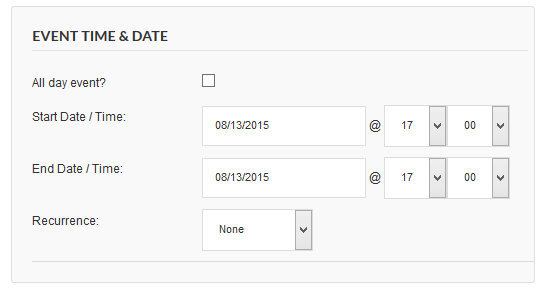
To do that, add the following CSS to your child theme’s stylesheet or your preferred file for custom CSS:
#tribe-community-events input, #tribe-community-events select, #tribe-community-events textarea {
  min-height: 0;
  padding: 12px;
  width: auto;
}
Genesis Featured Posts widget titles
You might notice the title of a Genesis Featured Post Widget not showing on event templates in the sidebar. If that is the case, add the following CSS to your child theme’s stylesheet or your preferred file for custom CSS:
.single-tribe_venue .featured-content .type-post header.entry-header,
.single-tribe_organizer .featured-content .type-post header.entry-header,
.single-tribe_events .featured-content .type-post header.entry-header,
.events-archive .featured-content .type-post header.entry-header {
  display:block;
}
Genesis Author Box
If you have the Author Box activated in the Genesis settings, it will show on all the single templates including the Events Calendars.
To remove the Author Boxes from single event, single venue, and single organizer templates, add the following coding to your child theme’s functions.php:
/**
 * Genesis Remove Author Box from Single Templates for the The Events Calendar
 *
 *
 */
add_action( 'pre_get_posts', 'tribe_genesis_hide_author_single_events' );
function tribe_genesis_hide_author_single_events( $query ) {
	if( is_singular( 'tribe_events' ) || $query->query['post_type'] == 'tribe_venue' || $query->query['post_type'] == 'tribe_organizer' ) {
		remove_action( 'genesis_after_entry', 'genesis_do_author_box_single', 8 );
	}
}
Filter Bar mobile toggle
The Filter Bar does not stay open on mobile devices using Genesis due to the open process causing a script to think a resize has taken place, which then causes the Filter Bar to close.
The following CSS will prevent this from happening. Add the CSS to your child theme’s stylesheet or your preferred file for custom css:
.tribe-filters-open, .tribe-filters-open body {
  overflow: visible!important;
}
We hope you found this tutorial helpful! Have questions or issues with Genesis compatibility? Hit us up at our Help Desk and we’d be happy to help.
Genesis Framework & Event Tickets
As of Event Tickets 4.9, the attendee details are now collected on a new, separate screen instead of the event page where the attendee form used to be. The default slug for this page is ‘attendee-registration’.
When using a theme based on the Genesis Framework and having a specific setting, the Attendee Registration page will not show up properly. It will show a kind of an excerpt of that page.
The setting in question can be found under Genesis → Theme Settings → Content Archive.
When the setting is Display → Excerpt or the content limit is higher than 0 — basically anything other than Display → Entry Content and “Limit content to 0 characters” — then the issue will be visible.
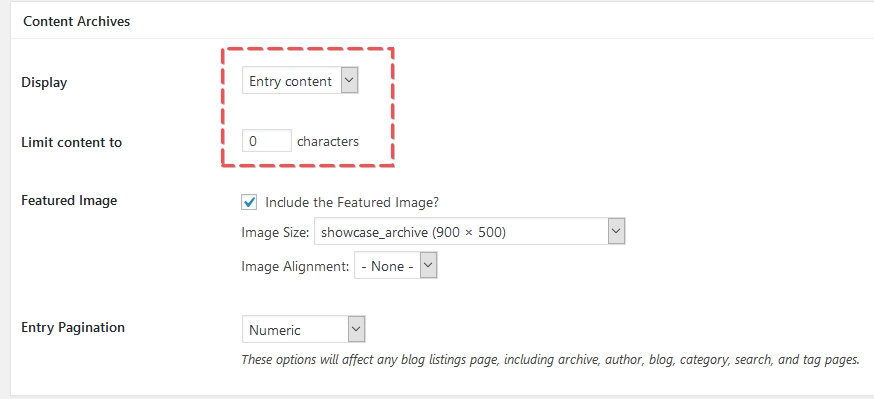
Here is the solution to fix that. Add this snippet to your child theme’s functions.php file or via a Code snippets plugin.
/**
 * Change the Get Tickets on List View and Single Events
 *
 * @param string $translation The translated text.
 * @param string $text      The text to translate.
 * @param string $domain    The domain slug of the translated text.
 *
 * @return string The translated text or the custom text.
 */

add_filter( 'gettext', 'tribe_change_get_tickets', 20, 4 );
function tribe_change_get_tickets( $translation, $text, $domain) {
  if ( $domain != 'default'
    && strpos( $domain, 'event-' ) !== 0
  ) {
    return $translation;
  }

  $ticket_text = [
    // Get Tickets on List View
    '%s are no longer available'    => 'Sold Out',
  ];

  // If we don't have replacement text, bail.
  if ( empty( $ticket_text[ $text ] ) ) {
    return $translation;
  }

  return $ticket_text[ $text ];
}
Notes
- Originally written in November 2018
- Tested with Event Tickets 4.8.4
- Author: András Guseo
Disclaimer
As with all of our recipes, please note that we share this in the hope it will be useful, but without any guarantees or commitments. If you wish to use it, it is your responsibility to test it first of all and adapt it to your needs (or find someone who can do so on your behalf). We are unable to provide further support in relation to this recipe.