Forum Replies Created
-
AuthorPosts
-
halostribe
ParticipantThat’s the solution! Thank you, Barry.
ParticipantOops, this solution seems to break the search function.
To fix it, you have to make the method “assign_distance_to_posts( &$posts, $lat_from, $lng_from )” public in file “tribe-geoloc.class.php” like so:
OLD: private function assign_distance_to_posts( &$posts, $lat_from, $lng_from )
NEW: public function assign_distance_to_posts( &$posts, $lat_from, $lng_from )Please note that this file will be overwritten as well when the plug-in receives an update.
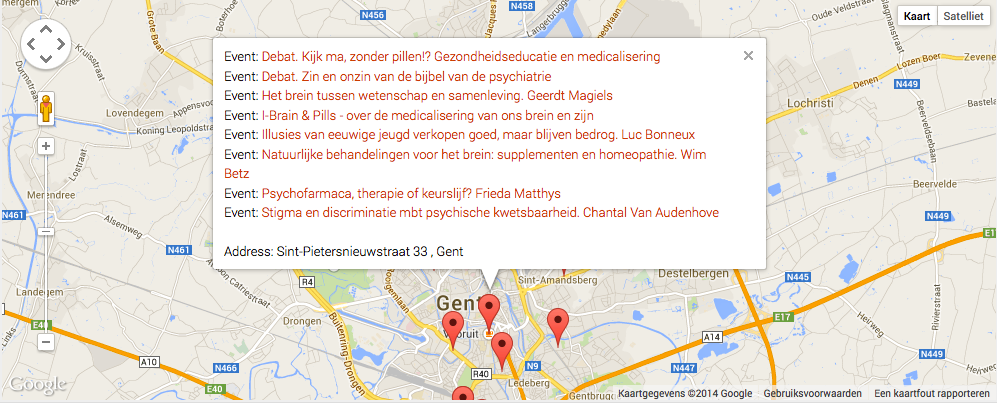
ParticipantIf you want to show all markers on the map AND have the marker show all the events at that venue when clicked, perform these 3 steps:
STEP 1. Do as Barry said:
add_filter( ‘tribe_events_ajax_response’, ‘change_geo_markers’ );
function change_geo_markers( array $response_data ) {
$markers = get_markers_for_all_events();
$response_data[‘markers’] = $markers;
return $response_data;
}function get_markers_for_all_events() {
TribeEventsQuery::init();$geoLoc = new TribeEventsGeoLoc();
$defaults = array( ‘post_type’ => TribeEvents::POSTTYPE,
‘posts_per_page’ => ‘1000’,//set this to a high number that will always exceed the number of events
‘post_status’ => array( ‘publish’ ),
‘eventDisplay’ => ‘map’
);$view_state = ‘map’;
$query = TribeEventsQuery::getEvents( $defaults, true );
$have_events = ( 0 < $query->found_posts );if ( $have_events && $geoLoc->is_geoloc_query() ) {
$lat = isset( $_POST[‘tribe-bar-geoloc-lat’] ) ? $_POST[‘tribe-bar-geoloc-lat’] : 0;
$lng = isset( $_POST[‘tribe-bar-geoloc-lng’] ) ? $_POST[‘tribe-bar-geoloc-lng’] : 0;$geoLoc->assign_distance_to_posts( $query->posts, $lat, $lng );
}$events = $query->posts;
$markers = array();foreach ( $events as $event ) {
$venue_id = tribe_get_venue_id( $event->ID );
if( !isset($markers[$venue_id]) ) {
$lat = get_post_meta( $venue_id, TribeEventsGeoLoc::LAT, true );
$lng = get_post_meta( $venue_id, TribeEventsGeoLoc::LNG, true );
$address = tribe_get_address( $event->ID ) .’, ‘. tribe_get_city( $event->ID );
$title = tribe_get_venue($event->ID);// replace commas with decimals in case they were saved with the european number format
$lat = str_replace( ‘,’, ‘.’, $lat );
$lng = str_replace( ‘,’, ‘.’, $lng );$markers[$venue_id] = array(
‘lat’ => $lat,
‘lng’ => $lng,
‘title’ => $title,
‘address’ => $address,
‘eventarray’ => array( array($event->post_title, get_permalink( $event->ID ))/*event name and link*/ ),
‘venue_id’ => $venue_id,
‘event_id’ => $event->ID
);} else {
$markers[$venue_id][‘eventarray’][] = array($event->post_title, get_permalink( $event->ID ));
}}
return $markers;
}STEP 2. Change the method “map_add_marker” in “tribe-events-ajax-maps.min.js”. This file will be overwritten when the Calendar Pro plugin gets updated! I’m just starting with WordPress so I don’t know how to make this solution future-proof. Maybe Barry can help with that?
This, combined with STEP 3, will get you a marker that shows all events when clicked like this: http://halos.be/marker-1-venue-multiple-events.png
So the method becomes:
map_add_marker: function (lat, lng, title, address, eventarray) {
var myLatlng = new google.maps.LatLng(lat, lng);var marker = new google.maps.Marker({
position: myLatlng,
map: tg.map,
title: title
});var infoWindow = new google.maps.InfoWindow();
var content_title = “”;
var content = “”;$.each(eventarray, function (i, e) {
content_title = $(‘<div/>’).append($(“<a/>”).attr(‘href’, e[1]).text(e[0])).html();
content = content + “Event: ” + content_title + “<br>”;
});if (address) {
content = content + “<br/>” + “Address: ” + address;
}infoWindow.setContent(content);
google.maps.event.addListener(marker, ‘click’, function (event) {
infoWindow.open(tg.map, marker);
});tg.markers.push(marker);
if(tg.refine){
marker.setVisible(false);
}
tg.bounds.extend(myLatlng);
}STEP 3. In the same file “tribe-events-ajax-maps.min.js” as step 2, change the method “tribe_map_processOption()”. Again, this file will be overwritten when the Calendar Pro plugin gets updated!
The altered method:
/**
* @function tribe_map_processOption
* @desc tribe_map_processOption is the main ajax event query for map view.
*/function tribe_map_processOption() {
if (!ts.popping) {
tribe_generate_map_params();
ts.pushstate = false;
if (!ts.initial_load) {
ts.do_string = true;
}
}if(invalid_date)
return;$(‘#tribe-events-content .tribe-events-loop’).tribe_spin();
deleteMarkers();$.post(GeoLoc.ajaxurl, ts.params, function (response) {
$(te).trigger(‘tribe_ev_ajaxStart’).trigger(‘tribe_ev_mapView_AjaxStart’);
tf.enable_inputs(‘#tribe_events_filters_form’, ‘input, select’);
if (response.success) {
ts.ajax_running = false;
td.ajax_response = {
‘total_count’: parseInt(response.total_count),
‘view’: response.view,
‘max_pages’: response.max_pages,
‘tribe_paged’: response.tribe_paged,
‘timestamp’: new Date().getTime()
};ts.initial_load = false;
var $the_content = ”;
if($.isFunction($.fn.parseHTML))
$the_content = $.parseHTML(response.html);
else
$the_content = response.html;$(‘#tribe-events-content’).replaceWith($the_content);
if (response.view === ‘map’) {
if (response.max_pages == response.tribe_paged || 0 == response.max_pages) {
$(‘.tribe-events-nav-next’).hide();
} else {$(‘.tribe-events-nav-next’).show();
}
}//If no events are returned, then hide Header
if (response.total_count == 0) {
$(‘#tribe-events-header’).hide();
}var markerslength = 0;
$.each(response.markers, function (i, e) {
tf.map_add_marker(e.lat, e.lng, e.title, e.address, e.eventarray);
markerslength++;
});if (tt.pushstate) {
ts.page_title = $(‘#tribe-events-header’).data(‘title’);
document.title = ts.page_title;if (ts.do_string) {
history.pushState({
“tribe_paged”: ts.paged,
“tribe_params”: ts.params
}, ts.page_title, td.cur_url + ‘?’ + ts.params);
}if (ts.pushstate) {
history.pushState({
“tribe_paged”: ts.paged,
“tribe_params”: ts.params
}, ts.page_title, td.cur_url);
}}
$(te).trigger(‘tribe_ev_ajaxSuccess’).trigger(‘tribe_ev_mapView_AjaxSuccess’);
if (markerslength > 0) {
centerMap();
}
}
});}
-
AuthorPosts