
Home › Forums › Calendar Products › Events Calendar PRO › Using Avada Theme and Revolution Slider
- This topic has 5 replies, 3 voices, and was last updated 11 years ago by
Support Droid.
-
AuthorPosts
-
September 10, 2015 at 1:32 pm #1003900
Nikolaus
ParticipantI need your calendar as content in my theme. Header and Menue are loading, revolution Slider doesn’t show up. I need a solution to keep our sites design – every page has a Revolution slider on top, so the eventscalender of course also must habe one on top.
And: No, I didn’t deactivate all other plugs and I didn’t switch to twelvesomething, because I need the calendr in the environment I have to go live with.
Login data: removed by george
September 11, 2015 at 6:12 am #1004169George
ParticipantHey @Nikolaus,
Sorry you’re having trouble with getting these things to work together at the moment. It’s possible that you may need to customize template files from The Events Calendar to fully integrate things, but before jumping to that conclusion, I’m curious if you can first try heading to Events > Settings > Display in your site’s wp-admin.
Once here, look for the “Event template” option.
Once you find this option, try out each of the various template options there – after every time you choose a new template, save the changes and have a look at the calendar on your site. Does the slider behave any better with the template?
What this process will do is reveal if any of your theme’s own templates work better with the Slider and thus will add the calendar to that theme template, so that both slider and calendar are in the same template together.
If this fails to improve things, then unfortunately it sounds like you’d have to set this template back to the “Default events template” option and proceed with customizing various calendar templates as described in our Themer’s Guide → https://theeventscalendar.com/knowledgebase/themers-guide/
Let us know what you find!
Thanks,
GeorgeSeptember 11, 2015 at 7:27 am #1004218ParticipantGuys – this is thus unprofessional that it can not be really true.
September 11, 2015 at 7:29 am #1004220ParticipantSorry – BUT it definitely is.
But I think I have to live with it. If I now delete my page “events” where you calendar used to nest like a cuckoo, killing everything else, will your kalendar generate an own page, that I can move to a submenue?
Or do I loose all my exibitions, fairs and meetings I already entered?
-
This reply was modified 11 years, 1 month ago by
September 11, 2015 at 9:08 am #1004311ParticipantHey @Nikolaus,
Deleting a page will not delete any existing events content you have added.
In fact, deleting a page called “Events” or something like that is necessary, and you should only rely on the auto-generated /events Page from The Events Calendar.
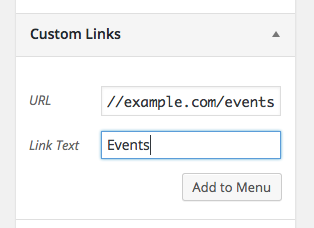
If you would like to link to this /events URL in a custom navigation menu, that is definitely possible. Use the “Custom link” feature of the Menu builder in WordPress, and just enter the URL there and add it to your menu.
If you’re not familiar with doing this, you can learn all about making Menus in WordPress here → https://codex.wordpress.org/Appearance_Menus_Screen#Appearance_.E2.86.92_Menus
You’d add a “custom link” like in this screenshot:
Cheers!
GeorgeSeptember 26, 2015 at 7:05 am #1008933KeymasterThis topic has not been active for quite some time and will now be closed.
If you still need assistance please simply open a new topic (linking to this one if necessary)
and one of the team will be only too happy to help. -
This reply was modified 11 years, 1 month ago by
-
AuthorPosts
- The topic ‘Using Avada Theme and Revolution Slider’ is closed to new replies.