
Home › Forums › Calendar Products › Community Events › Unable to change card number
- This topic has 7 replies, 2 voices, and was last updated 10 years, 10 months ago by
Brian.
-
AuthorPosts
-
April 20, 2015 at 12:14 am #956587
sanver
ParticipantDear Team,
This is regarding renewal of Community Events plugin, we want to renew Community Events plugin.
The problem is that we do not remember card number and also there is not option in how to change existing card number.
Kindly help us what is the existing card number and how to change it on urgent number.
Kindly do the needful.
Awaiting your reply.
Francis D
Technical Support
Sanver E-Solutions Private Limited
April 20, 2015 at 1:25 am #956592ParticipantDear Team,
Kindly look into this issue on urgent basis.
Awaiting your reply.
Francis D
Technical Support
Sanver E-Solutions Private Limited
April 20, 2015 at 8:01 am #956693MemberHi,
Sorry for the issues.
We do not store credit card information so there is no place to change in your account.
Are you able to go through the renewal checkout process and use a new credit card during the checkout?
Please note as well we may take up to 24 hours to respond on the forum per our terms and conditions.
Thanks
April 20, 2015 at 9:10 pm #956925ParticipantDear Mr.Brian,
Thank you for your mail.
We have gone through the renewal checkout process but when we going trying to add new card.
The card number is not editable ,kindly see the below link.
Kindly let us know the procedure to edit previous card or what is the previous card number.
Kindly do the needful on urgent basis.
Awaiting your reply.
Francis D
Technical Support
Sanver E-Solutions Private Limited
April 21, 2015 at 5:25 am #956976MemberThat is how it is suppose to look.
When you start typing numbers into the field it does not change?
It did for me.
April 21, 2015 at 10:04 pm #957244ParticipantDear Mr.Brian,
Kindly just let us know how to change the card number or what is the previous card number.
We need renew this plugin on urgent basis.
Kindly reply on urgent basis.
Awaiting your reply.
Francis D
Technical Support
Sanver E-Solutions Private Limited
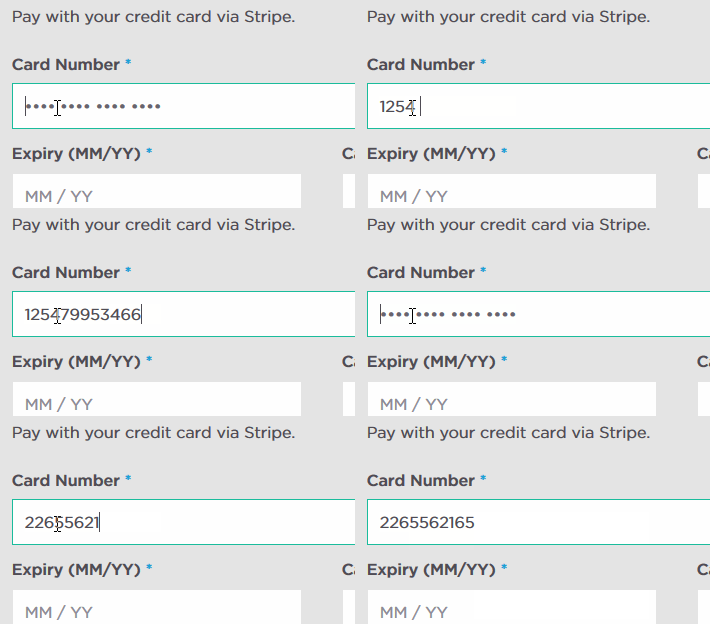
April 22, 2015 at 5:48 am #957306MemberI am not sure what the issue is. You have no confirmed if you cannot type anything into the field.
The ***** are just placeholders.
Start typing the new credit card number in the field and it will work. If not in one browser try another just to see if that is the issue.
Here is what I see and I am able to type in new numbers:
 June 12, 2015 at 9:03 am #969095Member
I am going to close this topic as we typically close threads if there is no activity after two weeks. Feel free to create a new thread and reference this one to save you time.
Thanks
-
AuthorPosts
- The topic ‘Unable to change card number’ is closed to new replies.