
Home › Forums › Ticket Products › Event Tickets Plus › Tickets and Checkin
- This topic has 6 replies, 3 voices, and was last updated 9 years, 4 months ago by
Jairo.
-
AuthorPosts
-
November 14, 2016 at 12:41 pm #1192057
Jairo
ParticipantHi,
Now our site runs Events Calendar PRO.
We would like to sell ticket and as I saw on the demo site it seems easy to work.
But we wonder how does the checkin work.– Can the doorman use their smartphones to read QR codes?
– Do the doorman have to enter WP-admin to validate de codes ?
– Do the system detects if two people carry the same ticket ?
– etc, etcThanks
November 15, 2016 at 7:20 am #1192410Andras
KeymasterHello Jairo,
Thanks for going Pro and for reaching out to us! Let me answer your questions one-by-one.
Can the doorman use their smartphones to read QR codes?
– Do the doorman have to enter WP-admin to validate de codes ?Yes, they can absolutely use smartphones for that and they do need to enter WP-admin to be able to check the people in. According to my lasts test a while back a contributor account should be sufficient for this. I believe this has not yet changed, but I would recommend testing this.
Do the system detects if two people carry the same ticket ?
Yes. When checking in the same QR code the second time (or more), then you’ll see a warning message like this:
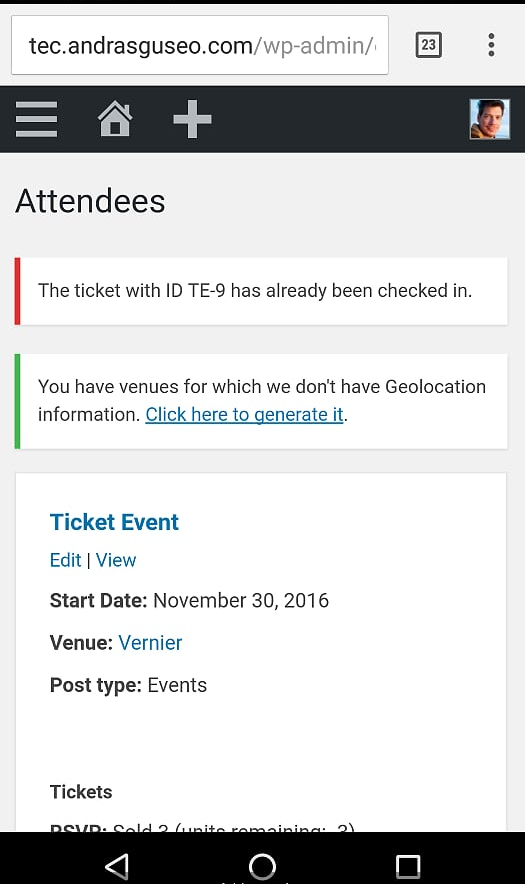
etc, etc
Yes. Ermmm… maybe. No, I don’t think so. But if… ermmmm no. What?!? 🙂
Let me know if this clarifies.
Cheers,
AndrasNovember 15, 2016 at 10:46 am #1192633ParticipantHi,
It sounds great!
Can I do some test with free version of EVENT TICKETS or QR codes are only available with PLUS version ?
I guess that QR embeds the url to validate the ticket and even if a customer opens it, it only can be validated by a Admin or Contributor user (nor Subscriber nor Customer role) … ?
Cheers
November 16, 2016 at 7:30 am #1193130KeymasterHello again,
Yes, you should be able to test this with the free Event Tickets plugin. Note however, that with Event Tickets you will only be able to create RSVPs – a sort of a registration for the event.
The email sent to the customer is pretty much the same and contains a QR code as well. You can do the tests with that.
With Event Tickets Plus you will be able to create and sell pay-for tickets as well. Note here, that for this you will need an eCommerce plugin as well. Currently we support WooCommerce, Easy Digital Downloads, WP eCommerce and Shopp.
I guess that QR embeds the url to validate the ticket and even if a customer opens it, it only can be validated by a Admin or Contributor user (nor Subscriber nor Customer role) … ?
Yes, you are right in that. The QR code is basically a URL encoded in that form. That URL will take you to your WordPress dashboard and check in the user for the event, IF you are logged in to the dashboard with at least a Contributor role. (That means Contributor, Editor, Author and Admin can all check in participants.) If you are only a Sub or a Customer, then nothing will happen.
I hope this explains. Is there anything else I can help you with?
Cheers,
AndrasNovember 18, 2016 at 6:09 am #1194412ParticipantHello,
I did a test with your online demo (I placed a purchase of tickets) but I got no ticket to print, just the WooCommerce purchase receipt.
Anyway, I trust it will work. 🙂Next week I will talk to the customer to start developing.
Thanks!
November 21, 2016 at 1:46 am #1195218KeymasterHi Jairo,
Thanks for the feedback on that, I will relay the information to the webmaster of the demo site. Might be that the autocomplete order function of WooCommerce didn’t kick in. Sometimes it has glitches.
Since you marked it resolved I am going to close this ticket, but if you need anything else related to this topic or another please post a new topic in the forum and we will help you out.
Good luck with your project!
Cheers,
AndrasPS: If you like our plugin, and you didn’t yet do so 🙂 we would be happy to receive a review in the wordpress.org repository. Thanks!
https://wordpress.org/support/view/plugin-reviews/the-events-calendarPS2: We’d be also grateful if you would give us feedback on your satisfaction with support. Just click on one of the classy looking emojis below. 🙂 If you can spare a few words, that’s even better. Doublethanks!
-
AuthorPosts
- The topic ‘Tickets and Checkin’ is closed to new replies.