
Home › Forums › Calendar Products › Events Calendar PRO › Space between address info
- This topic has 6 replies, 3 voices, and was last updated 10 years, 1 month ago by
Support Droid.
-
AuthorPosts
-
January 5, 2016 at 4:13 pm #1050791
laughmasters
ParticipantIt’s a little thing, but it gives us the shits.
http://imgur.com/DuqURwKJanuary 6, 2016 at 6:18 pm #1051529George
ParticipantHey @Laughmasters,
We cannot help with style customizations like this 🙁 Before posting more threads, please go over the “product support” section on this page → http://theeventscalendar.com/terms
—
While that policy is serious and worth respecting, we like to help regardless and especially for small code tweaks – fortunately, this is mostly an example of that.
Try some CSS like this in the bottom of your theme’s style.css file, for example:
.tribe-events-address .tribe-address span {

    margin-right: 0.2em;

}
Here’s how that makes things look:
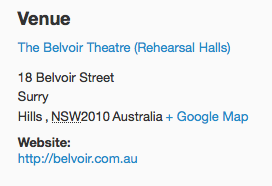
Is this light-years of improvement and perfect? Admittedly, not quite – but you can play around with this CSS, with the sizing of the margin-right value, etc. to find something that works well for you.
If you need to customize the address layout further, then unfortunately, regardless of our customization policies or not, the only way to get down-and-dirty with the actual construction of the addresses is to modify the related PHP templates inside The Events Calendar’s plugin files.
I’m sure you’ve seen this page before, but still – to learn more about customizing the PHP templates, if need be, check out our guide about doing so here: https://theeventscalendar.com/knowledgebase/themers-guide/
I hope this information helps, and reduces the amount of shits 🙂
Cheers,
GeorgeJanuary 6, 2016 at 8:00 pm #1051576ParticipantI guess a better question is why are all the address details jammed up against each other by default?
January 8, 2016 at 12:16 pm #1052779ParticipantThe lack of spacing is because of CSS coming from your site, it is not the default layout for addresses.
January 10, 2016 at 9:56 pm #1053630ParticipantI’m inspecting all the elements here and I don’t see any CSS on our site that would jam all the address details together without appropriate letter/word spacing. OR causing a line break in the middle of the city name.
January 11, 2016 at 11:38 am #1054051ParticipantThank you for the update @Laughmasters. By the same token, our own CSS does not cause this spacing issue and nor does the plugin’s default markup. The origin of these problems is specific to your site, and thus solving them would require custom CSS like I have recommended above.
Thank you,
GeorgeFebruary 18, 2016 at 8:34 am #1076674KeymasterThis topic has not been active for quite some time and will now be closed.
If you still need assistance please simply open a new topic (linking to this one if necessary)
and one of the team will be only too happy to help. -
AuthorPosts
- The topic ‘Space between address info’ is closed to new replies.