
Home › Forums › Calendar Products › Events Calendar PRO › Remove pagination
- This topic has 8 replies, 2 voices, and was last updated 10 years, 5 months ago by
George.
-
AuthorPosts
-
October 18, 2015 at 5:03 am #1015649
Karrie
ParticipantMy site, funthisweekend.com, is set up with menu navigation going to category pages (of states with events).
When you go to an individual event the bottom shows pagination but it brings the visitor to other states (because I guess it’s going in chronological order, maybe?).
Regardless, I either have to figure out how to keep the pagination within the category or remove it entirely.
I am using the Avada theme which has just added your plugin to their theme, so it’s particularly confusing to figure out where to do things. I’m an intermediate user of WordPress, however I’m a beginner when it comes to modify templates or functions – I’m pretty adventurous and have been watching tutorials all over the place, so I’m ready to start 🙂
Anyway, thanks in advance for any help you can provide.
October 19, 2015 at 5:25 am #1015764ParticipantHey @Karrie,
It’s cool to see funthisweekend.com taking shape compared to how it looked in your earlier posts here on the forums – it’s looking great!
In regards to your issues, just to be 100% clear on what the issue is, let’s take this specific event for example: http://funthisweekend.com/event/music-to-cure-ms-2015/
That event takes place in my now-freezing home state of Massachusetts – but if you go to the bottom of the event page, where the “previous event” and “next event” links reside, the “Next event” takes place in New York. The “previous event” takes place in Connecticut.
Is your main goal just to ensure that the “next” and “previous” event links are essentially “next in category” and “previous in category” links in stead? So that e.g. when viewing a Massachusetts event, only other Mass. events will be show up in the “previous” and “next” event navigation?
If so, this will unfortunately take a bit of code customization, but let me know if I’ve summarized things accurately just to be sure – we can go from there!
— George
October 19, 2015 at 6:09 am #1015779ParticipantHi George,
It’s pretty darn cold here in Rhode Island, too – but it could be worse (let’s NOT remember last winter :/ ).
Anyway, you have summarized my wishes exactly – and I figured it was going to take some customization, but I’m diving in to templates and functions and all that fun stuff. In fact, off topic a bit, but I was trying to put a featured image on each post while using the events list shortcode and I used this tutorial:
https://theeventscalendar.com/knowledgebase/add-thumbnails-to-upcoming-events-list-widget/
I had added a copy of functions.php to my child theme and then added the lines of code as noted in this tutorial, but it didn’t work 🙁
I can make a new topic of this, if that’s what’s required, but back to my original next and previous events staying within category … please let me know what I should do to make this work.
Thanks 🙂
October 20, 2015 at 4:57 pm #1016422ParticipantThank you for clarifying the nature of your request Karrie! I took some extra time today trying to come up with a code-based solution – we don’t technically offer any customization support. but I felt I could help out a fellow New Englander perhaps more than normal 🙂
Unfortunately it turns out that, though it might seem simple, it’s quite hard to generate the proper URLs for this category-specific functionality. We manage to do it in our premium “Filter Bar” add-on – not trying to sell you on this plugin, I swear! – so it is possible to generate links this, but it’s tricky.
If you’re comfortable with writing code at all, then you might be able to put together your own functions to make this custom pagination happen. Otherwise it would likely require the help of a developer. We have a list of developers here who all are highly-rated and trusted people in the community → http://m.tri.be/18k1, and we also have a Themer’s Guide which, if you’re comfortable with editing code at all, would be a good place to start in terms of actually making the customization → https://theeventscalendar.com/knowledgebase/themers-guide/
I’m really sorry to disappoint on this! I promise you I looked into this personally and tried my hand at a couple different code snippets; I couldn’t get a consistent, truly-working thing regardless of what I tried.
—-
As for the widget/thumbnail issue, I think I can actually be helpful here 🙂 Here’s an example of the thumbnails working in my own test site’s list widget:
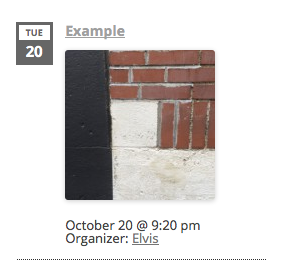
What I did to achieve that was not the code snippet that you shared – that snippet will only work with the free core version of The Events Calendar if Events Calendar Pro is not activated; if Events Calendar Pro is activated, it will not work, which fact was not very clear before but because of your bringing it to our attention I have just fixed! So, thanks for keeping us sharp with our documentation.
But on to the topic of actually fixing that and getting it working: instead of the functions.php snippet, I would recommend using the template-customization methods outlined in our Themer’s Guide here → https://theeventscalendar.com/knowledgebase/themers-guide/
Using those methods, create a new file in your theme or child theme at this file path in your theme:
[your-theme]/tribe-events/pro/widgets/modules/single-event.php
Then add the code from this Gist to that file → http://git.io/vWtyi
And that should work well!
Let me know if that helps 🙂
— George
October 22, 2015 at 1:03 pm #1017073ParticipantHi George,
How do I put a custom side bar on specific category pages?
Thanks 🙂
October 22, 2015 at 1:06 pm #1017078ParticipantHey @Karrie,
Did any of my input and custom code help you with your other two questions?
When it comes to custom sidebars, this is further code customization and we unfortunately cannot help with custom code. Your best out-of-the-box options that MIGHT help here are to go to Events > Settings > Display, and then scroll down until you see the “Events template” option – try every option there and see if any template works better in terms of sidebars on category pages and such.
Thanks,
GeorgeOctober 22, 2015 at 4:29 pm #1017134ParticipantI was wondering if I should copy that gist exactly into a the new single-event.php file?
October 22, 2015 at 4:47 pm #1017137ParticipantI copied the gist exactly and it did put the thumbnail there, but then it was throwing in something about the organizer and also changed the styling.
So there’s the problem of the organizer and styling, but what I’m wondering right now is can I make it display the featured image as a regular image as opposed to a thumbnail? I’m guessing I’ll just have to change the “thumbnail” in that line of code to something else:
<?php echo tribe_event_featured_image( null, ‘thumbnail’ ); ?>
Am I close?
October 26, 2015 at 10:40 am #1018010ParticipantYou’re indeed close @Karrie, and I’m sorry that my customizations didn’t 100% resolve your issues here – I would recommend refining them further on your own, or with the help of a developer for hire since we do not offer support for customizations here…
With that latter statement in mind, I will close up this thread for now since it relates to customizations to begin with. If you have other non-customization questions at any time, however, just open a new thread and we’ll help out right away 🙂
Best of luck with your site!
— George
-
AuthorPosts
- The topic ‘Remove pagination’ is closed to new replies.