
Home › Forums › Additional Help › Translations › One instance of "Event" falling through translation filter
- This topic has 8 replies, 2 voices, and was last updated 11 years, 6 months ago by
Zach Tirrell.
-
AuthorPosts
-
April 22, 2015 at 8:42 am #957379
hound
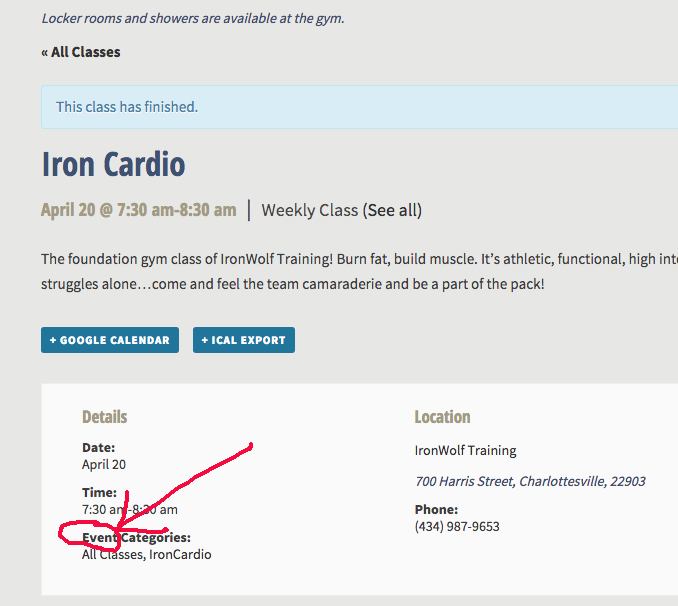
ParticipantHello. I found the following filter (text included below) on this forum to change all instances of ‘event’ to ‘meeting’. I adjusted the filter to change it to ‘class’, as well as some other word changes. All works great, except on individual event pages in the meta details ‘Event Categories’ still appears instead of ‘Class Categories’ (screen shot attached below). I looked as best as I could to figure out why the filter isn’t catching this, but I’m stumped, and wondering if it has something to do the the degrading stuff that is mentioned. I’d also be ok to just not display the categories in this view, but can’t for the life of me figure our what to set to “display=none” to achieve this.
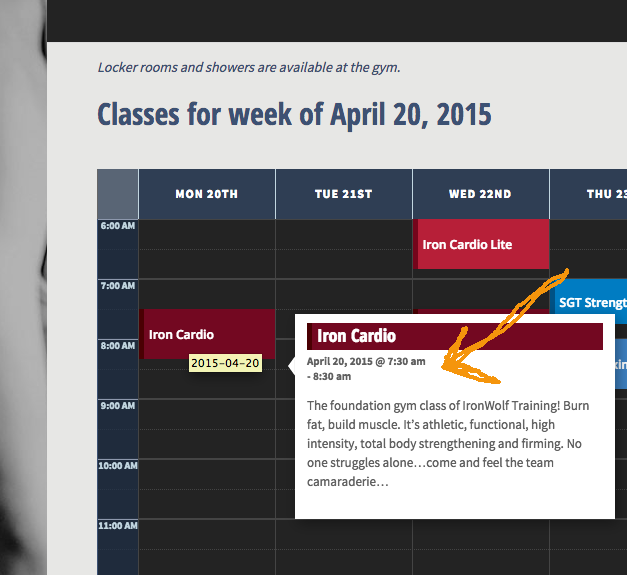
Also (though this isn’t a translation issue) there is an unwanted line break in the time duration of the event hover view on the weekly grid (screen shot below). Would you be able to tell me how to have the duration not break after the start time in this view)?
I’m using versions 3.9.2 of the Event Calendar, 3.9.3 of the Event Calendar Pro, and WordPress 4.1.2.
Any and all will be help greatly appreciated!
Here is the filter I found on this forum (including my modifications) that I’ve put into the functions.php of my child theme:
// This example replaces “Event” with “Class” in all Tribe Plugins text// See the codex to learn more about WP text domains:
// http://codex.wordpress.org/Translating_WordPress#Localization_Technology
// Example Tribe domains: ‘tribe-events-calendar’, ‘tribe-events-calendar-pro’…add_filter(‘gettext’, ‘theme_filter_text’, 10, 3);
function theme_filter_text( $translations, $text, $domain ) {
// If this text domain starts with “tribe-”
if(strpos($domain, ‘tribe-‘) === 0) {
// Replace upper case, lower case, singular, and plural
$text = str_replace(
// Text to search for
array(‘Event’, ‘event’, ‘Events’, ‘events’, ‘Organizer’, ‘organizer’, ‘Venue’, ‘venue’, ‘passed’, ‘Recurring’),// Text to replace it with — change this for your needs
array(‘Class’, ‘class’, ‘Classes’, ‘classes’, ‘Instructor’, ‘instructor’, ‘Location’, ‘location’, ‘finished’, ‘Weekly’),
$text
);}
return $text;
}add_filter(‘ngettext’, ‘theme_filter_ntext’, 10, 5);
function theme_filter_ntext( $translation, $single, $plural, $number, $domain ) {
// If this text domain starts with “tribe-”
if(strpos($domain, ‘tribe-‘) === 0) {
// Replace upper case, lower case, singular, and plural
if( $number > 1 ) {
$plural = str_replace(
// Text to search for
array(‘Events’, ‘events’),// Text to replace it with — change this for your needs
array(‘Classes’, ‘classes’),
$plural
);return $plural;
} else {
$single = str_replace(
// Text to search for
array(‘Event’, ‘event’, ‘Organizer’, ‘organizer’, ‘Venue’, ‘venue’, ‘passed’, ‘Recurring’),// Text to replace it with — change this for your needs
array(‘Class’, ‘class’, ‘Instructor’, ‘instructor’, ‘Location’, ‘location’, ‘finished’, ‘Weekly’),
$single
);return $single;
}
}
}Here is a screen shot of where the word ‘Event’ is not switching out to ‘Class’:
Here is a screen shot of the unwanted line break in the time duration of the hover view
 April 23, 2015 at 6:55 am #957671Keymaster
Hello 🙂
I tried the code you provided and it did translate properly on my test system. Perhaps you have a custom tribe-events/modules/meta/details.php template in your theme?
As for hiding this option, unfortunately there isn’t an easy way to consistently target that element with CSS. You could do this with a bit of javascript/jQuery though:
jQuery( '.tribe-events-event-categories' ).hide().prev().hide();I am also not seeing the time wrapping issue locally. Could you provide a link where I can see this on your site?
April 23, 2015 at 7:45 am #957705KeymasterI just stumbled on the same wrapping issue you reported! This bit of CSS should fix it for you.
[code language=”css”]
.tribe-events-event-body .tribe-events-abbr {
display: inline;
}
[/code]April 24, 2015 at 6:30 am #958005Katie
GuestHi Zach,
Thank you so much for your feedback. Unfortunately I’m still a bit confused.
I tried the css you gave above, but the time duration is still not displaying on one line.
Also, on the translation front, I’m not aware of having customized the tribe-events/modules/meta/details.php template, but stranger things have happened 🙂Here is a link to the site.
page showing translation problem:
http://www.ironwolftraining.com/class/iron-cardio-2/2015-04-22/
page showing hover time break problem:
http://www.ironwolftraining.com/class/iron-cardio-2/2015-04-22/Would you be able to look again?
I apologize for not including actual links the first time — not my smartest moment.Thank you!
KatieApril 24, 2015 at 6:47 am #958010KeymasterHi Katie,
Thanks for the links. The CSS I provided you previously was slightly wrong, try this instead:
[code]
#tribe-events-content .tribe-events-event-body .tribe-events-abbr {
display: inline;
}
[/code]I’m stumped on why the translation isn’t working on the “Event Categories:”. Perhaps it is the theme you are using that is doing something slightly different with that template? Did you try the Javascript snippet solution I suggested for hiding it?
Let me know if any of this helps or if you need me to look again.
April 24, 2015 at 7:09 am #958024GuestZach,
Yay, the revised CSS did the trick. Thank you!
I didn’t try the Javascript solution because I’m Javascript-clueless and don’t know where to put the code snippet. If you don’t mind putting on your Patient-Hat to tell me where to put the code, I’d be happy to try it 🙂
Thanks so much for your help,
KatieApril 24, 2015 at 8:09 am #958061KeymasterNo problem!
Linked here is a code snippet that should do what you are looking for: https://gist.github.com/8c290abcf2337da36080
I included two options in there, one for removing this section and another that translates it properly. Go ahead and remove the one that you do not want.
The easiest way for you to use this is to paste the code into your theme’s functions.php file.
Let me know if this works for you!
April 24, 2015 at 11:11 am #958153GuestPerfect!
Thank you so much, Zach!
-KatieApril 24, 2015 at 12:41 pm #958179KeymasterI’m glad that worked!
If you have any other questions, don’t hesitate to open a support request. I am going to go ahead and close this one now though, as I believe you are all set.
-
AuthorPosts
- The topic ‘One instance of "Event" falling through translation filter’ is closed to new replies.