
Home › Forums › Ticket Products › Event Tickets Plus › Move Ticket Form
- This topic has 6 replies, 2 voices, and was last updated 8 years, 6 months ago by
Aurélien.
-
AuthorPosts
-
October 6, 2017 at 9:20 am #1360345
Aurélien
ParticipantHi,
I’m using Event Ticket and Event Ticket Plus. I’m looking for a way to move the WooCommerce ticket form after my content. Could you tell me which hook should I use?
An example here: https://fitness-challenges.com/formation/metafit-methode-originelle-hiit-training/
The last table should be before the ticket form.
October 6, 2017 at 11:25 pm #1360677Geoff B.
MemberGood evening Aurélien and welcome back!
Thank you for reaching out to us.
I would love to help you with this topic.In case you did not already know, we actually have a setting for that very purpose under Events -> Settings -> Tickets (Location of Tickets form).
As noted, the default location of the RSVP and ticket forms is below the event meta. There are four possible locations where the forms can be displayed. Here is each location with its corresponding action hook:
Above the content
tribe_events_single_event_before_the_contentBelow the content
tribe_events_single_event_after_the_contentAbove the meta
tribe_events_single_event_before_the_metaWhile the names of the action hooks are self-descriptive, here is a visual reference of a real single event with each action hook’s location:
[caption id="attachment_1151506" align="aligncenter" width="703"]
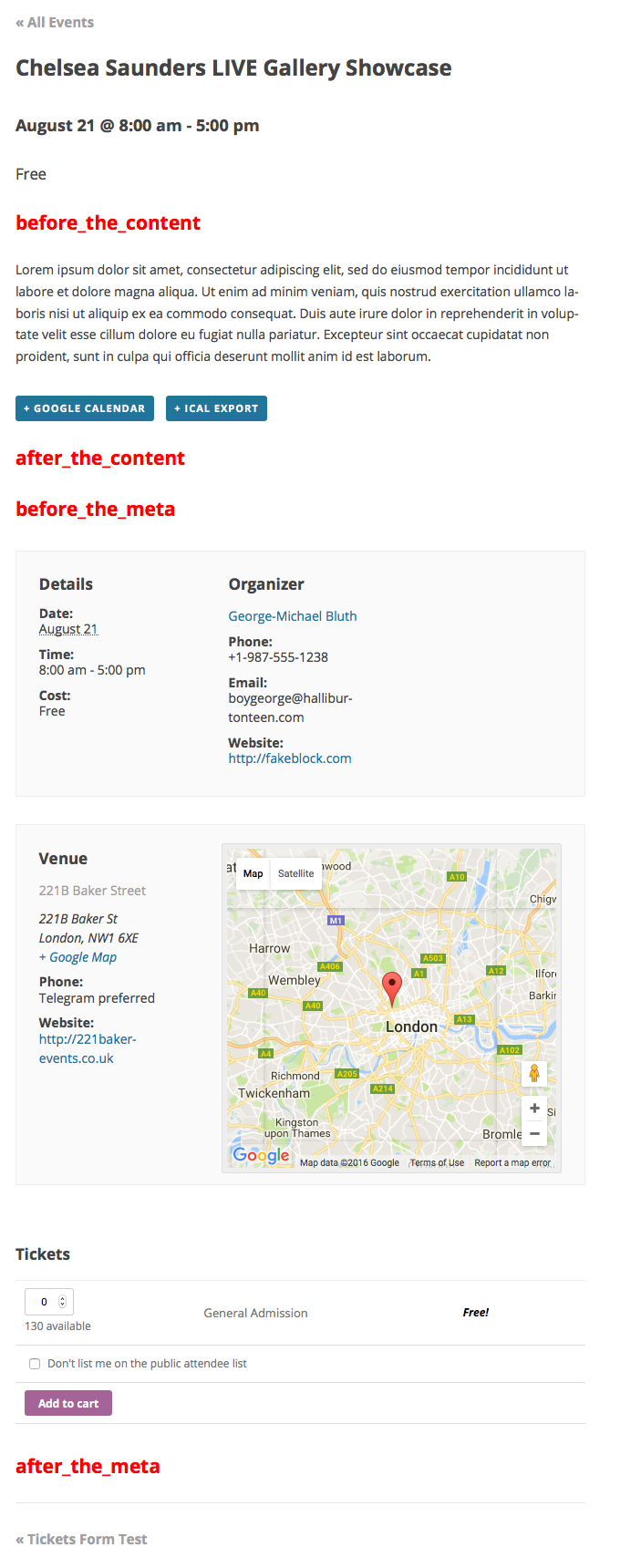 These content hooks display on every single event, and are the locations to where you can move the tickets and RSVP forms.[/caption]
if ( class_exists( 'Tribe__Tickets_Plus__Commerce__WooCommerce__Main' ) ) {
// Remove the form from its default location (after the meta).
remove_action( 'tribe_events_single_event_after_the_meta', array( Tribe__Tickets_Plus__Commerce__WooCommerce__Main::get_instance(), 'front_end_tickets_form' ), 5 ); }if ( class_exists( 'Tribe__Tickets_Plus__Commerce__WooCommerce__Main' ) ) {
// Place the form in the new location (before the content).
add_action( 'tribe_events_single_event_before_the_content', array( Tribe__Tickets_Plus__Commerce__WooCommerce__Main::get_instance(), 'front_end_tickets_form' ), 5 ); }Let me know if that helps.
Have a great day!
Geoff B.
October 9, 2017 at 12:11 am #1361017ParticipantHi Geoff,
thanks for your detailed answer. I can’t find an option in Ticket Plus as you described, maybe because I’m not using Events Calendar too?
I tried to use the code provided but nothing change.
October 9, 2017 at 7:47 pm #1361370MemberGood evening Aurélien,
Thank you for writing back.
As a side note, we can absolutely switch to French if you prefer.You are absolutely right, good catch!
These snippets will only work alongside the Events Calendar.I believe you will be better served with the following snippet as a foundation to work on: https://gist.github.com/GeoffEW/09005c81be890a562def47b05ae7fe3b
Let me know how that goes.
Best regards,
Geoff B.October 9, 2017 at 11:53 pm #1361413ParticipantThanks for your gist! I’ll continue in English. 😉
But it did not work as expected… anyway my client would like to manage tickets in a different way so my problem is no longer relevant.
October 10, 2017 at 11:34 pm #1361920MemberHey Aurélien,
I am mostly glad the issue is out of your hands, but I wish this would have been more helpful to you.
You are welcome back in our support forums any time 🙂
For now, I am going to close this thread.
Have a great week!
Geoff B.
-
AuthorPosts
- The topic ‘Move Ticket Form’ is closed to new replies.