
Home › Forums › Calendar Products › Events Calendar PRO › Mobile Issues
- This topic has 2 replies, 3 voices, and was last updated 10 years, 1 month ago by
Support Droid.
-
AuthorPosts
-
November 6, 2015 at 2:54 pm #1022702
Justin
ParticipantHello,
We are having a few issues with CalendarPro on mobile.
1. On iPhone 4, the days of the week within the calendar are not getting abbreviated (to the 3 letter abbreviation), and so they are overlapping within one another.
2. On iPhone 4, the functionality of clicking the date and having the info appear below the calendar is not working (when you click, nothing registers at all).
3. On iPhone 4, when you click the filters button to show filters, there is a dark grey ‘Submit’ button that appears below the filters. We have not seen this button appear on any other device, and we cannot get it to appear from within Firefox in order to target its CSS class. Could you please tell us what the CSS class of this button is so that we can style it to match our theme?
Thank you!
November 7, 2015 at 9:24 pm #1022966Cliff
MemberHi Justin.
I’ll try to help with the items you mentioned.
- On my testing site with all non-Modern Tribe plugins disabled and the Twenty Fifteen default WordPress theme — on the main Events page: If initial page load occurs while the browser width is 768px or less (i.e. you could replicate it on a narrow desktop browser), the day abbreviations (e.g. “Mon”) appear instead of the full names (e.g. “Monday). I’d suggest testing for plugin or theme conflicts if you confirm it really isn’t happening on your site.
- Are you referring to the Mini Calendar widget? It’s the only thing I can think of that displays content below a calendar view once you click a date.
- Just resize your Firefox browser to 767px or narrower to get the gray button version of Filter Bar to appear. Here’s the Chrome Developer Tools view of the rules applying to that button:
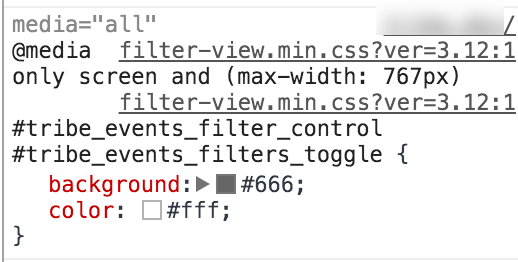
I hope this information helps you resolve your items. Let me know if I can be of further assistance.
February 18, 2016 at 8:30 am #1075468KeymasterThis topic has not been active for quite some time and will now be closed.
If you still need assistance please simply open a new topic (linking to this one if necessary)
and one of the team will be only too happy to help. -
AuthorPosts
- The topic ‘Mobile Issues’ is closed to new replies.