
Home › Forums › Calendar Products › Events Calendar PRO › Is there any way to remove the Use New Venue option
- This topic has 4 replies, 3 voices, and was last updated 10 years, 1 month ago by
Support Droid.
-
AuthorPosts
-
November 3, 2015 at 9:02 am #1021332
Luke
ParticipantWhen creating new events it gives you the option to Use New Venue.
Is there anyway to remove this so it only gives options of the venues I have already created?
Kind regards,
LukeNovember 3, 2015 at 11:36 am #1021415George
ParticipantHey Luke,
Just to be 100% clear, do you mean the venue fields in the wp-admin? These ones, specifically:
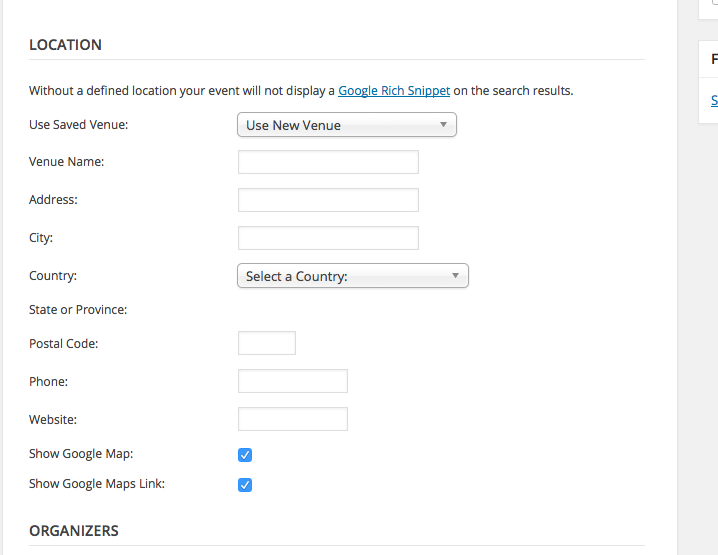
Just want to make sure I know what you’re talking about – I’m pretty darn certain this is what you mean but you never know 🙂
—
Assuming this is what you mean, then unfortunately the only way to go about doing this is with custom code. You can get started by first hiding all the extra fields for “new venue creation”, which you can do with this CSS:
#event_venue.eventtable tr {

    display: none;

}
#event_venue.eventtable tr:first-of-type,
#event_venue.eventtable tr:nth-child(2),
#event_venue.eventtable tr:nth-child(3) {
display: table-row !important;
}Here’s how that makes things look for me:
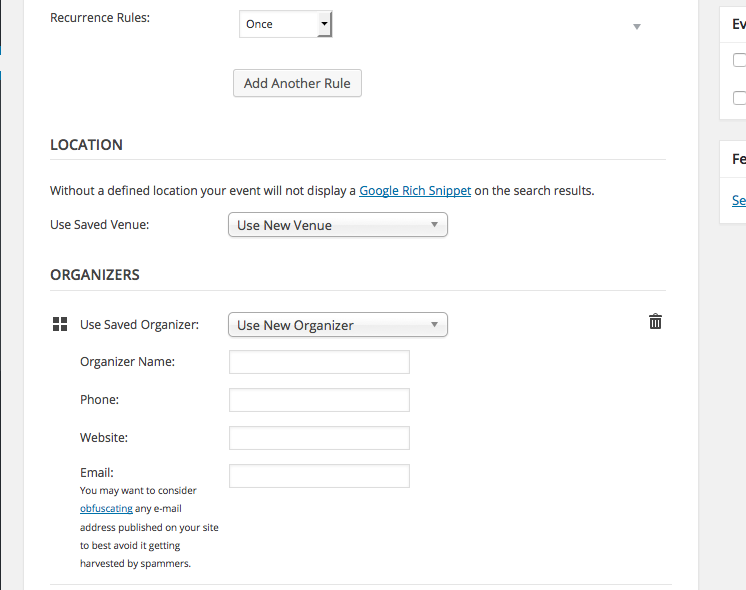
The dropdown still says “Use new venue”, obviously, but this is unfortunately not so easy to change 🙁 You’d have to customize the chosen.js javascript directly which is a bit outside the scope of the forums here.
I hope this is a good start though! If you’re not familiar with adding admin-facing CSS to your WordPress site, research this online – there are many ways to do it and you should choose the option that best suits your needs.
Cheers!
GeorgeNovember 4, 2015 at 4:36 am #1021606ParticipantHi George,
Thanks for the reply. Yeah that was the Venue section I was referring to, I had already removed the extra fields using custom CSS and changing the Use new venue text is the last past I need to fix. Simply changing this placeholder text will work but I have so far been unable to locate the correct JS file. I don’t suppose you know which file I need to locate do you, or at least some idea of the correct folder would be useful as a starting point.
Kind regards,
LukeNovember 4, 2015 at 10:51 am #1021800ParticipantThanks for elaborating on things Luke – I can point you to where that text is dictated, but as I noted it is unfortunately a bit of complex customization 🙁 It’s also something you cannot alter from a filter or something; meaning you have to edit core plugin code, meaning these changes will be overwritten each time you update the plugin and thus have to be re-added.
But onto the location of this text itself – I actually misspoke earlier about this being primarily dictated by JavaScript. It’s actually generated by a method called saved_venues_dropdown() which belongs to the Tribe__Events__Main class.
To find this, head to the following file: the-events-calendar/src/Tribe/Main.php
The saved_venues_dropdown() method resides around line 1628 or so of the file.
The meat of the code that actually displays the HTML markup, and thus the “Use new Venue” text, all lives in this method.
Around line 1707 or so, you’ll see code like this:
echo '<option value="0">' . esc_html( sprintf( __( 'Use New %s', 'the-events-calendar' ), $this->singular_venue_label ) ) . '</option>';
Change 'Use New %s' to something like 'Choose a %s' (the %s will be auto-replaced with the word “Venue”) and you should be good to go.
I hope this helps!
— George
February 18, 2016 at 8:30 am #1075387KeymasterThis topic has not been active for quite some time and will now be closed.
If you still need assistance please simply open a new topic (linking to this one if necessary)
and one of the team will be only too happy to help. -
AuthorPosts
- The topic ‘Is there any way to remove the Use New Venue option’ is closed to new replies.