How to manage stock for different pricing tiers of a single event.

Home Forums Ticket Products Event Tickets Plus How to manage stock for different pricing tiers of a single event.

Viewing 3 posts - 1 through 3 (of 3 total)
  • Author
    Posts
  • #1223937
    dpeschio
    Participant

    For example, we have 100 seats available and different pricing for Children, members and non-members. The number of tickets for each pricing tier isn’t fixed, just a max of 100 can be sold in any combination. Any suggestions on how we can manage stock for this?

    #1224637
    Andras
    Keymaster

    Hello Dan,

    Excellent question you have there, thanks for reaching out!

    If that is for one event, then you can easily use the Global Stock feature.

    When creating an event, in the ticket section tick the checkbox “Enable global stock”, then save the event. If you start adding tickets before saving this setting, then you will not be able to use it for tickets.

    After the new settings is saved add a new ticket or edit an existing one.

    You now should see a dropdown titled “Global stock mode”. There select “Use global stock”. Create all 3 tickets the same way.

    You are done. 🙂

    Here’s a screenshot of the settings.
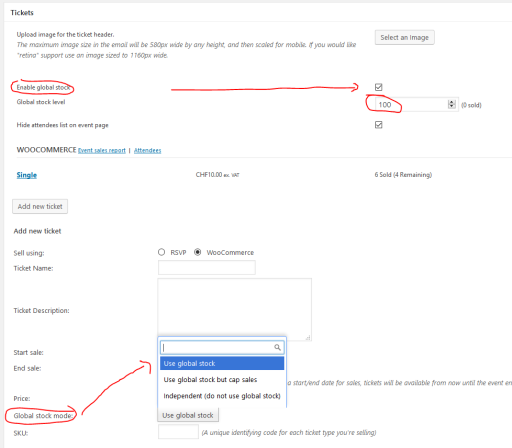
    Cloudup wf0kxsecm3n

    Now people can buy max. 100 tickets for that event (or whatever you set). That can be 100 pcs from one ticket, or a total mix.

    Let me know if this is what you are looking for.

    Cheers,
    Andras

    #1239966
    Support Droid
    Keymaster

    Hey there! This thread has been pretty quiet for the last three weeks, so we’re going to go ahead and close it to avoid confusion with other topics. If you’re still looking for help with this, please do open a new thread, reference this one and we’d be more than happy to continue the conversation over there.

    Thanks so much!
    The Events Calendar Support Team

Viewing 3 posts - 1 through 3 (of 3 total)
  • The topic ‘How to manage stock for different pricing tiers of a single event.’ is closed to new replies.