
Home › Forums › Calendar Products › Community Events › Function to remove "lost your password" text from admin area breaks Google Maps
- This topic has 5 replies, 2 voices, and was last updated 10 years, 4 months ago by
George.
-
AuthorPosts
-
November 16, 2015 at 6:52 am #1026356
Daniel Maier
ParticipantHello,
When using the following function on functions.php to remove “lost your password?” text form the admin login area it breaks Google Maps. No errors are displayed in the inspector it only breaks it.
Any idea why your plugin reacts to this function?
// Remove 'Lost your password?' link text on WordPress login page
function remove_lostyourpassword_text ($lostyourpassword_text) {
    if ($lostyourpassword_text == 'Lost your password?') {
        $lostyourpassword_text = '';
    }
    return $lostyourpassword_text;
}
add_filter( 'gettext', 'remove_lostyourpassword_text' );
Thanks!
-
This topic was modified 10 years, 5 months ago by
-
This topic was modified 10 years, 5 months ago by
November 16, 2015 at 9:17 am #1026485ParticipantHey Daniel,
Thanks for reaching out – there are a few specific things I’m curious about here:
- Why are you trying to disable this link? I know that in some sense it’s none of my business! 🙂 Just curious, as this is a very essential feature of any site where users will be logging in and out…although maybe you don’t have users other than yourself or just a few admins or something, so that would make sense. Just curious!
- When you say “it breaks Google Maps” do you just specifically mean the “Map View” generated by The Events Calendar? Can you link to where this is broken so that I can see how specifically it’s manifesting?
In closing, for now, there’s a bit of code that does this that I took right from the Jetpack plugin. It’s essentially the same exact code you currently have, but just in case you’re interested in trying it out:
function remove_lost_password_text( $text ) {

	if ( 'Lost your password?' == $text )

		$text = '';
return $text;
}add_filter( 'gettext', 'remove_lost_password_text' );
Thanks!
GeorgeNovember 16, 2015 at 10:08 am #1026505ParticipantHi George,
The reason I’m trying to disable that link is for internal security. We have some users with higher privileges that don’t always choose strong passwords so we will manage that in a different way. Hence the reason for disabling the link for the users.
The map that breaks is the map displayed on the single view of an event. The Google Maps view is ok but not the map on the event view.
You can check that here: https://cityofwinterpark.org/event/art-on-the-green/2015-11-16/I tried the code you got from the Jetpack. It doesn’t fix it. It is basically the same code.
Thank you!
November 16, 2015 at 12:53 pm #1026570ParticipantIt is indeed the same code, I just wanted to recommend it in case something with quotation marks in your original code was messing it up or something, no worries on this.
Back to the issue, there are few things:
1. The map on the link you provided worked fine for me. I’m in Firefox on a Mac – what about you? If you try a different browser and/or operating system, does the behavior change for you?
2. Do you mean to say that literally everything works, then you just add this one password-reset-link snippet on your site, and then the map just stops working suddenly?
3. I went to your site and it appears it’s broken in ways related to your theme or something, not The Events Calendar – for example, on page load there’s just a huge list of unstyled links above the page content:
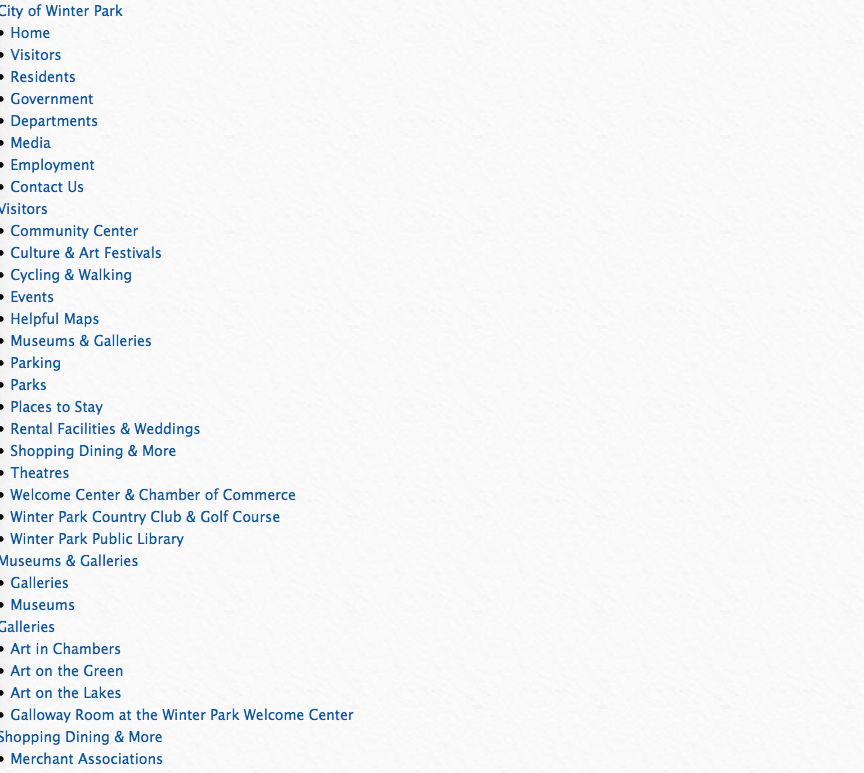
We don’t have to do it now but at some point I may recommend testing for theme conflicts here…
Thanks for your patience!
GeorgeNovember 16, 2015 at 1:26 pm #1026592ParticipantYes, I figured that George. I tried it but the code is the same and didn’t change anything unfortunately. Thanks for suggesting that though.
1. You probably checked after I removed the snippet so it was working because of that. I didn’t want to leave it broken for too long.
2. Yes, that’s correct. As soon as you add that function to functions.php the map stops working on single view.
3. Thanks for letting me know about that. I had some trouble with the mobile menu script but it should be fixed now. If you still see that, please empty your browser’s cache.
I’m not sure why that function to remove a text from the admin area would break the map on the event page. If you are able to scale that to your developers that would be good as it seem to be a bug of some sort. I could be wrong but I just can’t find a relation and it doesn’t throw any error.
I found a workaround/fix:
Instead of using the “equal” (==) PHP operator, if you use “identical” (===) it doesn’t break the map and everything seems to work.
// Remove 'Lost your password?' link text on WordPress login page
function remove_lostyourpassword_text ($lostyourpassword_text) {
    if ($lostyourpassword_text === 'Lost your password?') {
        $lostyourpassword_text = '';
    }
    return $lostyourpassword_text;
}
add_filter( 'gettext', 'remove_lostyourpassword_text' );
Thanks.
November 17, 2015 at 9:16 am #1027078ParticipantWow, I’m really surprised about simply qualifying the comparison there a bit more with a === instead of == resolved this! Weird!
Thanks for sharing your solution though. I will close up this thread for now, but open a new thread any time if we can help with anything else 🙂
Cheers!
George -
This topic was modified 10 years, 5 months ago by
-
AuthorPosts
- The topic ‘Function to remove "lost your password" text from admin area breaks Google Maps’ is closed to new replies.