
Home › Forums › Calendar Products › Filter Bar › FILTER BAR NOT DISPLAYING "WITHIN DISTANCE OF" UNLESS DATA IS ENTERED
- This topic has 3 replies, 2 voices, and was last updated 10 years, 10 months ago by
George.
-
AuthorPosts
-
December 6, 2015 at 11:11 am #1036478
cybertek
ParticipantI am trying to have the “Within Distance of” displayed all the time….at this time it only displays after one enters some data in the “NEAR” input field and clicks on “FIND EVENTS” or hits the Enter key.
Please advise. As I mentioned, I would like to have the “Within Distance of” displayed all the time, even before any input is made, as shown in the link below:
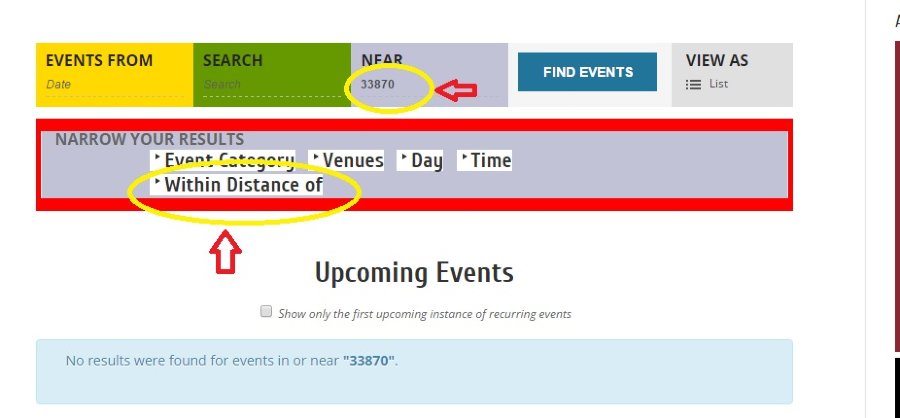
Thank you.
December 7, 2015 at 12:43 pm #1037098ParticipantHey @cybertek,
The way you’ve described Filter Bar’s functionality is exactly by design. If there is no data entered, or no zip code provided or anything, then “Within Distance Of” cannot work. Because there’s nothing to be in distance of.
In other words, when you enter a location, that field makes sense because then you can filter things within distance of that location.
But if no data is entered, then “Within Distance Of” makes no sense. Within Distance Of…of what? There’s no location or zip code entered, so “within distance of” cannot be used.
I mention this for two reasons:
1. We unfortunately can not help with customizations in any way. Please see the “Product support” section of our site and license terms here for more information.
2. Revealing that field without the location requirement would be useless and would break things, and so even if we could help with customizations, it’s one that I would very heavily recommend against doing.
Please let me know what you think about my comments here, and how you envision things working if this field is just open all the time with no location available for it to work correctly.
Thank you,
GeorgeP.S.
Please still address my concerns above! However, just to provide the answer you mainly are seeking here, you can force that field to be visible by adding the following CSS to the bottom of your theme’s style.css file:
#tribe_events_filter_item_geofence {

    display: inline-block !important;

}
😀
December 7, 2015 at 4:53 pm #1037247ParticipantHey George,
Thanks for the code, it worked great!
As for the reasoning, per my customer’s request. It also provides a visual of the different options one has before entering any data request. One cannot take for a “given”, what a user is contemplating…but to provide as much options as esthetically possible…;) Tribe might even consider under the “Search” field, replacing “Search”(which is quite redundant) with “click here or enter request/data here”, etc.??BTW, is there a section where one can find CSS mods to “dress up” the Events page a bit?
Regards.December 8, 2015 at 10:58 am #1037762ParticipantCool, I’m glad to have helped with that code – and I appreciate your elaboration on the reasoning behind revealing that field. I hope you didn’t take my questions as “snarky” or anything – I was just genuinely curious and totally see now why you might have wanted that field revealed.
As for your question about a place where CSS modifications are all collected and shared, we are unfortunately working on that sort of thing on our site, but have nothing like that at present 🙁
Sorry about that.
I hope this information helps! I will close up this specific thread for now, but if any other questions, comments, or concerns arise, open a new thread any time 😀
Sincerely,
George -
AuthorPosts
- The topic ‘FILTER BAR NOT DISPLAYING "WITHIN DISTANCE OF" UNLESS DATA IS ENTERED’ is closed to new replies.