
Home › Forums › Ticket Products › Event Tickets Plus › Fieldset not appearing at checkout / orders
- This topic has 7 replies, 4 voices, and was last updated 9 years, 11 months ago by
Krystle.
-
AuthorPosts
-
October 2, 2016 at 11:00 am #1171649
Krystle
ParticipantTrying to sell tickets to an event and since we’re serving alcohol, we want to have a checkbox to validate attendees are 21+. Created a fieldset with a checkbox for just that, but it’s not appearing in the order or in checkout. Already did the various tests, and no change. Just not seeing the order.
October 3, 2016 at 11:31 pm #1172098Geoff B.
MemberGood evening Krystle and welcome back!
Thank you for reaching out to us.
We are sorry to hear about the checkbox not showing up during the order process. Yikes!
I would love to help you with this topic.Unfortunately, it seems like your website is down currently.
Could you please send me a copy of your WordPress theme / child theme in a .zip file link in a private reply (via Dropbox or Google Drive) so that I can run some tests on my end ?
Please ensure you are using the latest files as found on your actual website.
This way I will get access to any updates you might have made.Best regards,
Geoff B.
October 4, 2016 at 11:29 am #1172420ParticipantThis reply is private.
October 5, 2016 at 1:47 am #1172595MemberGood evening Krystle,
Thank you for writing back and for the files.
The good news is that I was able to successfully able to have tickets work with your theme.
So the issue lies elsewhere.The first thing I am noticing is that you have a couple of warning in the Google Chrome Developer Tools Console.
You might want to check that out to make sure all can work well.Secondly, could you please send me a screenshot of the Ticket section of this event https://californiacoffeeandteatrails.com/event/san-gabriel-valley-trails-california-hiking-coffee-tea/ , including the details of each ticket + Attendee information section.
Hang in there as we try to figure this one out.
Best regards,
Geoff B.
October 5, 2016 at 10:52 am #1172837ParticipantThis reply is private.
October 6, 2016 at 10:37 am #1173384MemberGood afternoon Krystle,
Thank you for the screenshots.
This allowed me to find out what the issue is: you need to have at least one option in checkbox fields (see screenshot).
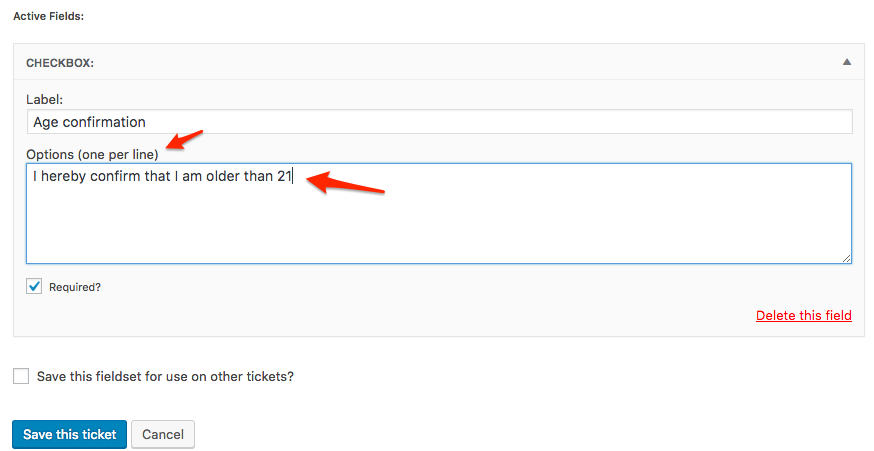
Let me know how that goes.
Best regards,
Geoff B.October 28, 2016 at 9:35 am #1184476Support Droid
KeymasterHey there! This thread has been pretty quiet for the last three weeks, so we’re going to go ahead and close it to avoid confusion with other topics. If you’re still looking for help with this, please do open a new thread, reference this one and we’d be more than happy to continue the conversation over there.
Thanks so much!
The Events Calendar Support Team -
AuthorPosts
- The topic ‘Fieldset not appearing at checkout / orders’ is closed to new replies.