
Home › Forums › Calendar Products › Events Calendar PRO › Events Calendar Widget next and previous month links not working
- This topic has 6 replies, 3 voices, and was last updated 10 years, 7 months ago by
Support Droid.
-
AuthorPosts
-
August 28, 2015 at 8:24 am #999923
windhill
ParticipantJust updated WP, Events Calendar and Events Calendar Pro to latest versions. Noticed the Calendar Widget on home page and sidebar no longer shows the previous and next buttons for the months. Saw a post here a few months back on this but didn’t see a resolution.
August 28, 2015 at 11:23 am #1000018George
ParticipantHey @windhill,
Thanks for reaching out!
I checked out http://www.ncmaboston.org/ and only found one instance of our widget there:
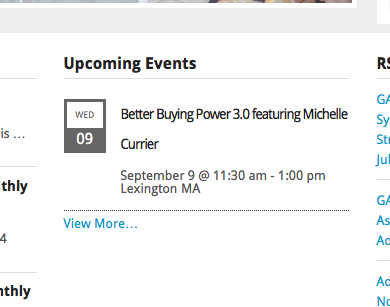
This only shows one event, but I went to http://www.ncmaboston.org/events and indeed found only one upcoming event there, so this widget is displaying things accurately.
I did not find another instance of our widget in the sidebar – can you add one back in place so we can see problems live?
For now, I didn’t notice anything wrong with that other widget’s display…apologies if I’m missing something here, just curious to understand the problem accurately so that I can best help you out! 🙂
Thanks,
GeorgeAugust 28, 2015 at 12:55 pm #1000067ParticipantIts the calendar widget in the sidebar that we’re having issues with. Not the one in the center of the home page. Sorry for not being clear.
August 31, 2015 at 2:19 pm #1000641ParticipantHey @windhill,
No worries! Thanks for clarifying. So, you mean the calendar in this screenshot?:
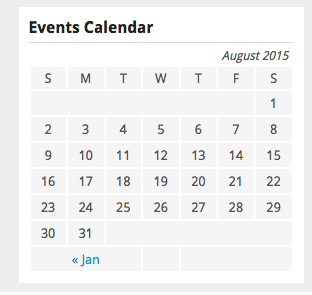
If so, that is not a calendar generated by The Events Calendar, that’s another widget either from WordPress core itself or from another plugin. We unfortunately do not offer support for either category of things, only for our own code – sorry for the confusion here and if this is frustrating! I will not close this thread though – please let us know if there’s anything we can help with or you have any other questions.
Thank you,
GeorgeSeptember 1, 2015 at 3:35 am #1000813ParticipantThank you for the clarification. Got my plugins mixed up and have the correct one now. However, on the home page, the Event Calendar widget is not displaying correctly. It looks find on inside pages but is distorted on the home page. How can I fix that?
September 2, 2015 at 1:44 pm #1001428ParticipantHey @windhill,
No worries! Glad to have helped clarify that there. As for the styling weirdness, this is unfortunately arising mostly from your theme. To fix those styles, you’ll have to write custom CSS at the bottom of your theme’s style.css file to override styles from your theme. We don’t officially support customizations here, so you’ll have to take the reins on this mostly, but here’s a quick example to hopefully get you started:
.tribe-mini-calendar-event .list-info h2.entry-title,

.tribe-mini-calendar-event .list-info h2.entry-title a {

    letter-spacing: 0;

    line-height: 1.4;

}
This CSS will undo the tight letter spacing of the widget Titles and will set their line-height a bit lower than they currently are.
For further help with customizing that CSS, you should definitely check out a free tool like Firebug if you use FireFox, or the Developer Tools for either Safari or Chrome, and use their “Inspector” tools to find the HTML elements and classnames for them that you’d need to write your custom styles.
I hope this information helps!
Cheers,
GeorgeSeptember 17, 2015 at 7:05 am #1005917KeymasterThis topic has not been active for quite some time and will now be closed.
If you still need assistance please simply open a new topic (linking to this one if necessary)
and one of the team will be only too happy to help. -
AuthorPosts
- The topic ‘Events Calendar Widget next and previous month links not working’ is closed to new replies.