
Home › Forums › Calendar Products › Events Calendar PRO › Event Calendar Pro – CSV Import – Event End Date Incorrect
- This topic has 10 replies, 3 voices, and was last updated 10 years, 1 month ago by
Support Droid.
-
AuthorPosts
-
January 7, 2016 at 11:06 am #1052069
Jessica Sepkowitz
ParticipantHello! I have Tribe Events Pro, and I just started using the Import CSV functionality to upload events. I noticed:
1) The Event Start Date sets correctly, however the Event End Date sets incorrectly as the day before the Event Start Date.
2) If I go to “Edit Event” > make a change like adding a picture, then press “Update”, the Event End Date & End Time resets to the same value of the Event Start Date & TimeFor Example, if my event is 1/18/2016, 8:30pm – 10:30pm:
– the Event Start Date sets to 1/18/2016
– the Event End Date sets to 1/17/2016Is there anything I can do to get this to set to the correct date? Or is this user error?
I just imported 1 event and did not make any updates, so you can see how it imports: http://therustic.com/event/strangetowne-2/
Thank you for your help!
January 7, 2016 at 11:22 pm #1052300Brook
ParticipantHowdy Jessica,
That’s certainly not expected. I would love to help you with this. Would you mind sharing a copy of the CSV file you are uploading which is having this problem? I can then inspect it and see if I can figure out what’s up. If you can upload it to any site, perhaps a file sharing one like dropbox, then link it here. Would that work?
Cheers!
– BrookJanuary 7, 2016 at 11:25 pm #1052302ParticipantHello! I just realized I forgot to upload my file! I have attached my csv files here, I tried both excel and a UTF-8 text file: https://www.dropbox.com/sh/c5es80bsuyxfriy/AADIWghuLZzGiZAH53fBL2XZa?dl=0
Thank you so much for your help!
January 11, 2016 at 10:12 pm #1054300ParticipantHowdy Jessica,
Thanks for sharing the link! I tried that CSS file. When I imported it the dates were all correct. Here are the settings I used:
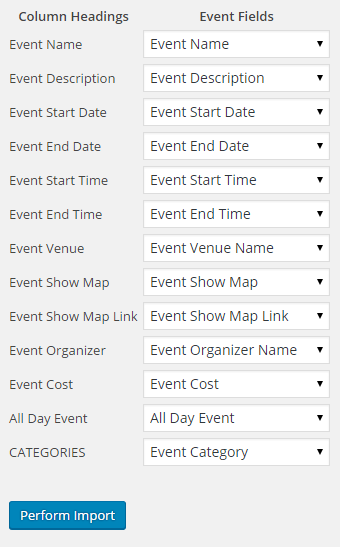
I am sure you have double checked your settings, but can you check one more time? I know from experience that it is easy to accidentally set the end date to the end time by accident, which can have strange and unpredictable results.
Do your settings match those above? If so, would you mind sharing your full system info? Make sure to use the ‘Set as private reply’ checkbox to protect your private information from the public. You can find the system info by going to WP Admin > Events > Settings, clicking on the “Help” tab, and scrolling down to the ‘System Information’ box. (Or by going to [yoursite]/wp-admin/edit.php?post_type=tribe_events&page=tribe-events-calendar&tab=help) That will give me a lot of extra information to help diagnose the problem. IN particular I am wondering if your Timezone settings might be affect this somehow.
Cheers!
– Brook
January 11, 2016 at 11:18 pm #1054325ParticipantThis reply is private.
January 12, 2016 at 10:50 pm #1054983ParticipantOops. It looks like you only got the first portion of your system info. The box that contains your system info scrolls up and down. Scrolling way down in the box you will see timezone information. If you could select everything in the box and share it here that would be perfect! My apologies for the confusion.
- Brook
January 13, 2016 at 1:31 am #1055026ParticipantThis reply is private.
January 13, 2016 at 10:20 pm #1055760ParticipantThank you Jessica. I am trying to reproduce this on my end. I’ll let you know what I find tomorrow.
Cheers!
– Brook
January 24, 2016 at 12:58 pm #1061406ParticipantHi Brook! Were you able to see anything that may have caused the end date to not set correctly? Hope you are having a great weekend!
January 25, 2016 at 10:26 pm #1062186ParticipantOops I am so sorry my last response is missing! I might have closed the tab before it finished posting my response.
I was unable to reproduce this issue. I was wondering if perhaps this could be the result of a conflicting plugin of theme. Sometimes plugins or events themes alter WP Timezone settings midscript, which can cause dates to drift by one day. Would you mind doing a conflict test? This guide walks you through how to test for a conflict, and then identify what is conflicting. Once we have narrowed this down we will be a big step towards finding a solution.
I hope you enjoyed your weekend as well!
- Brook
February 20, 2016 at 8:35 am #1078865KeymasterThis topic has not been active for quite some time and will now be closed.
If you still need assistance please simply open a new topic (linking to this one if necessary)
and one of the team will be only too happy to help. -
AuthorPosts
- The topic ‘Event Calendar Pro – CSV Import – Event End Date Incorrect’ is closed to new replies.