
Home › Forums › Calendar Products › Community Events › error 404 when adding an event
- This topic has 40 replies, 9 voices, and was last updated 10 years, 8 months ago by
Brook.
-
AuthorPosts
-
August 3, 2015 at 8:06 am #992736Participant
Definitely a temporary solution. Thanks for letting us know Christoph. I hope you don’t mind, I nabbed your system information from a previous post of yours. I will use that as well. We set aside some more time for further testing today, so I will let you know the result.
Cheers!
– Brook
August 4, 2015 at 1:12 am #992982Dirk
ParticipantThis reply is private.
August 4, 2015 at 2:46 am #992989gonzalosanza
ParticipantHello team, as I need to fix this quickly, I have been working on my own, and I discovered that this error is coming when the language is not set to US english, or at least, it’s coming when the language is set to Spanish. I hope this can point you in the direction to fix the problem quickly, it’s been a bit frustrated.
Thanks.
Gonzalo.August 6, 2015 at 7:40 am #993897ParticipantThat is interesting Gonzalo. It brings renewed scrutiny to this being an issue with language switching in WP.
I have definitely tried switching WordPress to a different Language as that has been a common pattern thus far. With Spanish I don’t get a 404 in any of the following scenarios:
- Going to: Community > Submit Event and clicking Submit
- Going to: Community > My Events
- Browsing the Calendar, or the WP Admin and adding/updating/deleting events.
I noted many people had customized slugs. For example instead of the URL being “example.com/events/community/add” folks had changed it to something like “example.com/eventos/communidad/agregar/”. So I have tested extensively with custom slugs as well. Everyone here updated from a past version before experiencing an error, so I have tried that as well. That’s just for staters, there are many many different things I have tried and nothing reproduces the problem.
At this point I am at a loss as to the cause. I am worried that the issue simply can not be reproduced on my systems. So I am going to try roping in someone else in a thoroughly different environment and see if they can do some extensive testing as well.
– Brook
August 6, 2015 at 10:04 am #993966Christoph
ParticipantI find out that the add page in version 3.11 is now named “hinzufuegen” in the german tranlsation.
If I link to “example.com/events/community/hinzufuegen” instead of “example.com/events/community/hinzufuegen” everything seems to be working.
Maybe in the spain version it is similar.August 6, 2015 at 12:26 pm #994025ParticipantAha! That makes sense. That seems the likely source of the problem. Thank you so much Christoph for taking the time to share that.
In Community Events 3.11 we fixed a bug that had existed for a while. The last part of the URL for Community pages was not translating properly. So, in 3.10 running Spanish the the Community Add Event and My Events URLs were:
- example.com/eventos/communidad/add/
- example.com/eventos/communidad/list/
But as of 3.11 and newer the final portion now translates:
- example.com/eventos/communidad/ahregar/
- example.com/eventos/communidad/lista/
In my case, and the case of my colleagues, we have all been using the automatically generated link to the Community Events link which points to the new URL. But, I bet everyone here was using a link they had manually added and it goes to the old URL.
The solution should be very easy. Update the Community Events plugin to 3.11. Grab the new URL by going to you WP Admin Bar, and clicking the Community: Submit Event link. Then use that URL to replace the old URL.
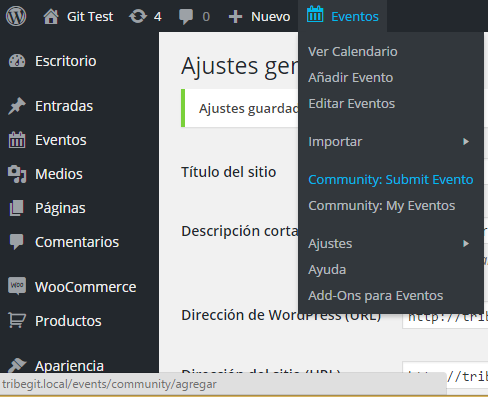
Most of you have probably added this URL to your menu, by going to WP Admin > Appearance > Menus, and adding an item to submit an event. If you edit that menu item, you can input the new update URL. No more 404s!
I am truly sorry none of us thought of this before hand. Our entire team was likely using PHP to automatically generate the current version of the URL. Thus no one would have noticed a problem. This did not occur to me until Christoph kindly pointed out that it had changed.
Does that solution fix things for everyone? Thanks again, Christoph!
– Brook
August 6, 2015 at 12:55 pm #994028Participantnice!! 🙂
August 6, 2015 at 1:59 pm #994042ANTONIO JOSE
ParticipantGoodnight: I changed my menu to the new url http://rondainfinita.info/eventos/comunidad/agregar/ (not ahregar)
and it WORKS!
Thank you all for the contributions, if you pass by Ronda (Spain) invite you to a wine of Ronda 😉 ThanksAugust 6, 2015 at 2:50 pm #994060Hans-Gerd
ParticipantI have solved the problem on my website with the hint from christoph:
http://www.beispiel.de/veranstaltungen/community/hinzufuegenthanks
August 6, 2015 at 11:26 pm #994114Stephan
ParticipantWorked! 🙂 Thank you
@Brook: I´ve changed my edit-event.php for more content.
The changes have gone with the update to 3.11.
Will this happen with every update?August 7, 2015 at 7:22 am #994204ParticipantExcellent! That is great news.
@Stephan Yes they will be lost. When WordPress updates a plugin it deletes the existing plugin folder, and then unzips the file it just downloaded to replace it. All changes made to plugins and themes are lost when you update them in WordPress. However, WordPress also provides “hooks and filters” to make it easy to modify things. Most people create a Child Theme and put any modifications in there. You can even create a theme override as per our Themer’s Guide. If you need any help with this please open a new topic and hit us up with questions. We’d love to help.
Since this issue is now resolved I am going to archive the topic. Thank you all for your patience and assistance in figuring this out. Cheers!
– Brook
-
AuthorPosts
- The topic ‘error 404 when adding an event’ is closed to new replies.