
Home › Forums › Calendar Products › Events Calendar PRO › Daylight Savings Issue
- This topic has 0 replies, 6 voices, and was last updated 7 years, 11 months ago by
Support Droid.
-
AuthorPosts
-
November 10, 2016 at 5:03 pm #1190684
clarksburgbaptist
ParticipantThe daylight savings change has all my events showing up on the calendar an hour later than what they are scheduled for in the backend.
I’ve tried opening the events and resaving them – but no luck there. I’ve looked through the support forum and couldn’t seem to find a previously recommended solution that fixes the problem. I also upgraded to latest version of the plugin and it now has my events out of order. 🙁
For the past three time changes I’ve had to manually change the event times, but for a premium plugin this shouldn’t be necessary.
Thanks for any help you can provide.
-
This topic was modified 9 years, 5 months ago by
November 11, 2016 at 1:38 pm #1191160Andras
KeymasterHello clarksburgbaptist,
Thanks for reaching out and sorry about your issue with DST. I can imagine that is causing a lot of headache. Let me try to help you with that.
To get a full picture of the situation I will need to ask you a couple of questions.
The daylight savings change has all my events showing up on the calendar an hour later than what they are scheduled for in the backend.
Did you do any changes to your website when DST was over? What were these changes?
I’ve tried opening the events and resaving them – but no luck there.
What are the timezone settings for your Events Calendar? You can find this under Events > Settings > General tab > Timezone settings (at the bottom). Please send me a screenshot, it should look like this:
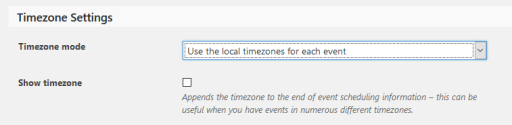
I also upgraded to latest version of the plugin and it now has my events out of order.
In your system information I still see versions 4.2.7. Can you please confirm that indeed you are using the latest versions, which is 4.3.2?
What do you mean exactly when you say “has my events out of order”? Is it only the timing or also something else? Was this “out of order” the result of the DST change, the change you made on your site or the upgrade of the plugins?
For the past three time changes I’ve had to manually change the event times, but for a premium plugin this shouldn’t be necessary.
Indeed it shouldn’t be and usually it is not. When there was a time change before (past three times) did you change any setting on your website to reflect the change? Or you didn’t touch anything and the times of the events just changed?
Also could you please send me a screenshot of the date & time settings of an event that you are experiencing a problem with? Should look something like this:
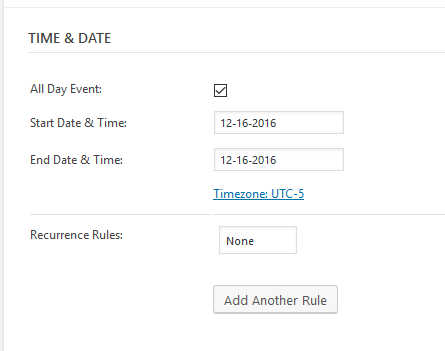
Looking forward to your answers!
Cheers,
AndrasNovember 13, 2016 at 10:36 pm #1191705ParticipantHi András,
My answers to your questions are below…
– No changes were made to the website when DST ended.
– See attached Screen Shot 1
– Please visit http://www.clarksburgbaptistchurch.com/calendar/ and look at the events for any Sunday. They should be ordered by time (AM to PM). However the first event listed is at 7PM followed by two events at 12:15PM, followed by a 11AM event, followed by a 4:30PM event.
– Yes, we are definitely using 4.3.2 (I may have copy/paste the system info that I provided before updating)
– Previously I would go in and manually change the times for all the effected recurring events.
– See attached Screen Shot 2Thank you for helping to resolve this issue!
November 14, 2016 at 1:31 pm #1192070KeymasterHello clarksburgbaptist,
Thanks for getting back to me on all the questions.
Regarding the events being not in a timely order in month view, we are aware of the issue and a fix is already underway. If all goes according to plan, it should ship with the next maintenance release in a week or two.
As for the DST issue, please give me some time to look into that. I’ll get back to you soon.
Thanks for your patience and cheers,
AndrasNovember 16, 2016 at 3:54 pm #1193530George
ParticipantHello!
I wanted to inform you that we’ve just published a series of updates to our products that fixes a number of issues.
The issues with Month View event ordering reported here should be fixed with these updates.
Learn more about this release—version 4.3.3—in the official release notes here → https://theeventscalendar.com/maintenance-release-events-calendar-4-3-3-event-tickets-4-3-3-premium-plugins/
Thanks for your patience in waiting for a fix!
GeorgeNovember 22, 2016 at 9:30 am #1195969ParticipantHello,
Checking back in here. It’s been a little over a week since I’ve heard anything regarding the Daylight Savings time change issue. Do you all have an update for this issue?
The month view event ordering was corrected by the latest update.
Thanks for your help!
November 23, 2016 at 3:39 am #1196406KeymasterHello clarksburgbaptist,
Thanks for reaching out.
We have a ticket open for the DST issue where we are collecting information from different users facing the same problem. There will be still some time until this issue gets fixed, I’m sorry.
Nonetheless, when we release a fix that will not modify your events’ timings that is already in your calendar. You will need to either do that manually or with an SQL query straight in your database.
If you let me know the details of the issue, I might be able to hammer together an SQL query for you. You will then need to run that on your database, which will then change the timings of your events.
- Is it all the events? If not, then it will get difficult and I might not be able to do it.
- Did the start time move? By how much and in which direction? (Pls. give me an example what it was / what it should be and what it is now.)
- Did the end time move? By how much and in which direction? (Pls. give me an example what it was / what it should be and what it is now.)
- Did anything else change? If yes, please give me as many details as you can.
If you send me this info, I can try to help with a hack.
Cheers,
AndrasDecember 15, 2016 at 8:35 am #1206446KeymasterHey there! This thread has been pretty quiet for the last three weeks, so we’re going to go ahead and close it to avoid confusion with other topics. If you’re still looking for help with this, please do open a new thread, reference this one and we’d be more than happy to continue the conversation over there.
Thanks so much!
The Events Calendar Support TeamMarch 30, 2018 at 4:32 am #1492570Jaime Marchwinski
KeymasterHi There!
Just wanted to share with you that a new release of our plugins is out, including a fix for this issue 🙂
Find out more about this release —> https://theeventscalendar.com/maintenance-release-week-25-march-2018/
Please update the plugins and let us know if the fix works for your site.
Best,
JaimeApril 21, 2018 at 9:35 am #1512867KeymasterHey there! This thread has been pretty quiet for the last three weeks, so we’re going to go ahead and close it to avoid confusion with other topics. If you’re still looking for help with this, please do open a new thread, reference this one and we’d be more than happy to continue the conversation over there.
Thanks so much!
The Events Calendar Support Team -
This topic was modified 9 years, 5 months ago by
-
AuthorPosts
- The topic ‘Daylight Savings Issue’ is closed to new replies.