
Home › Forums › Calendar Products › Events Calendar PRO › CUSTOM STYLESHEET "/Tribe-events/tribe-events.css" NOT APPLYING
- This topic has 8 replies, 2 voices, and was last updated 8 years, 8 months ago by
tradingbo.
-
AuthorPosts
-
July 25, 2017 at 5:44 am #1325680
tradingbo
ParticipantHey Guys,
Love the plugin and have recently purchased pro ( am writing here as have envato issue where for some reason I cannot access pro support forum, currently being resolved but can dm purchase code etc if required)
Basically installed TEC & ECP on site, attempting to customise Tribe-Event-Styles full stylesheet so have followed your instructions to create new stylesheets /tribe-events/tribe-events.css on my server and was under the impression these would automatically load on top of default plugin styles?
None of the css edits here are applying, HOWEVER they do apply when I set them as !important in my calendar display pages stylesheet (events-page.css).
Not sure what i’m missing here as have followed instructions to the letter. Also editing functions file with to replace stylesheets with
function replace_tribe_events_calendar_stylesheet() {
   $styleUrl = get_bloginfo('template_url') . '/gamble2016/-tribe-events/tribe-events.css';
   return $styleUrl;
}
add_filter('tribe_events_stylesheet_url', 'replace_tribe_events_calendar_stylesheet');

function replace_tribe_events_calendar_pro_stylesheet() {
   $styleUrl = get_bloginfo('template_url') . '/gamble2016/-tribe-events/Pro-/tribe-events-pro.css';
   return $styleUrl;
}
add_filter('tribe_events_pro_stylesheet_url', 'replace_tribe_events_calendar_pro_stylesheet');
This seems to replace the stylesheets but also overrides all default styles for the Tribe-Event-Styles full stylesheet which it says it will not override completely in the documentation.
Essentially I want to bootstrap the default photo events view with some custom css without using !important everytime.
I’m using WordPress 4.8 creating a theme with _S.
Any ideas whats going wrong here would be greatly appreciated.
website is http://www.tradingboundarieslive.com (still under construction but I will make public until this issue is resolved so you can view)Many Thanks,
Oli
July 25, 2017 at 6:52 am #1325723ParticipantHi just to amend the above,
Managed to get the theme to recognise the new /tribe-events/tribe-events.css
Issue was a silly mistake, I named the new folder on my server /tribe-events , obviously the forward slash was not required.However any additional CSS in this new stylesheet still isn’t overriding the default styles without the use of !important
I’m still slightly baffled as to why this is, as the support documentation clearly states that the new tribe-events.css file will be loaded after the default events stylesheets.
Still look forward to hearing from you
Many Thanks, Oli
July 27, 2017 at 6:20 am #1326848ParticipantHi Guys,
Just pinging this as still an active issue. Have created a new tribe-styles.css on my server and css is taking effect but only with !important rule. Is there a way to force my new stylesheet to load AFTER the default tribe plugin styles so we don’t have to rely on !important for every edit?
Many Thanks,
M
July 27, 2017 at 10:10 pm #1327294Geoff B.
MemberGood evening Michael (or Oli – I am not sure) and welcome back!
Thank you for reaching out to us.
First off, I would like to apologize for the delay answering.
We are currently experiencing a higher level of requests than usual.Please rest assured that we are working hard at correcting this situation.
We appreciate your patience while we try to normalize things.We are sorry to hear about the struggles you have faced while trying to use custom CSS stylesheets. I would love to help you with this topic.
You are right about the naming convention.
I will have to check with the powers that be regarding CSS stylesheet hierarchy as of now.However, I believe I have a much simpler solution to offer.
As long as the different CSS rules are specific enough, you can simply put them in your child theme’s style.cssThis typically works like a charm and is far less involved.
With that in mind, hang tight as I follow up on this for you.
Best regards,
Geoff B.
July 28, 2017 at 6:39 am #1327373ParticipantHi Geoff,
It’s Oli, name on account is Michael but i am the one designing the plugin for us.
Yeah i figured, it looks like you guys are having a hectic time on the forum recently!
Re: specificity I’ve tried to target more accurately as you suggest and this seems to be working in my tribe.events.css. For example to target:
.tribe-events-event-image a imgeffectively it seems you only need to adddiv.tribe-events-event-image a imgto get around the !important rule.However for other classes such as
.tribe-events-photo-event-wrapit seems required to target via parents 3 levels above egdiv.tribe-events-loop div.type-tribe_events div.tribe-events-photo-event-wrap.This is more heavy lifting that I was hoping for, are there any rules/exceptions to keep in mind when working out how specific we need to be with certain elements Geoff?
Or for the sake of much shorter (if a bit dirty) code, for performance, would it be better to simply bear the use of the !important rule and target classes directly?
Many Thanks,
Know you guys are busy and really appreciate the response
Oli
July 28, 2017 at 10:49 pm #1327821MemberGood evening Oli,
Thank you for your awesome understanding.
As promised, I have reached out to our coding ninjas.
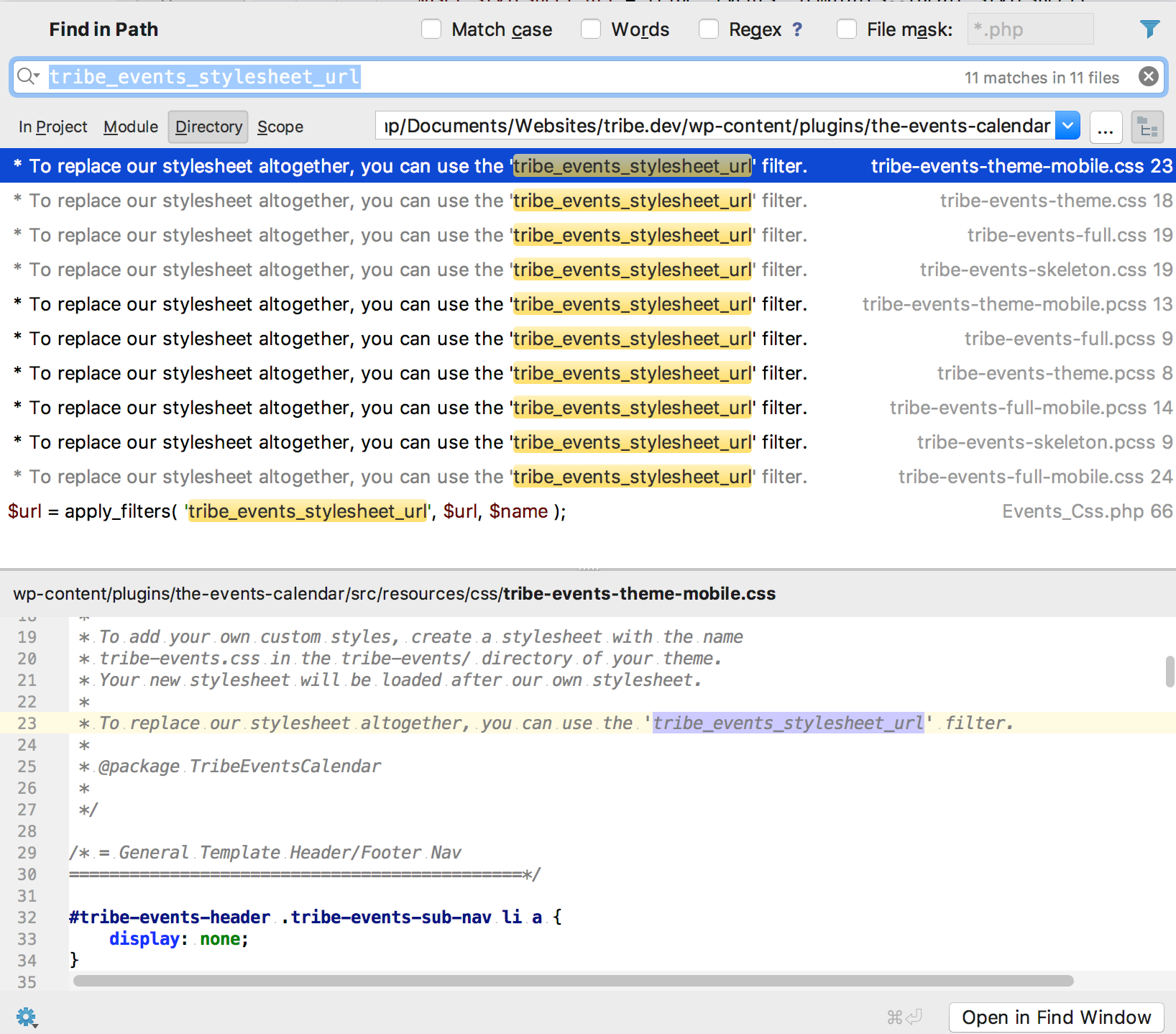
Apparently, the stylesheet hierarchy has not budged lately (which is great news in a way).However, it turns out that the tribe_events_stylesheet_url filter does not extend the default stylesheet, but replaces it completely. See the following screenshot for that
are there any rules/exceptions to keep in mind when working out how specific we need to be with certain elements Geoff?
That is a great question.
The short answer is that this is a case by case situation.
However, you can always try to cheat a little.For instance, if I am in a hurry, what I will do is take the CSS rule I want to change and add one element to it as far up as possible in the CSS hierarchy (making sure it stays relevant to this specific view).
As per your example, if I want to override
.tribe-events-photo-event-wrapI will use something like
#tribe-events-photo-events .tribe-events-photo-event-wrapAs you can see, there is no need to specify every single element between the 2 CSS elements.
Furthermore, adding a CSS ID (whenever available) is better than a class as it will always have priority.A rule that would have priority over the one I just gave you would be
#tribe-events-content .tribe-events-photo-event-wrapSame idea, the higher in the class, the better.
So in the end, this is totally up to you.
Purist will frown upon !important as it is “less clean”.But personally, I am more of a “as long as it works” type of guy 😉
Have a good weekend,
Geoff B.
August 1, 2017 at 5:30 am #1328705ParticipantHi Geoffe,
Thanks for the detailed response this seems to have helped a lot! Also taught me some much appreciated CSS wisdom for which I am v grateful, managed to cut a lot of the !important out and looking a lot cleaner now.
Many Thanks,
Oli
August 1, 2017 at 7:57 pm #1329218MemberGood evening Oli,
I am super stoked I managed to help you out AND teach you new tricks along the way.
You are welcome back in our support forums any time 🙂
For now, I am going to close this thread.
Have a great week!
Geoff B.
-
AuthorPosts
- The topic ‘CUSTOM STYLESHEET "/Tribe-events/tribe-events.css" NOT APPLYING’ is closed to new replies.