
Home › Forums › Calendar Products › Events Calendar PRO › Calendar Month view not displaying correctly on smaller screens
- This topic has 2 replies, 3 voices, and was last updated 10 years, 6 months ago by
Support Droid.
-
AuthorPosts
-
September 11, 2015 at 1:49 pm #1004429
bluesteelesolutions
ParticipantHello,
I’ve installed The Events Calendar Pro plugin for a clients brand new website.
Upon installation I noticed that when I changed the default view to the calendar month view for the /events page, on smaller screens the days of the week overlap and don’t shorten like the demos do on this site.
Also the Search, Date, Search, Location bar above the calendar doesn’t look like the demo does. Instead of consolidating to just having Find Events and View As options, the 4 columns contiue to squish until the labels aren’t legible.
I’ve installed the plugin on a sandbox site with only the bare basics of plugins installed and the same issues occured.
I also tried to abbreviate the days of the week by following the set up instructions here, but this didn’t work either.
Can you point me in the right direction? I can’t seem to find a topic with these exact issues occuring.
Thanks!
September 14, 2015 at 5:52 am #1004778George
ParticipantHey @bluesteelsolutions,
I’m sorry you’re having some issues here, especially because I took a look at your site and found that these issues are mostly arising from your theme 🙁
Step One: Getting Up-to-Date
The very first step in this process is for you to make sure that your Tribe plugins are at the most recent version:
• The Events Calendar: 3.12.1
• Events Calendar Pro: 3.12If your plugins are not at these versions on your site, you must update them to these versions before we can offer further assistance here.
Step Two: Further Troubleshooting
If updating the plugins does not help, then I’d first recommend taking another look at our official demo page of the “Month View” here → http://wpshindig.com/events/month/
You’ll notice that, on smaller browser/device sizes, the full weekday names compress to three-letter versions of the names; e.g. “Sunday” becomes just “Sun”.
This is being prevented by your theme, and the odd filter bar styles are from your theme, too. We do not offer support for themes, officially, but I only mention this as a “disclaimer” and to hopefully set your expectations early in case we can’t figure this one out ourselves – with that all being said, I’d like to at least try and help pinpoint the origin of these problems specifically.
To get started on that process, I’m curious if you can first confirm whether or not you’ve written any custom CSS on your site, or any custom JavaScript as well?
If so, then first make a back up of all your custom code. Then: try removing it from your site, and have another look at things.
Do your issues persist?
If so, then leave your theme in this state (i.e. with all your custom code removed, temporarily) and then head to Events > Settings > Display in your wp-admin. Look for the option here called “Events template”, and check out all the different options that you have on your site; here’s a screenshot of this option on my site, for example:
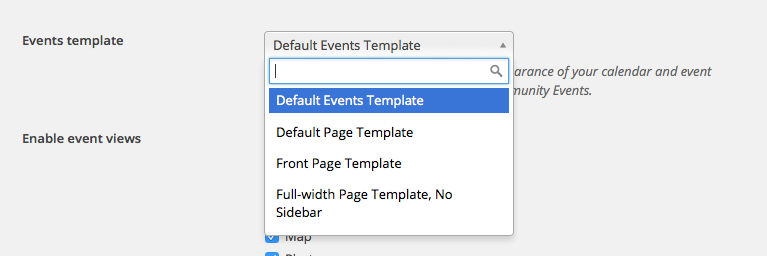
Try each option on your site – simply try one page template, save your settings, and then see if the Month View problems on your site behave a little better. If not, then go back to the settings panel and try the next template in line, and so on until you’ve tried them all. This may or may not make a difference, but is worth trying because a template from your theme may work better than one of our plugin-provided ones.
I hope all this information helps! Let us know how updating The Events Calendar and Events Calendar Pro on your site goes; and if problems persist after doing so, let us know what the “Step Two” steps reveal, if anything 🙂
Cheers!
GeorgeSeptember 29, 2015 at 7:05 am #1009605KeymasterThis topic has not been active for quite some time and will now be closed.
If you still need assistance please simply open a new topic (linking to this one if necessary)
and one of the team will be only too happy to help. -
AuthorPosts
- The topic ‘Calendar Month view not displaying correctly on smaller screens’ is closed to new replies.