Are there example of the exact syntax – how to use these shortcode arguments?

Home Forums Calendar Products Events Calendar PRO Are there example of the exact syntax – how to use these shortcode arguments?

Viewing 3 posts - 1 through 3 (of 3 total)
  • Author
    Posts
  • #1128250
    Th
    Participant

    From this page: https://theeventscalendar.com/knowledgebase/pro-widget-shortcodes/#common-to-all

    “Common arguments

    Whichever shortcode you opt for, you can always make use of these additional arguments:

    before_widget
    before_title
    title
    after_title
    after_widget

    These are, hopefully, pretty self-explanatory and often will not be required when you use shortcodes – but they are there if you need them.”

    #1128411
    George
    Participant

    Hey @Th,

    Thanks for reaching out. Those shortcode arguments work the same as any other, so in this sort of format:

    before_widget=""

    Now, what you put between the quotes there simply gets displayed in certain places depending on the argument.

    So let’s say you have this shortcode:

    [tribe_events_list before_widget="here are some events!"]

    Well, then the text “here are some events!” will display before the widget:
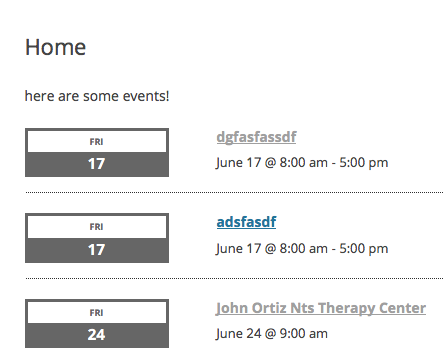
    A title argument adds a title; before_title and after_title add strings before and after the title; and so on.

    If you’re curious how they all work, I recommend putting a widget shortcode in a sample page, and just tinkering around a bit, experimenting with the different attributes. It’s the best way to see what they do.

    I hope this information helps,
    George

    #1134799
    Support Droid
    Keymaster

    This topic has not been active for quite some time and will now be closed.

    If you still need assistance please simply open a new topic (linking to this one if necessary)
    and one of the team will be only too happy to help.

Viewing 3 posts - 1 through 3 (of 3 total)
  • The topic ‘Are there example of the exact syntax – how to use these shortcode arguments?’ is closed to new replies.