
Home › Forums › Ticket Products › Event Tickets Plus › Adding Attendee Data to WooCommerce Email Confirmation
- This topic has 12 replies, 5 voices, and was last updated 9 years, 7 months ago by
FRANK.
-
AuthorPosts
-
July 19, 2016 at 3:33 pm #1141718
FRANK
ParticipantHi guys,
I have read many posts about adding event specific data to the email confirmation generated by WooCommerce and have managed to add event title, date and time to this email.
One thing that would finish the whole things off perfectly would be if the attendee meta gathered from the custom questions could also be added to this email after each ticket type.
I appreciate this is above the scope of support but some points or quick advice would be great if at all possible.
One previous post provided this snippet which unfortunately no longer works since the last update;
/*—-[ADD CUSTOM META TO ORDER EMAIL/INVOICE]—-*/
function mse_woocommerce_order_item_meta_end( $item_id, $item, $order ) {
$order_items = $order->get_items();
$post_custom_keys = get_post_meta( $order->id );
if (array_key_exists(‘_mse_order_fieldset_meta’, $post_custom_keys)) {
$fieldset_questions = get_post_custom_values(‘_mse_order_fieldset_meta’, $order->id);
$fieldset_questions = unserialize($fieldset_questions[0]);
foreach ($fieldset_questions as $item => $fs_questions) {
if ($item_id == $item) {
foreach ($fs_questions as $fs_question => $fs_meta) {
if (strpos($fs_meta[‘answer’], ‘|’)) {
$fs_meta[‘answer’] = str_replace(‘|’, ‘, ‘, $fs_meta[‘answer’]);
}
echo ‘<br><b>’ . $fs_meta[‘label’] . ‘: </b>’ . $fs_meta[‘answer’];
}
}
}
}
}add_action( ‘woocommerce_order_item_meta_end’, ‘mse_woocommerce_order_item_meta_end’, 10, 3 );
If there is something obvious from the above that changed to break the above any advice would be appreciated.
The attendee custom meta is of course shown in the tickets email so there must be a function somewhere to generate and add this data to an email.
I have looked everywhere for that bit of code but could not find where this function is generated that might allow me to hook it in to the other emails as well. Any idea what file (and where it is located) generates this output?
Thanks for any help possible on the above.
Regards,
Frank
July 19, 2016 at 4:08 pm #1141732Brook
ParticipantHowdy Frank,
I would love to help you with this.
We actually have an updated version of that snippet that probably does just what you’re looking for:
https://gist.github.com/ggwicz/2a87b71e08c584341ef2809f2ea9cb27
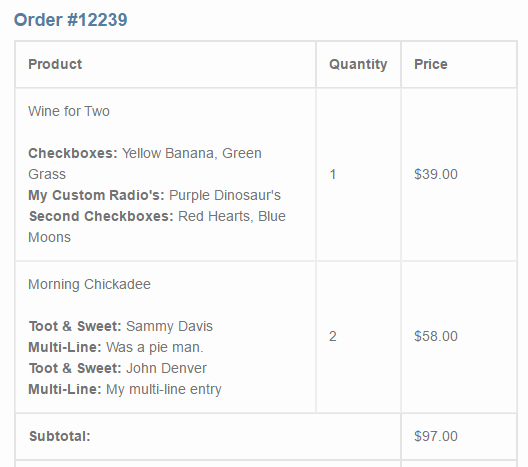
It will look like this when you insert it into your theme. Is that what you wanted? Is that the specific email you wanted to add the details to?
Cheers!
– Brook
July 19, 2016 at 4:18 pm #1141736ParticipantHi Brook,
That is the correct email and some of the above is what I was looking for and George provided me with an update to your snippet earlier today as it was repeating the events details for every ticket type – see his reply here: https://theeventscalendar.com/support/forums/topic/customising-the-new-order-e-mail-to-include-ticket-details/#post-1141508
That is the email but the information I was looking to include under each ticket is the custom attendee information gathered by gathering specific attendee information via the ticket fieldsets.
Similar to this screenshot (https://theeventscalendar.com/content/uploads/2016/04/b495cc7f3ca082ec.png) provided in post https://theeventscalendar.com/support/forums/topic/have-the-additional-fields-appear-on-invoice/ where the code I provided above came from.
Thanks for the initial help and feedback. If you could advise further on that additional information to include in that email then that would be fantastic if I could manage to get that done. Would be the icing on the cake to an already great system.
Kind regards,
Frank
July 21, 2016 at 5:22 pm #1142772ParticipantAhh great! I am glad you got straight in touch with George there since he wrote the snippet.
I see what you’re getting at with the “attendee meta info”. Right now we do not have a great API for retrieving and displaying meta info, and so we are not yet developing much in the way snippets for it. However, if you wish to hack together a solution I can point you in the right direction. Checkout this file: /event-tickets-plus/src/Tribe/Meta/Render.php . You will notice on about line 77 there is a function called ticket_email_meta() that displays the meta info in our tickets info. This could be heavily modified to display the info in the Woo Emails instead.
As I said we are hoping to make this easier in the future, and when we do it is likely we will come up with a few snippets of our own that showcase the easier to use API. Until then all we have are hacks like the above.
Does that all make sense? Will that work for you? Please let me know.
Cheers!
– Brook
July 25, 2016 at 2:56 am #1143589ParticipantThanks for the pointer Brook, I will take a look at that and see if I can do anything with it.
I appreciate the ticket meta feature is relatively new but it is encouraging to hear that you are looking at ways to improve this. Passing this info back to the customer before payment and after payment is critical to ensure accuracy and remove any scope for errors so it would really make for a near flawless purchasing process when this happens.
July 25, 2016 at 4:37 am #1143599ParticipantI can see that file and how it works no problem.
However, how is that code injected in to the ticket email.
The ticket email has the following action <?php do_action( ‘tribe_tickets_ticket_email_ticket_bottom’, $ticket ); ?> but where is the instruction for the code in render.php to be added to the above action?
Using that action I was able to output the QR code for each ticket in the Woo email confirmation but the ticket meta did not appear.
If you can provide any further pointers on the above it would be most appreciated.
Thanks again,
FRANK
July 25, 2016 at 10:45 pm #1144013ParticipantHowdy Frank,
For sure. That code is attached near the top of the file. You will see this line:
add_action( 'tribe_tickets_ticket_email_ticket_bottom', array( $this, 'ticket_email_meta' ) );
Which adds the email meta to that action. You will have to craft your own way of attaching the function to the other email though, it might even require writing your own version of that function.
Cheers!
– Brook
August 1, 2016 at 11:30 am #1146203Jayson Cote
Participant@frankgribbin, just wanted to offer my solution. I have a few attendee fields set in the ticket field sets to collect information for each ticket. I use the following code to get the submitted data from the field sets and display on the admin order screen, email notices etc. You will need to use the proper woocommerce action hook or filter for the function you are wishing to effect.
//** Add fields to order emails - customer //add_action( 'woocommerce_email_customer_details', 'gum_woo_checkout_fields_email_customer' ); function gum_woo_checkout_fields_email_customer( $order ) { //* NEW $fieldset_meta = get_post_meta( $order->id, Tribe__Tickets_Plus__Meta::META_KEY, true ); $cnt = 1; if (! $fieldset_meta ) return; echo '<h3> Course Participants </h3>'; foreach( $fieldset_meta AS $item => $value ) { foreach( $fieldset_meta[$item] AS $key => $value ) { $att_fname = (isset( $value['first-name'] )) ? $value['first-name'] : ''; $att_lname = (isset( $value['last-name'] )) ? $value['last-name'] : ''; $att_email = (isset( $value['email'] )) ? $value['email'] : ''; $att_phone = (isset( $value['phone'] )) ? $value['[phone'] : ''; $att_profession = (isset( $value['profession'] )) ? $value['profession'] : ''; $att_license = (isset( $value['license'] )) ? $value['license'] : ''; echo '<p>'; echo '<strong>Attendee - '. $cnt .'</strong><br />'; echo 'Name: '. $att_fname .' '. $att_lname .'<br />'; echo 'Email: '. $att_email .'<br />'; echo 'Phone: '. $att_phone .'<br />'; echo 'Profession: '. $att_profession .'<br />'; echo 'License #: '. $att_license .'<br />'; echo '</p>'; $cnt++; } } }-
This reply was modified 9 years, 8 months ago by
August 1, 2016 at 4:22 pm #1146324ParticipantNice, thank you so much for sharing Jayson. I could see how with a dash of customization, changing out the field names and such, it would work here too.
- Brook
August 2, 2016 at 2:26 pm #1146802ParticipantHi Jayson,
A huge thanks to you for sharing that snippet, really appreciate it.
I was able to modify that and hook it so it now appears at the end of the Woo email confirmation.
I was also trying to hook it in to the checkout page so customers can check the information they enter before paying to reduce errors but so far I have not been able to do that but still working on that. I must just be missing something somewhere on that side of it.
Is it just the emails you use it for or have you been able to hook it in to the cart/checkout page prior to the order being confirmed?
Just on the snippet, a wee typo in there I think as when I changed it, the code worked as follows;
This line was
$att_phone = (isset( $value[‘phone’] )) ? $value[‘[phone’] : ”;Change to
$att_phone = (isset( $value[‘phone’] )) ? $value[‘phone’] : ”;Just an extra square bracket in there before ‘phone was preventing that field from displaying.
I like the way you have done it, calling in specific ticket details for each ticket with meta.
Just a thought and not sure how it will work if some tickets have different meta questions and field names then that would not suit as well so if there was a way just to call them in regardless of different meta data per ticket that would be more flexible for those who need that of course.
The code you provided works a treat in the email and tailored that way works for me at the moment so very happy with it and appreciate the kindness showed and time taken to share that.
Hopefully the team at Tribe can work on an easier way to show the ticket meta to all users to hook it in and display it anywhere as required as this new feature develops as I can see huge potential in it. I appreciate this feature is new so the more contributions and ideas on how it can be used will surely help move it forward.
On my wishlist would be the ability to call in each ticket meta data per ticket and create a story integratng the meta to print on the ticket using the meta data provided. No harm in hoping but if it could ever become that flexible then it would give TEC a massive edge on the competition.
Thanks again Jayson and Brook,
Frank
August 3, 2016 at 3:52 pm #1147393ParticipantHopefully the team at Tribe can work on an easier way to show the ticket meta to all users to hook it in and display it anywhere as required as this new feature develops as I can see huge potential in it. I appreciate this feature is new so the more contributions and ideas on how it can be used will surely help move it forward.
Definitely. I am sad this is such a pain. And not only are we trying to make it easier to pull that data and show it anywhere, one feature request we would like to build is showing this information either by default or as an option you can tick in WP Admin. But until then we have to rely one some fairly in depth customizations like the one you are building.
What is giving you trouble with the checkout page? Have you tried hooking into the same action George used in his snippet?
add_action( <span class="pl-s"><span class="pl-pds">'</span>woocommerce_email_before_order_table<span class="pl-pds">'</span></span>, <span class="pl-s"><span class="pl-pds">'</span>add_attending_events_above_woo_order_info<span class="pl-pds">'</span></span>, <span class="pl-c1">10</span>, <span class="pl-c1">2</span> );
Cheers!
– Brook
August 25, 2016 at 9:35 am #1155902Support Droid
KeymasterHey there! This thread has been pretty quiet for the last three weeks, so we’re going to go ahead and close it to avoid confusion with other topics. If you’re still looking for help with this, please do open a new thread, reference this one and we’d be more than happy to continue the conversation over there.
Thanks so much!
The Events Calendar Support Team -
This reply was modified 9 years, 8 months ago by
-
AuthorPosts
- The topic ‘Adding Attendee Data to WooCommerce Email Confirmation’ is closed to new replies.