
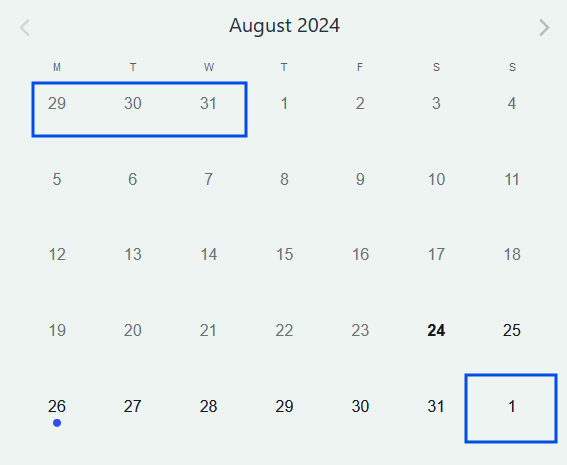
Sometimes the next month’s first few days appear on the Mini Calendar View calendar, depending on how each month is structured. If you’d like, you can remove these dates by adding a PHP snippet on your site and then using custom CSS added to your theme’s stylesheet. We’ll provide you with the snippets you need to make this happen.
The PHP snippet
First, you’ll need to add the following PHP snippet on your functions.php theme file or using the Code Snippets plugin:
add_filter(
	'tribe_events_views_v2_view_month_template_vars',
	function( $template_vars, $view ) {
		// current time.
		$now = Tribe__Date_Utils::build_date_object( $template_vars['now'] );
		// requested date - for month view this is the first of the month.
		$request_date = $template_vars['request_date'];

		// if requested date isn't the same as the current date
		if ( $now->format( 'Y-m-d' ) !== $request_date->format( 'Y-m-d' ) ) {
			// pass the requested date as the current date
			$template_vars['today_date'] = $template_vars['request_date']->format( 'Y-m-d' );
		}

		return $template_vars;
	},
	10,
	2
);
This snippet is needed to make sure that hiding the respective days works in other months as well, not only the current one.
The Template Override
Create a mobile-day.php file on your /wp-content/themes/[your-theme or child-theme folder]/tribe/events/v2/month/mobile-events folder (you may need to create the folders if you haven’t already done so). After that, place the following as the content of the mobile-day.php file.
<?php
use Tribe__Date_Utils as Dates;

$events = ! empty( $day['events'] ) ? $day['events'] : [];
if ( ! empty( $day['multiday_events'] ) ) {
	$events = array_filter( array_merge( $day['multiday_events'], $events ) );
}
$mobile_day_id = 'tribe-events-calendar-mobile-day-' . $day['year_number'] . '-' . $day['month_number'] . '-' . $day['day_number'];

$classes = [ 'tribe-events-calendar-month-mobile-events__mobile-day' ];

if ( $today_date === $day_date ) {
	$classes[] = 'tribe-events-calendar-month-mobile-events__mobile-day--show';
}
?>

<div <?php tribe_classes( $classes ); ?> id="<?php echo sanitize_html_class( $mobile_day_id ); ?>">

	<?php if ( count($events) ) : ?>

		<?php foreach ( $events as $event ) : ?>
			<?php
				$first_day_of_month = date( 'Y-m-d', strtotime ( 'first day of' . $today_date ) );

				$end_day_of_month = date( 'Y-m-d', strtotime( 'last day of' . $today_date ) );

				if ( $event->dates->start->format ('Y-m-d') < $first_day_of_month || $event->dates->start->format ('Y-m-d') > $end_day_of_month ) {
					continue;
				}
				else {
			?>

			<?php $event_date = $event->dates->start->format( Dates::DBDATEFORMAT ); ?>

			<?php $this->template( 'month/mobile-events/mobile-day/day-marker', [ 'events' => $events, 'event' => $event, 'request_date' => $day_date ] ); ?>

			<?php $this->setup_postdata( $event ); ?>

			<?php $this->template( 'month/mobile-events/mobile-day/mobile-event', [ 'event' => $event ] ); ?>

			<?php } ?>

		<?php endforeach; ?>

		<?php $this->template( 'month/mobile-events/mobile-day/more-events', [ 'more_events' => $day['more_events'], 'more_url' => $day['day_url'] ] ); ?>

	<?php else : ?>

		<?php
		$this->template(
			'components/messages',
			[
				'classes' => [ 'tribe-events-header__messages--mobile', 'tribe-events-header__messages--day' ],
				'messages' => $mobile_messages,
			]
		);
		?>

	<?php endif; ?>
</div>
The CSS Snippet
There are a few different ways to add custom CSS to your WordPress site. For more information on how to do that, check out the Customizing CSS knowledge base article.
To remove the next and previous month’s dates from the calendar, use this CSS snippet:
.tribe-events-view--shortcode div.tribe-events-calendar-month__day--next-month {
  visibility: hidden !important;
}
To remove the previous month’s dates from the calendar, use this snippet:
.tribe-events-view--shortcode div.tribe-events-calendar-month__day--past-month {
    visibility: hidden !important;
}
And, to remove both the previous month and upcoming month dates from the calendar, use this snippet:
.tribe-events-view--shortcode div.tribe-events-calendar-month__day--next-month,
.tribe-events-view--shortcode div.tribe-events-calendar-month__day--past-month  {
     visibility: hidden !important;
}