
This article collects developer-level customizations for venues and organizers — changing URL slugs, modifying display formatting, customizing labels, and adjusting how the duplicate-merge maintenance tool behaves.
💡 Each snippet below should be added to your child theme’s functions.php file or via a code snippets plugin. See Best Practices for Implementing Custom Code Snippets for guidance. Always test changes in a staging environment before applying them to your live site.
Change the Default Venue Slug
By default, single venue page URLs use the /venue slug — for example, yourdomain.com/venue/the-city-hall/. To change this base to something else like /location or /space, use the tribe_events_register_venue_type_args filter, which modifies the arguments used when registering the Venues post type.
add_filter( 'tribe_events_register_venue_type_args', function( $args ) {
    $args['rewrite']['slug'] = 'location'; // Change 'location' to your preferred slug
    return $args;
} );
Replace location with your preferred slug (e.g., space, place, or site).
⚠️ Flush permalinks after adding this snippet. Whenever you change a rewrite rule, WordPress needs to regenerate its internal URL structure. Go to Settings → Permalinks and click Save Changes (you don’t need to change anything). If you skip this step, your venue pages will return 404 errors.
After flushing, your venue URLs will use the custom slug — for example, yourdomain.com/location/the-city-hall/.
Change the Meta Title for Venue Pages
By default, the meta title for venue pages is the venue’s name. For SEO purposes, you may want to override this with custom text.
add_filter( 'document_title_parts', function ( $parts ) {
    if ( function_exists( 'tribe_context' ) && tribe_context()->get( 'view_request' ) === 'venue' ) {
        $parts['title'] = 'Notredame';
    }
    return $parts;
} );
Replace Notredame with the meta title you want to use. The same approach works for organizer pages and other metadata by adjusting the context check.
Change the Venue Address Structure
Venue addresses follow a fixed structure across the calendar:
- Single event page (classic and block editor) and venue page (Pro): Venue name → Street address → City, Province/State Zip Country
- List view (longer layout): Venue name Street address, City, Province/State
- List view and Photo view (compact): Venue name Street address, City
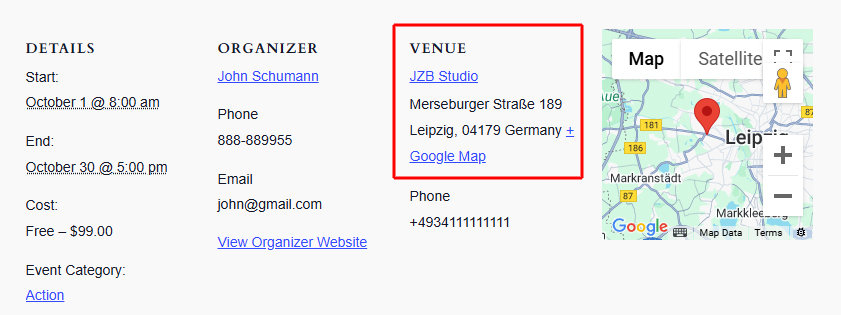
Some languages format addresses differently. To change the structure, use a template override on the address module.
The source file to copy is:
/wp-content/plugins/the-events-calendar/src/views/modules/address.php
Place your override at:
/wp-content/themes/[your-child-theme]/tribe-events/modules/address.php
The example below reformats the address for German conventions, which produces:
Venue name
Street with number
Zip City
Country
<?php
/**
 * Address Module Template
 *
 * Template override for venue meta data, formatted for Germany.
 *
 * Save this template in your own theme by creating a file at:
 * [your-theme]/tribe-events/modules/address.php
 *
 * This file overrides this template:
 * the-events-calendar/src/views/modules/address.php
 *
 * Plugins required: The Events Calendar
 * Author: Andras Guseo
 * @version 6.0.0
 */

if ( ! defined( 'ABSPATH' ) ) {
    die( '-1' );
}

$venue_id    = get_the_ID();
$full_region = tribe_get_full_region( $venue_id );
?>
<span class="tribe-address">

    <?php
    // Street address
    if ( tribe_get_address( $venue_id ) ) : ?>
        <span class="tribe-street-address"><?php echo tribe_get_address( $venue_id ); ?></span>
        <?php if ( ! tribe_is_venue() ) : ?>
            <br>
        <?php endif; ?>
    <?php endif; ?>

    <?php
    // Postal code
    if ( tribe_get_zip( $venue_id ) ) : ?>
        <?php if ( tribe_is_venue() && tribe_get_address( $venue_id ) ) : ?>
            <br>
        <?php endif; ?>
        <span class="tribe-postal-code"><?php echo tribe_get_zip( $venue_id ); ?></span>
    <?php endif; ?>

    <?php
    // City
    if ( tribe_get_city( $venue_id ) ) : ?>
        <span class="tribe-locality"><?php echo tribe_get_city( $venue_id ); ?></span>
    <?php endif; ?>

    <?php
    // Country
    if ( tribe_get_country( $venue_id ) ) : ?>
        <?php if ( tribe_is_venue() && tribe_get_address( $venue_id ) ) : ?>
            <br>
        <?php else: ?>
            <span class="tribe-delimiter">,</span>
        <?php endif; ?>

        <?php
        // Abbreviated region with full name as title attribute
        if ( tribe_get_region( $venue_id ) ) : ?>
            <abbr class="tribe-region tribe-events-abbr" title="<?php esc_attr_e( $full_region ); ?>"><?php echo tribe_get_region( $venue_id ); ?></abbr><span class="tribe-delimiter">,</span>
        <?php endif; ?>

        <span class="tribe-country-name"><?php echo tribe_get_country( $venue_id ); ?></span>
    <?php endif; ?>

</span>
Result:
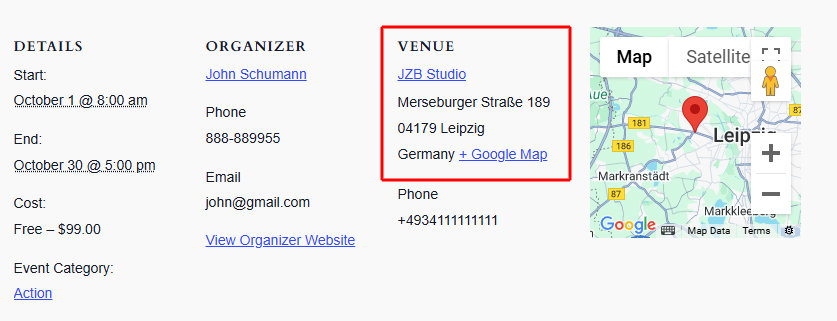
The full snippet is also available as a Gist. For more on creating template overrides, see Customizing Template Files.
Display the Organizer Website URL Directly
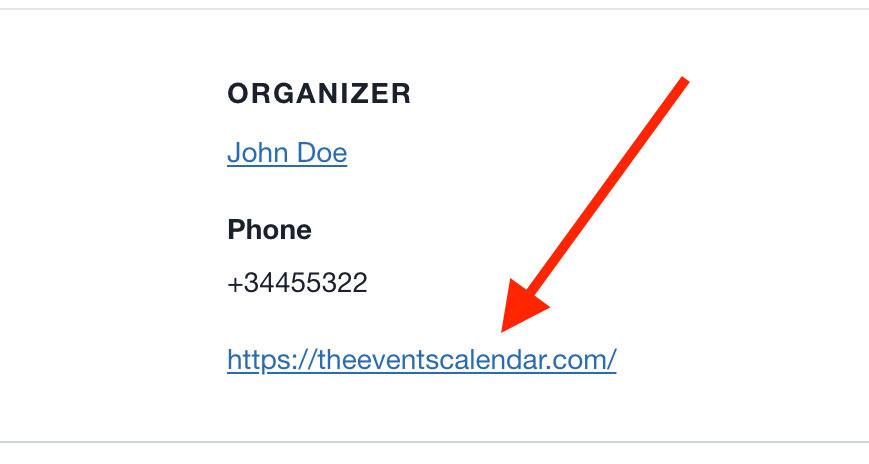
By default, the organizer’s website link displays the text “View Organizer Website” rather than the actual URL. To show the URL instead, use the tribe_get_organizer_website_link_label filter.
add_filter( 'tribe_get_organizer_website_link_label', 'custom_organizer_website_label_to_url', 10, 2 );

function custom_organizer_website_label_to_url( $label, $post_id ) {
    $website_url = tribe_get_organizer_website_url( $post_id );
    return esc_html( $website_url );
}
With this snippet active, the organizer link displays the bare URL:
Linking the Venue Name to the Venue’s Website
If you have venues that have their own websites, you can populate the Website field when creating a venue, and on the single event page, this URL is used on the View Venue Website link.
However, what if you do not find the need for your visitors to open the venue page, which happens when one clicks on the venue name in the single event page? You’re in luck! The following custom snippet, which you can add to your site (see Using Custom Code Snippets), allows for the venue name in the single event page to be linked to the venue’s website URL.
add_filter ( 'tribe_get_venue_link', function ( $link, $venue_id, $full_link, $url ) {
	if ( tribe_get_venue_website_url( $venue_id ) ) {
		if ( $full_link ) {
			return $link = '<a href="' . tribe_get_venue_website_url( $venue_id ) . '">' . tribe_get_venue( $venue_id ) . '</a>';
		}
		return $link = tribe_get_venue_website_url ( $venue_id );
	}
	return $link;
}, 20, 4 );
Customize the Duplicate Venue and Organizer Merge Tool
The Events Calendar includes a maintenance tool for merging duplicate venues and organizers, found under Events → Settings → General → Maintenance. This is useful when managing user-submitted events with Community Events, where users may submit duplicate venues or organizers.
Several filters give you control over how the merge logic identifies and processes duplicates.
| Filter | Purpose |
|---|---|
tribe_merge_identical_organizers_enabled | Enable or disable organizer merging |
tribe_merge_identical_venues_enabled | Enable or disable venue merging |
tribe_merge_identical_organizers_fields | Define which fields determine if two organizers are duplicates |
tribe_merge_identical_venues_fields | Define which fields determine if two venues are duplicates |
tribe_amalgamate_venues_keep_venue | Control which venue is kept when duplicates are merged |
tribe_amalgamate_organizers_keep_organizer | Control which organizer is kept when duplicates are merged |
Example: Match Venues by Title and Address
The default behavior compares all venue fields. To merge venues only when their title, address, city, and country match, customize the field set:
add_filter( 'tribe_merge_identical_venues_fields', 'custom_merge_identical_venues_fields', 20, 1 );

function custom_merge_identical_venues_fields( $data ) {
    // Merge venues that have the same title, address, city and country.
    $data = [
        'title'         => $data['title'],
        '_VenueAddress' => $data['_VenueAddress'],
        '_VenueCity'    => $data['_VenueCity'],
        '_VenueCountry' => $data['_VenueCountry'],
    ];

    return $data;
}