Forum Replies Created
-
AuthorPosts
-
August 18, 2016 at 6:13 am in reply to: MAJOR ISSUE: ATTENDEE DATA NOT SAVED IF 10 OR MORE TICKETS ADDED #1153068
FRANK
ParticipantHI Geoff B,
Thanks again for the continued updates.
Just a quick questions and as much for my piece of mind as anything.
The solution, whichever one, from the 4 you implement, will it have any impact on all the attendee meta data already saved in the database at all?
I know at present there is no functionality for the admin to update attendee meta. However, I can access this via phpmyadmin to make any changes.
Is there likely to be any issue with me updating attendee meta this way?
When accessing the records via phpmyadmin I notice there are 2 entries for each set of attendee information provided. One corresponds with the order number and the next one has an order number incremented by one.
Is this what I should expect to encounter?
Any advice or words of caution on amending data that way welcome.
I also came across a bit of code in another post which I can no longer find but I still have the link to the code. It was to allow attendee meta to be updated from admin, titled ET metahawk. Any ideas about this snippet/plugin?
Thanks,
Frank
August 16, 2016 at 2:54 am in reply to: MAJOR ISSUE: ATTENDEE DATA NOT SAVED IF 10 OR MORE TICKETS ADDED #1151979ParticipantHi Geoff B,
Thanks for the update.
Good to hear the cause of the bug identified and totally understand the need for thorough testing.
We are now live and taking bookings with the temporary workaround until you guys release an update with the bug fix.
Orders are coming through and we are keeping a nervous eye on the orders, checking each one as it comes through to make sure no similar issues or other bugs in there. I can report, so far so good.
Group bookings is a big income stream for this client so while we can placate the tour operators in the short term we will need to in the coming says or weeks be able to allow bookings for more than 9 tickets. The sooner the better but I know you guys hard at is so that gives us confidence moving forward.
We have over 100 events every year, selling in excess of 8000 tickets so a solid stable and bug free system is imperative to us which, apart from this issue, TEC stacks up well with tons of potential over and above all the good stuff it is already capable of.
Look forward to more positive news on this front in the coming days.
Kind regards,
Frank
August 12, 2016 at 11:27 am in reply to: MAJOR ISSUE: ATTENDEE DATA NOT SAVED IF 10 OR MORE TICKETS ADDED #1151088ParticipantHi Geoff B,
Thanks for touching base on this matter again.
I have worked through those plugins in the links provided, some were old outdated ones. I searched around and found some others as well and tried them all out.
One thing none of them did was prevent a customer selecting any quantity they like, even if restrictions in place. They were only warned about the maximum quantity after adding to cart and no warnings were given on the ET tickets.php under the wootickets directory at all which all would only lead to a lot of confusion and with no easy way to modify your cart after adding the tickets and custom meta this would have caused no ends of issues for a customer.
However, I did some digging around for a solution that works for us and came across a snippet of code the universally limits the quantity of each individual product (tickets in this case). Adding it to the functions file did the trick. This thankfully does work on the tickets.php page before adding to the cart preventing the above scenarios materialising. I have added some explanatory text to the page for the user to explain and between that I think we have something that is workable short term at least. Group and volume buying of tickets is a big feature of the needs of our customers so we still need a permanent fix moving forward.
I am running another series to tests with that new functionality added to limit the ticket quantities and once satisfied that works without issue I think we will just run with that until you guys get the chance to get rid of that bug.
Thanks for all your help so far and enjoy the weekend!
Regards,
Frank
August 11, 2016 at 9:35 pm in reply to: MAJOR ISSUE: ATTENDEE DATA NOT SAVED IF 10 OR MORE TICKETS ADDED #1150816ParticipantHi Geoff B,
Thanks again for your continued support and understanding of the situation.
I will discuss this with the client and look at implementing this workaround with their agreement and see how that goes.
If they are happy with this short term then as you rightly say, while not ideal, at least it will buy us all some time.
While I am happy to see if that works, as I am sure you can understand, my confidence in the system is a little shaken at the moment so even with that possible workaround there is a worry there that something else might be lurking around the corner. That said, I have tested it all thoroughly and to be fair it does all look in good shape aside from this issue.
I look forward to any updates, even if just to say still working on it, so I can keep communicating with my client as that keeps them in the loop and lets them see the matter is in hand.
Sometimes these things happen and I have to say your support to date has been top class and if this can be resolved quickly with a permanent fix then you guys will have excelled yourselves. Nothing ever runs perfect so when things do go wrong the measure of any organisation is how they respond so I take my hat off to you guys for your efforts so far.
Kind regards,
Frank
August 11, 2016 at 6:43 am in reply to: MAJOR ISSUE: ATTENDEE DATA NOT SAVED IF 10 OR MORE TICKETS ADDED #1150489ParticipantHi Geoff B,
I have worked through the downgrading and retested it using the same parameters as mentioned in a previous post.
Unfortunately, the exact same problem under the same circumstance occurred so it looks like this bug has been there since day one.
I downgraded The Events Calendar to v4.2, Event Tickets to v4.2 and Events Tickets Plus to 4.2.2 (this was the oldest version available in my downloads section on my account).
Maybe that information will help your guys solve this quickly. It is a difficult situation but some comfort can be taken that we found this out just before going live. Had we been taking ticket sales and lost all the attendee data provided it would have been one monumental disaster for myself, the client and customers.
I know you guys will do your best and hopefully be able to fix this quick for all concerned.
Thanks again and keep the pressure on for me for a quick fix at least, happy with a temporary workaround if one can be found short term, anything at all I am willing to try and work with any other suggestions you guys can come up with.
Regards,
Frank
August 11, 2016 at 12:02 am in reply to: MAJOR ISSUE: ATTENDEE DATA NOT SAVED IF 10 OR MORE TICKETS ADDED #1150384ParticipantHi Geoff B,
Appreciate the update and suggestion.
I am definitely up for giving that a try as anything worth a shot at this stage.
That might work so I will keep you posted on how I get on with that.
Thanks for your understanding of the situation.
Regards,
Frank
August 10, 2016 at 3:54 pm in reply to: MAJOR ISSUE: ATTENDEE DATA NOT SAVED IF 10 OR MORE TICKETS ADDED #1150277ParticipantHi there,
Just wondering if any luck with this issue?
I know sometimes these things can take time but if any progress at all let me know as have an client here to keep informed who is far from happy at the moment.
Thanks,
Frank
August 10, 2016 at 1:44 am in reply to: MAJOR ISSUE: ATTENDEE DATA NOT SAVED IF 10 OR MORE TICKETS ADDED #1149879ParticipantHi Geoff B,
Thanks for the response and your efforts to date taking this matter forward.
This really is a pressing matter for us so all your efforts to address this bug and provide a temporary workaround or a quick fix would really be appreciated.
We sell about 8000 tickets per year for these events and the demand is huge. Our promotional push was that they would be on sale by now so we having to backtrack a little but hopefully no custom will be lost as a result of the delay. It is a very competitive market so we need to be on the ball here and get going before the opportunity is lost in terms of maximising sales again this year.
I appreciate you cannot commit to a release date but a temporary fix for us would be extremely welcome so hopefully your dev team can pull this out the bag for us today.
Keep at the dev team for us and thanks for your continued efforts resolving this on our behalf.
Hope to hear some positive news on this shortly.
Thanks,
Frank
August 9, 2016 at 6:05 pm in reply to: MAJOR ISSUE: ATTENDEE DATA NOT SAVED IF 10 OR MORE TICKETS ADDED #1149799ParticipantJust a quick update since I posted this with some information that might help solve this issue.
I have spent hours testing this trying to get it fixed and the following patterns emerged.
For each event we run there are 65 tickets available through global stock.
We have 3 ticket types. 2 of which required attendee data to be entered. There are 5 attendee questions, 2 of which are dropdowns, the rest text input fields.
When all set up as we would like you can book up to 10 tickets on each of the 2 ticket types that have attendee questions before it breaks. Breaks as in saves no attendee data and wipes from the event all previously entered attendee data.
I created a test event and started playing around with the custom fields.
When I create at ticket and have 3 attendee questions, all input text fields, I can buy up to 20 tickets without problem. As soon as I buy 21 tickets the attendee data is not saved and it wipes all previously entered data from that event.
When I change the number of attendee questions up to 5, again all text input fields it all works great up to 12 and if I try and buy 13 again it breaks down exactly the same as above.
If I take it a step further and make 2 of those 5 questions dropdowns then it works great up until you book 11 tickets then same thing happens.
I then tried going back to one questions for attendee meta and could book up to 59 tickets at the one time without any issue but when I booked 60 in one go the exact same problem arises: no attendee meta saved and all previous meta wiped from event.
From that it seems to there is a direct correletaion between the number of attendee meta fields/questions and how many tickets you can book per ticket before issues start occurring.
Maybe somewhere this is some kind of restriction in terms of file size, db dumps or something is timing out I really don’t know but there is a clear and distinct relationship between the two factors.
Really appreciate any help and direction on this as we are loosing money by the hour not being live with this just now.
Is there a minimum version of PHP or MySQL that we should be using as well just in case some kind of conflict here as well?
Thanks for your kind and urgent attention to this matter.
Regards,
Frank
August 2, 2016 at 2:26 pm in reply to: Adding Attendee Data to WooCommerce Email Confirmation #1146802ParticipantHi Jayson,
A huge thanks to you for sharing that snippet, really appreciate it.
I was able to modify that and hook it so it now appears at the end of the Woo email confirmation.
I was also trying to hook it in to the checkout page so customers can check the information they enter before paying to reduce errors but so far I have not been able to do that but still working on that. I must just be missing something somewhere on that side of it.
Is it just the emails you use it for or have you been able to hook it in to the cart/checkout page prior to the order being confirmed?
Just on the snippet, a wee typo in there I think as when I changed it, the code worked as follows;
This line was
$att_phone = (isset( $value[‘phone’] )) ? $value[‘[phone’] : ”;Change to
$att_phone = (isset( $value[‘phone’] )) ? $value[‘phone’] : ”;Just an extra square bracket in there before ‘phone was preventing that field from displaying.
I like the way you have done it, calling in specific ticket details for each ticket with meta.
Just a thought and not sure how it will work if some tickets have different meta questions and field names then that would not suit as well so if there was a way just to call them in regardless of different meta data per ticket that would be more flexible for those who need that of course.
The code you provided works a treat in the email and tailored that way works for me at the moment so very happy with it and appreciate the kindness showed and time taken to share that.
Hopefully the team at Tribe can work on an easier way to show the ticket meta to all users to hook it in and display it anywhere as required as this new feature develops as I can see huge potential in it. I appreciate this feature is new so the more contributions and ideas on how it can be used will surely help move it forward.
On my wishlist would be the ability to call in each ticket meta data per ticket and create a story integratng the meta to print on the ticket using the meta data provided. No harm in hoping but if it could ever become that flexible then it would give TEC a massive edge on the competition.
Thanks again Jayson and Brook,
Frank
July 25, 2016 at 4:37 am in reply to: Adding Attendee Data to WooCommerce Email Confirmation #1143599ParticipantI can see that file and how it works no problem.
However, how is that code injected in to the ticket email.
The ticket email has the following action <?php do_action( ‘tribe_tickets_ticket_email_ticket_bottom’, $ticket ); ?> but where is the instruction for the code in render.php to be added to the above action?
Using that action I was able to output the QR code for each ticket in the Woo email confirmation but the ticket meta did not appear.
If you can provide any further pointers on the above it would be most appreciated.
Thanks again,
FRANK
July 25, 2016 at 2:56 am in reply to: Adding Attendee Data to WooCommerce Email Confirmation #1143589ParticipantThanks for the pointer Brook, I will take a look at that and see if I can do anything with it.
I appreciate the ticket meta feature is relatively new but it is encouraging to hear that you are looking at ways to improve this. Passing this info back to the customer before payment and after payment is critical to ensure accuracy and remove any scope for errors so it would really make for a near flawless purchasing process when this happens.
July 19, 2016 at 4:18 pm in reply to: Adding Attendee Data to WooCommerce Email Confirmation #1141736ParticipantHi Brook,
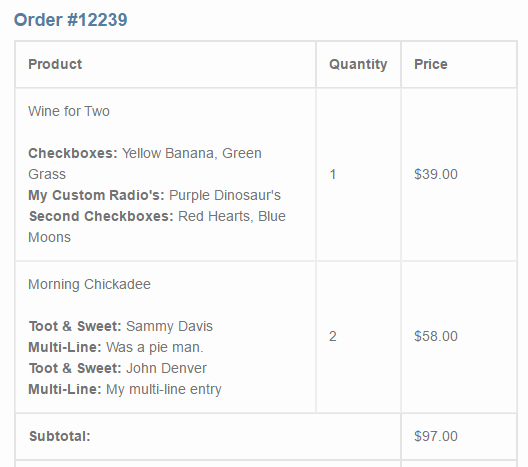
That is the correct email and some of the above is what I was looking for and George provided me with an update to your snippet earlier today as it was repeating the events details for every ticket type – see his reply here: https://theeventscalendar.com/support/forums/topic/customising-the-new-order-e-mail-to-include-ticket-details/#post-1141508
That is the email but the information I was looking to include under each ticket is the custom attendee information gathered by gathering specific attendee information via the ticket fieldsets.
Similar to this screenshot (https://theeventscalendar.com/content/uploads/2016/04/b495cc7f3ca082ec.png) provided in post https://theeventscalendar.com/support/forums/topic/have-the-additional-fields-appear-on-invoice/ where the code I provided above came from.
Thanks for the initial help and feedback. If you could advise further on that additional information to include in that email then that would be fantastic if I could manage to get that done. Would be the icing on the cake to an already great system.
Kind regards,
Frank
July 19, 2016 at 9:57 am in reply to: Customising the New Order E-mail to include ticket details #1141586ParticipantNo problem George, problem now solved thanks to your quick advice! Appreciate the help and prompt response.
July 19, 2016 at 9:19 am in reply to: Customising the New Order E-mail to include ticket details #1141500ParticipantHi George,
This was exactly what I was looking for so I tried it and it almost worked.
I have different tickets types and therefore this code repeats the event for every ticket type purchased.
I appreciate this is all above scope of support but was wondering if there was a quick way to ensure that the event title & meta only appears once per event regardless of how many different ticket types are purchased?
Thanks,
Frank
-
AuthorPosts